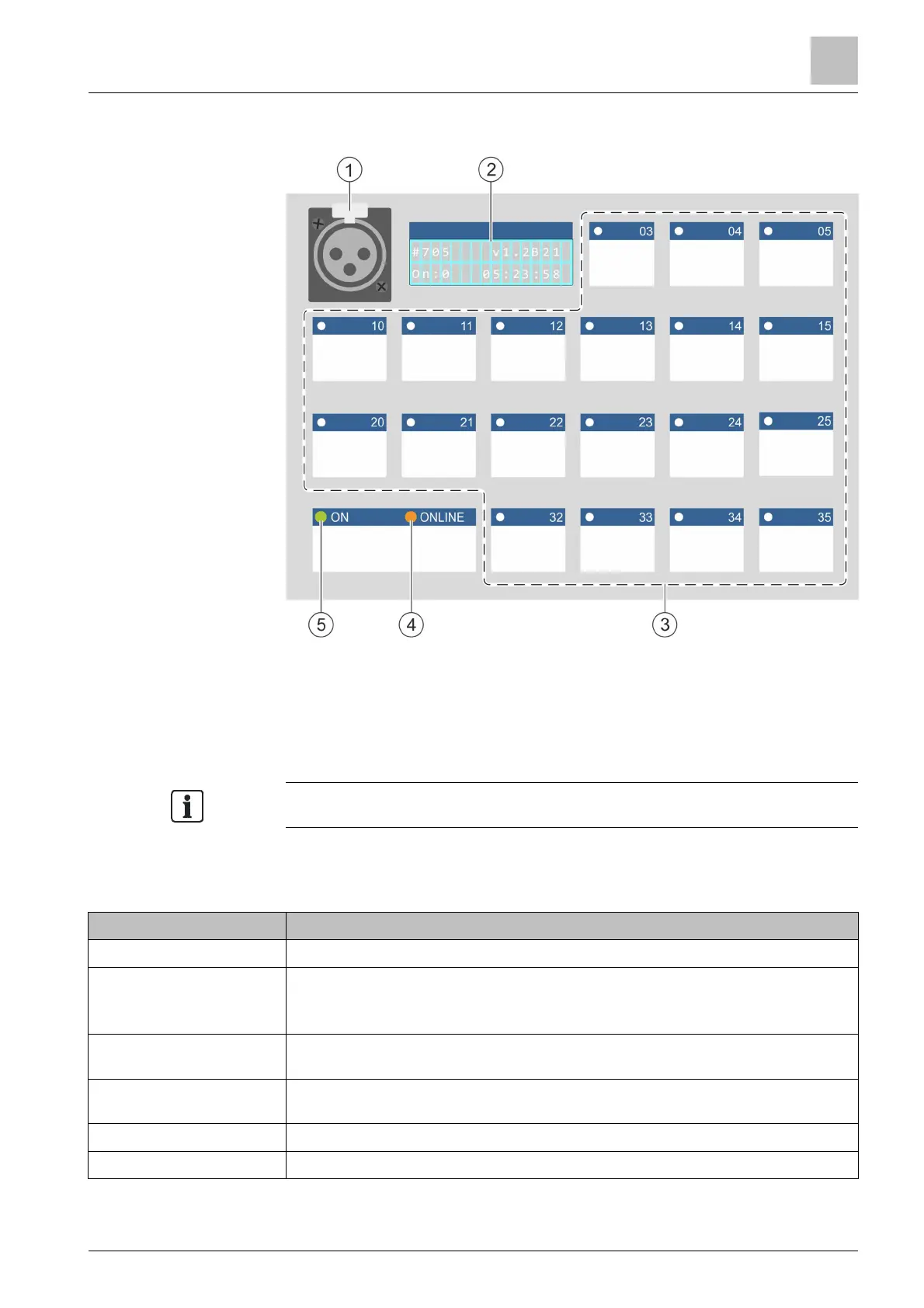
Desk call station (19 buttons) PT2001
Operating functions PT2001-A1
8
A6V10430571_en--_c 29 | 57
8 Desk call station (19 buttons) PT2001-A1
1 Microphone 4 LED 'ONLINE' / Fault
2 Display 5 LED 'ON' / Operation
3 Configurable buttons 6
Speaker (below LED 'ON', not
shown in the graphic)
You can create and print the button identification in '
8.1 Operating functions PT2001-A1
Function Design
Selecting zone
◈
Press the button labeled accordingly
Carrying out manual
announcement /
triggering evacuation
1. Press and hold the button labeled as the talk button
2. Talk into the microphone
Playing pre-recorded
voice message
◈
Press the button labeled accordingly
Stopping voice message
playback
◈
Press the button labeled <RESET / ACOUSTIC OFF>
Remedying faults
◈
Press the button labeled <RESET / ACOUSTIC OFF>
Giving the all-clear
◈
Press the button labeled <ALL-CLEAR>












 To Next Page