Operator elements and displays
5.1 Mobile Panel
Mobile Panel 177 (WinCC flexible)
Operating Instructions (Compact), Edition 07/2005
5-7
5.1.4.2 STOP button on Terminal Box Plus
Introduction
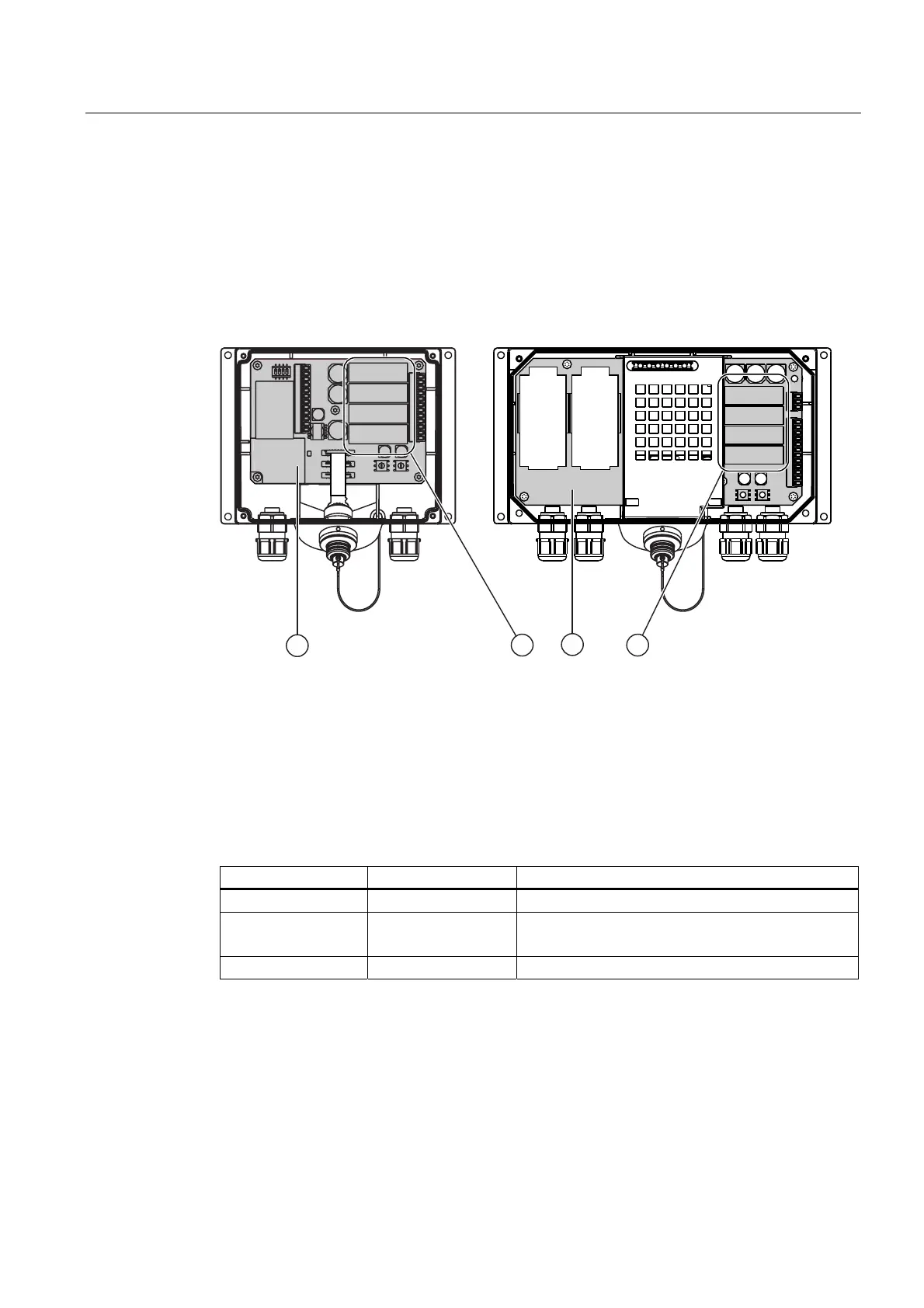
A Terminal Box Plus differs from a Terminal Box Basic due to four relays that are mounted
on the board.
'3 31
Figure 5-7 Terminal Box Plus
① Relay
② Board
Switching states of the Stop or Emergency Stop circuit with Terminal Box Plus
The Stop or Emergency Stop circuit switching statuses for a connected Mobile Panel 177
with a STOP button and Terminal Box Plus are:
Mobile Panel 177 STOP button Status of the Stop or Emergency Stop circuit
Connected Not pressed The Stop or Emergency Stop circuit remains closed.
Connected Pressed The Stop or Emergency Stop circuit is open.
The system being monitored is shut down.
Not connected - The Stop or Emergency Stop circuit remains closed.





 To Next Page