Mounting and Connection
4.3 Connecting Mobile Panel 177
Mobile Panel 177 (WinCC flexible)
4-22 Operating Instructions (Compact), Edition 07/2005
4.3.4 Connecting the connecting cable
Introduction
The connecting cable can be connected to the terminal box using the plug connector
(metallic push-pull circular connector). The plug connector is coded anti-rotationally using a
slot and key system.
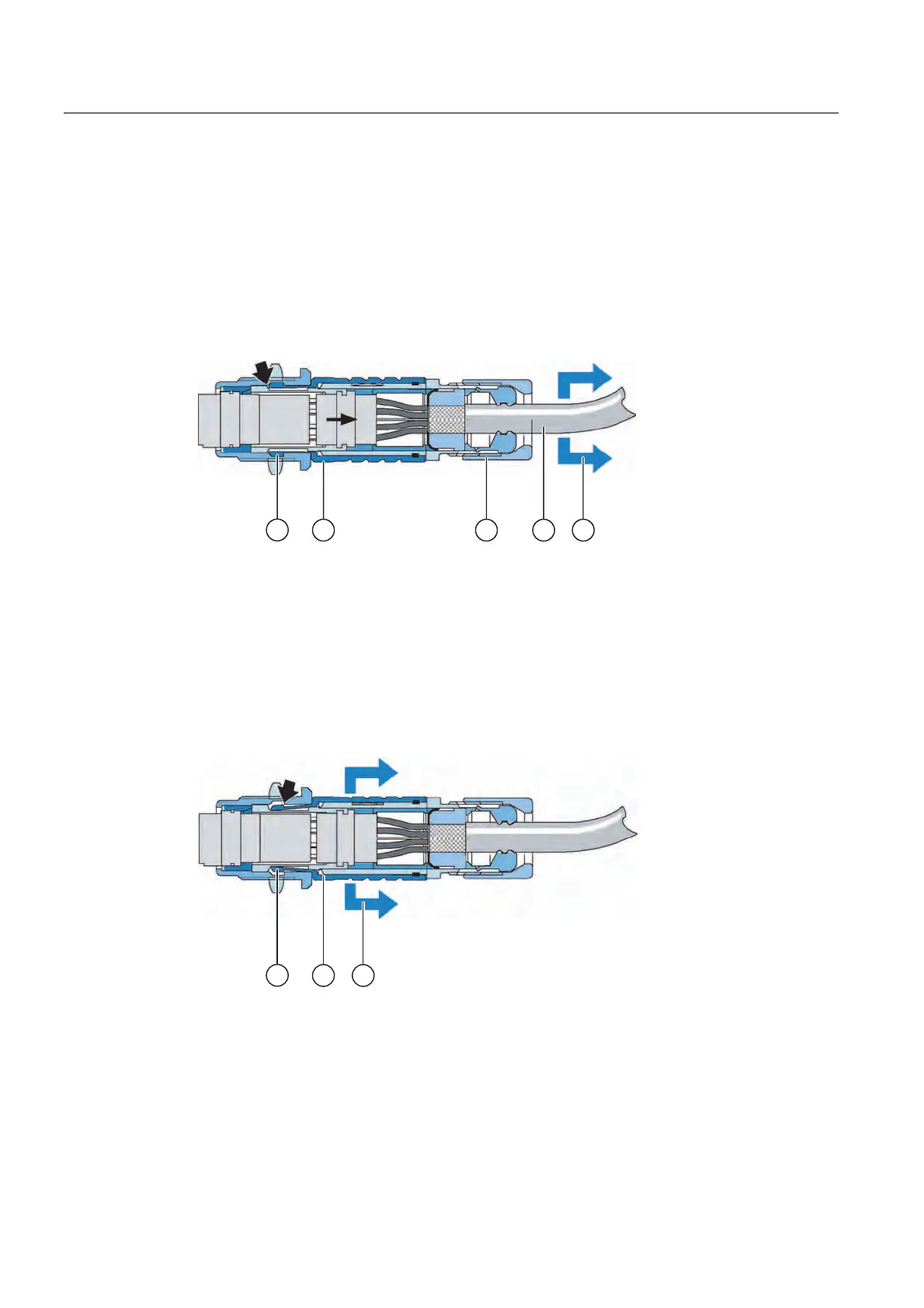
Interlocking mechanism
Figure 4-17 Interlocking mechanism
① Interlocking claws
② Outer sleeve
③ Clamping nut
④ Cable
⑤ Strain direction
If you pull on the cable or the clamping nut, the taper sleeve moves under the interlocking
claws and presses them into the interlocking slot. The plug connection cannot be separated.
Figure 4-18 Detaching the plug connector
① Interlocking claws
② Outer sleeve
③ Strain direction
If you pull on the outer sleeve, the interlocking claws slide out of the interlocking slot. The
plug connection can be separated.










 To Next Page