3.
Notes on program development
Power
up
When the power supply is switched on
or on recovery of the power supply after
a power failure,
the PC assumes the
following states without having to
take any additional measures in the
user program:
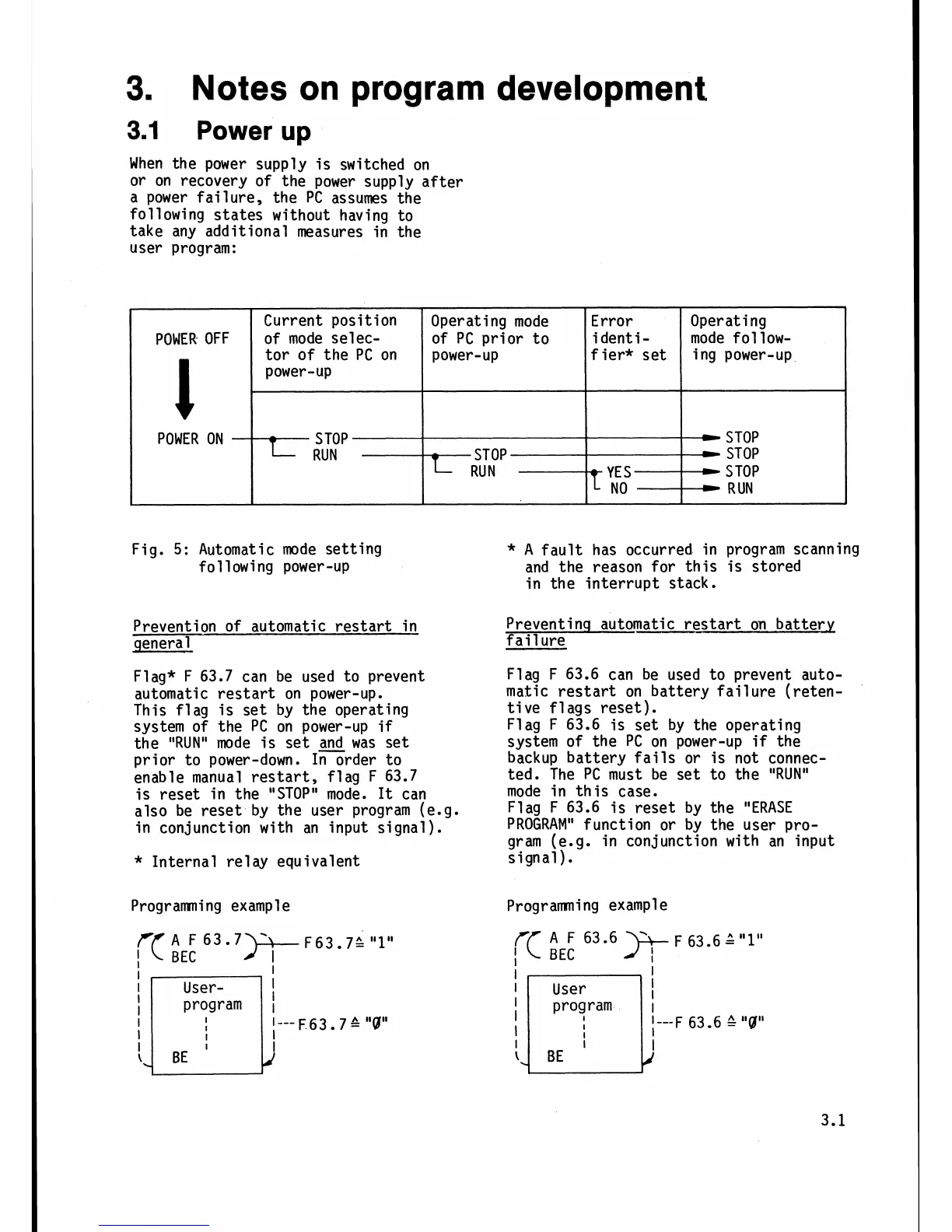
Fig.
5:
Automatic mode setting
following power-up
Prevention of automatic restart in
general
Flag* F 63.7 can be used to prevent
automatic restart on power-up.
This flag is set by the operating
system of the PC on power-up
if
the
"RUN"
mode is set
and
was set
prior to power-down. In order to
enable manual restart, flag F 63.7
is reset in the "STOP" mode.
It
can
also be reset by the user program (e.g.
in conjunction with an input signal).
Error
i
dent
i
-
f
ier* set
-
YE
S
--------t
I
NO
Operating mode
of PC prior to
power-up
STOP
RUN
POWER OFF
l
POWER ON
*
Internal re1 ay equivalent
Operating
mode
follow-
i
ng power-up
-
STOP
STOP
S
TOP
-
RUN
Current position
of mode selec-
tor of the PC on
power-up
-
STOP
L
RUN
Programning example
)+
F63.7;
"1"
I
I
User-
!
I
I---
F 63
7
&
"9"
l
I
*
A
fault has occurred in program scanning
and the reason for this is stored
in the interrupt stack.
Preventinq automatic restart on battery
fail
ure
Flag F 63.6 can be used to prevent auto-
matic restart on battery failure (reten-
tive flags reset).
Flag F 63.6 is set by the operating
system of the PC on power-up
if
the
backup battery fails or is not connec-
ted. The PC must be set to the "RUN"
mode in this case.
Flag F 63.6 is reset by the "ERASE
PROGRAM" function or by the user pro-
gram (e.g. in conjunction with an input
signal).
Programming example







 To Next Page