v
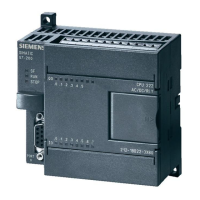
S7-200 Programmable Controller, CPU 210
C79000-G7076-C235-01
Contents
1 Installing the S7-200 CPU 210
1.1 Product Overview 1-2. . . . . . . . . . . . . . . . . . . . . . . . . . . . . . . . . . . . . . . . . . . . . . . . . . . . . . .
Equipment Requirements 1-2. . . . . . . . . . . . . . . . . . . . . . . . . . . . . . . . . . . . . . . . . . . . . . . .
Features of the CPU 210 1-3. . . . . . . . . . . . . . . . . . . . . . . . . . . . . . . . . . . . . . . . . . . . . . . .
1.2 Pre-installation Considerations 1-4. . . . . . . . . . . . . . . . . . . . . . . . . . . . . . . . . . . . . . . . . . .
Installation Configuration 1-4. . . . . . . . . . . . . . . . . . . . . . . . . . . . . . . . . . . . . . . . . . . . . . . . .
Clearance Requirements for Installing a CPU 210 1-4. . . . . . . . . . . . . . . . . . . . . . . . . . .
DIN Rail Requirements 1-5. . . . . . . . . . . . . . . . . . . . . . . . . . . . . . . . . . . . . . . . . . . . . . . . . .
Panel-Mounting Dimensions 1-5. . . . . . . . . . . . . . . . . . . . . . . . . . . . . . . . . . . . . . . . . . . . . .
1.3 Installing a CPU 210 1-6. . . . . . . . . . . . . . . . . . . . . . . . . . . . . . . . . . . . . . . . . . . . . . . . . . . .
Mounting a CPU 210 on a Panel 1-6. . . . . . . . . . . . . . . . . . . . . . . . . . . . . . . . . . . . . . . . . .
Installing a CPU 210 on a DIN Rail 1-6. . . . . . . . . . . . . . . . . . . . . . . . . . . . . . . . . . . . . . . .
Installing a CPU 210 in a Panel Box 1-7. . . . . . . . . . . . . . . . . . . . . . . . . . . . . . . . . . . . . . .
1.4 Installing the Field Wiring 1-8. . . . . . . . . . . . . . . . . . . . . . . . . . . . . . . . . . . . . . . . . . . . . . . .
General Guidelines 1-8. . . . . . . . . . . . . . . . . . . . . . . . . . . . . . . . . . . . . . . . . . . . . . . . . . . . .
Grounding and Circuit Referencing Guidelines for Using Isolated Circuits 1-9. . . . . . .
Using the Optional Field Wiring Connector 1-10. . . . . . . . . . . . . . . . . . . . . . . . . . . . . . . . .
Guidelines for AC Installation 1-10. . . . . . . . . . . . . . . . . . . . . . . . . . . . . . . . . . . . . . . . . . . . .
Guidelines for DC Installation 1-10. . . . . . . . . . . . . . . . . . . . . . . . . . . . . . . . . . . . . . . . . . . . .
1.5 Using Suppression Circuits 1-12. . . . . . . . . . . . . . . . . . . . . . . . . . . . . . . . . . . . . . . . . . . . . . .
Protecting DC Transistors 1-12. . . . . . . . . . . . . . . . . . . . . . . . . . . . . . . . . . . . . . . . . . . . . . . .
Protecting Relays Controlling DC Power 1-12. . . . . . . . . . . . . . . . . . . . . . . . . . . . . . . . . . .
2 Installing and Using the STEP 7-Micro/WIN Version 2.0 Software
2.1 Installing the STEP 7-Micro/WIN Version 2.0 Software 2-2. . . . . . . . . . . . . . . . . . . . . . .
Pre-installation Instructions 2-2. . . . . . . . . . . . . . . . . . . . . . . . . . . . . . . . . . . . . . . . . . . . . . .
Installation Instructions for Windows 3.1 2-2. . . . . . . . . . . . . . . . . . . . . . . . . . . . . . . . . . .
Installation Instructions for Windows 95 2-2. . . . . . . . . . . . . . . . . . . . . . . . . . . . . . . . . . . .
Troubleshooting the Installation 2-2. . . . . . . . . . . . . . . . . . . . . . . . . . . . . . . . . . . . . . . . . . .
2.2 Establishing Communication with the PDS 210 2-3. . . . . . . . . . . . . . . . . . . . . . . . . . . . .
Connecting Your Computer to the PDS 210 for PPI Communications 2-3. . . . . . . . . . .
Setting Up the Communications Parameters 2-4. . . . . . . . . . . . . . . . . . . . . . . . . . . . . . . .
2.3 Configuring the Preferences for STEP 7-Micro/WIN 2-5. . . . . . . . . . . . . . . . . . . . . . . . . .
2.4 Creating and Saving a Project 2-6. . . . . . . . . . . . . . . . . . . . . . . . . . . . . . . . . . . . . . . . . . . .
Creating a New Project 2-6. . . . . . . . . . . . . . . . . . . . . . . . . . . . . . . . . . . . . . . . . . . . . . . . . .
Saving a Project 2-6. . . . . . . . . . . . . . . . . . . . . . . . . . . . . . . . . . . . . . . . . . . . . . . . . . . . . . . .








 To Next Page