NX-1700 DC [PN 200464] Chapter 6 Appliance Views
PN 200972-001 Rev B 65
NX-1700 DC [PN 200464]
NX-1700 DC HDD Power Supplies
Quantity 1 1
User authorized to replace? no no
Hot swappable? -- --
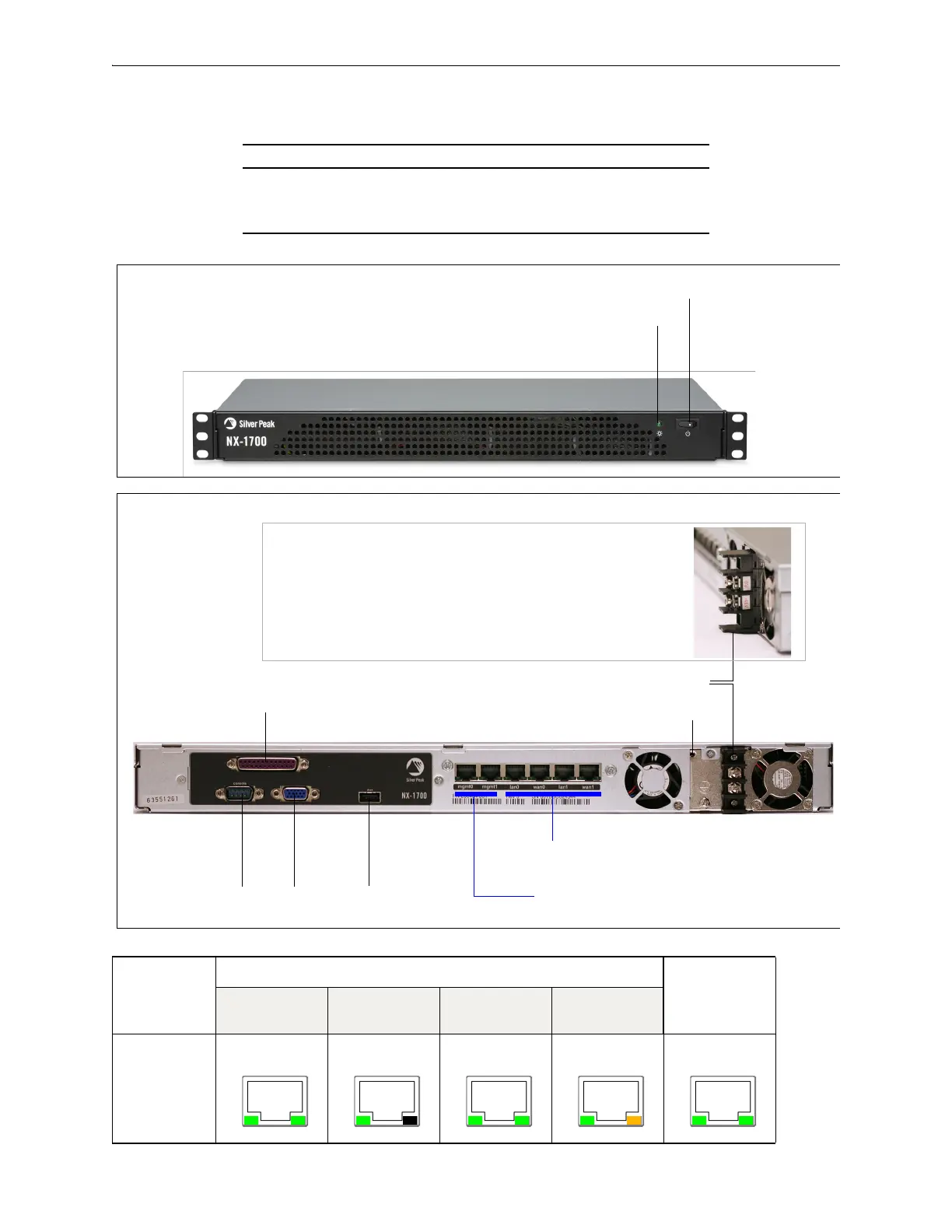
Power LED
Power switch
When you toggle the Power switch, verify
that the Power LED illuminates green.
NX-1700 (DC) — Front View
parallel port
console
[serial port]
VGA port
auxiliary
port
management interfaces
[mgmt0 / mgmt1]
network interfaces
[lan0 / wan0 / lan1 / wan1]
power supply LED
DC terminal connector (DC)
side view
NX-1700 (DC) — Rear View
a Connect one wire from the NX-1700’s 0V terminal to
the DC source
0V terminal.
b Connect the second wire from the NX-1700’s
–48V
terminal to the DC source
–48V terminal.
NX-1700
mgmt0 & mgmt1 lan0 / wan0 /
lan1 / wan1
Not
connected
10 Mbps 100 Mbps 1000 Mbps
Link/Activity:
blinking = traffic
--
Speed = solid


 To Next Page