Silver Peak Hardware Reference Guide Using Appliance Manager
2 PN 200972-001 Rev B
Using Appliance Manager
The appliances use RAID arrays with encrypted disks. RAID stands for Redundant Array of Independent
(or Inexpensive) Disks, a category of disk drives that ensures recoverability by mirroring data on paired
hard drives.
Disk failure results in a critical alarm, and the specific disk’s LED stops illuminating on the appliance.
Follow this procedure when replacing a failed disk:
1 Log into your Support portal account, and click
Open a Self Service RMA for disk replacement.
2 Complete the wizard, using the serial number of the appliance (not the disk).
3 After you receive the new disk, go to the
Maintenance - Disk Management page.
4 Select the failed disk's row in the table and click
Remove. This takes the disk off-line.
5 Physically remove the old disk from the appliance.
6 Physically insert the new disk.
7 In the table, select the new disk and click
Insert. This prompts the software to discover the disk and
put it online.
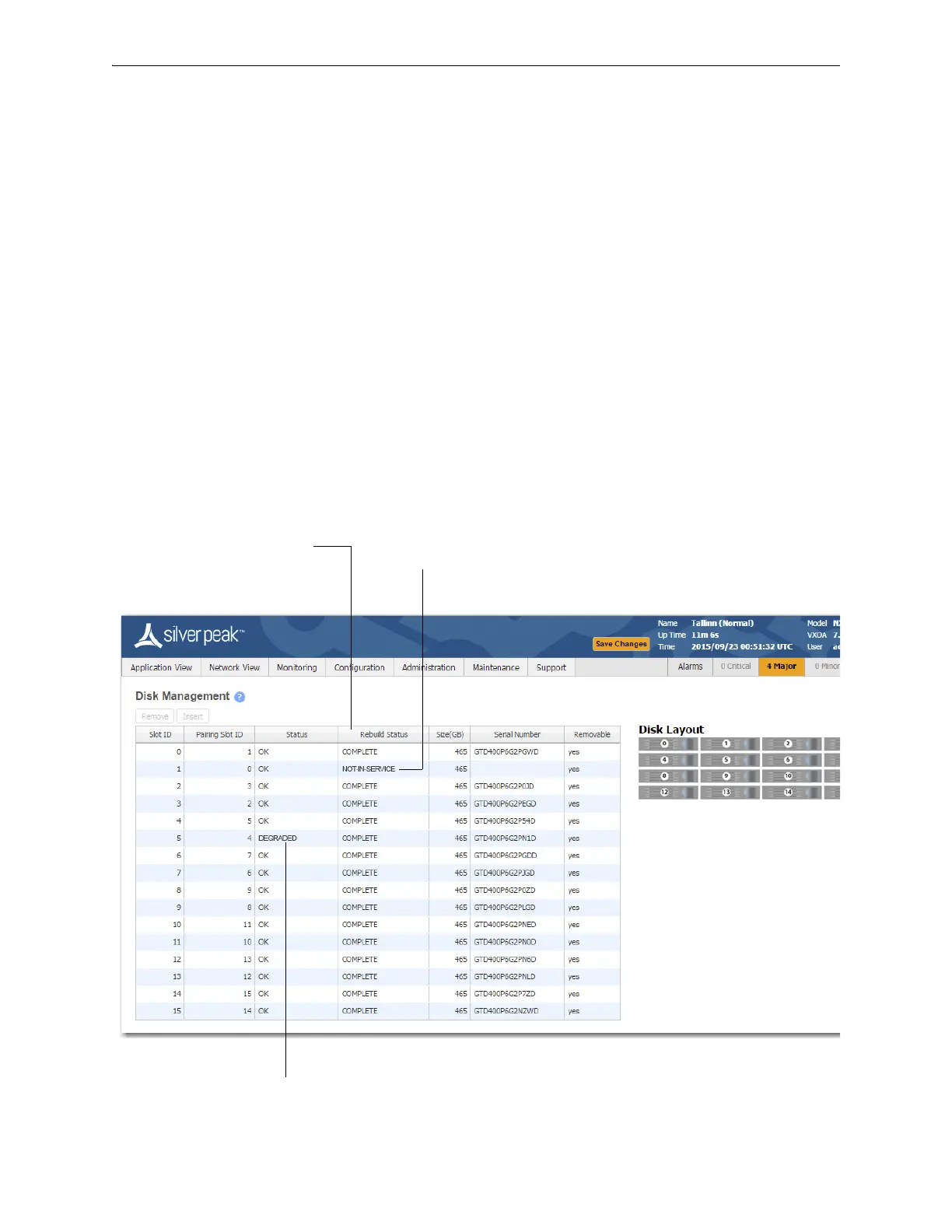
Displays the progress of a new disk that’s
being rebuilt from its array partner.
If a disk has been physically removed, the
Status is NOT-IN-SERVICE and no
Serial Number displays.
If a disk’s Status is DEGRADED, you
need to Remove it from the database,


 To Next Page