Chapter 4: Server troubleshooting 45
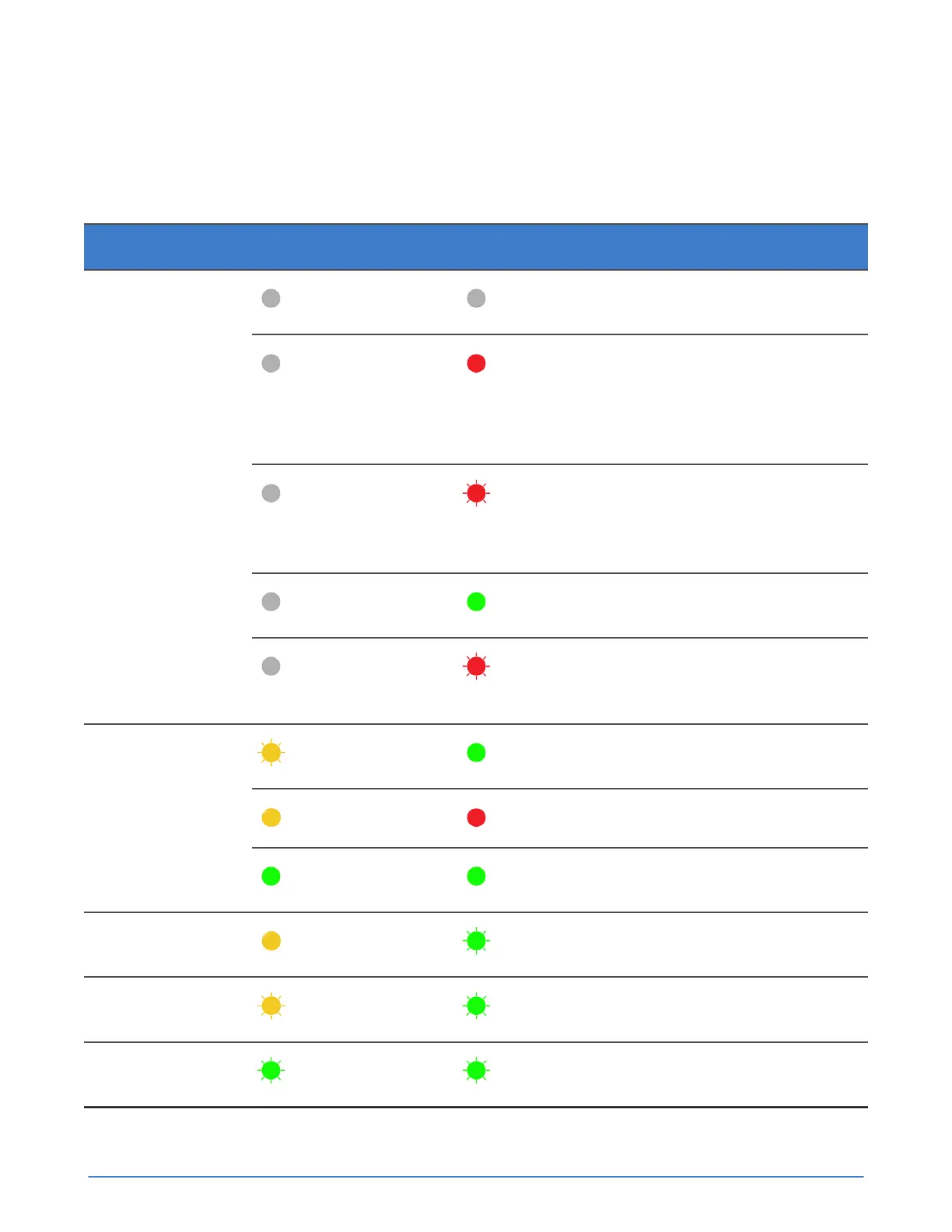
An Accelerator card has two LEDs:
■ LED 1 glows or flashes green or yellow.
■ LED 2 glows or flashes green or red.
Table 10: Accelerator card LED states
Server state LED 1 LED 2 Description
Off Off
PCIe 12V power is not
present.
Off Steady red
Configuration
Programmable Logic
Device (CPLD) detected
power failure or CPLD is
not configured.
Off Flashing red (1 on, 1
off)
Field Programmable
Gate Array (FPGA)
configuration error or
configuration failed.
Off Steady green
FPGA configuration is
complete.
Power up
Off Flashing red (2 on, 2
off)
Firmware is not
responding to health
check.
Flashing yellow
Steady green
Power-on self test
(POST) is executing.
Steady yellow
Steady red
POST failure.
POST
Steady green Steady green
Normal operation
(passed POST).
State save
Steady yellow
Flashing green
NVRAM state save in
progress.
State restore
Flashing yellow
Flashing green
NVRAM state restore in
progress.
Upgrade
Flashing green Flashing green
Firmware upgrade in
progress.



 To Next Page