2
Replacing External Parts (2) Bed Cover
Replacing the bed cover
To remove:
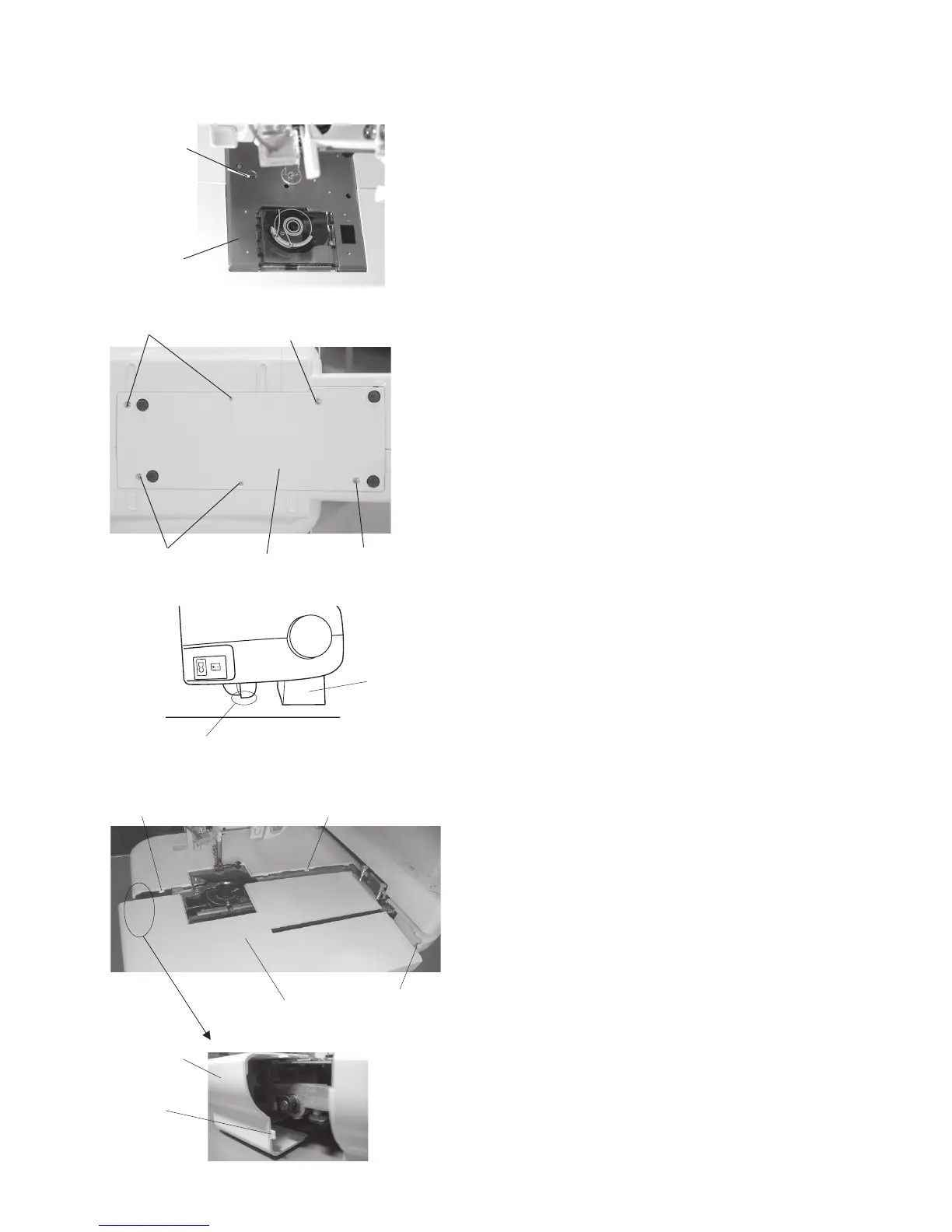
1. Turn the power switch on to move the carriage to
the stored position, then turn the power switch off.
2. Remove the setscrew (A) and remove the needle
plate.
3. Remove the 6 setscrews (B) and remove the
bottom plate.
NOTE:
Place a 100 mm thick block on the back of the
machine when laying the machine on the back to
prevent the carriage from damage.
4. Remove the bed cover while pushing the rear
cover to unlock the hooks.
To attach:
5. Follow the above procedure in reverse.
Setscrews (A)
Needle plate
Setscrew (B)
Carriage should not contact work surface.
Block
Setscrew (B)
Setscrew (B)
Bed cover
Hook
Hook
Setscrew (B)
Bottom plate
Rear cover
Hook
Hook


 To Next Page