CGM User Guide
57 Section 3 Understand Your iCan i3 CGM Results
3.6 Access
Use iCan CGM APP’s “Access” feature to let up to 10 friends, family, or
another trusted caregiver view your glucose information. You can give
them access to just your Sensor readings and trend arrow, or include
the trend graph. You can even set up glucose notications for them to
get when your glucose goes high or low, similar to the alerts you get on
your iCan CGM APP. You can edit, stop sharing with, or remove a “Care
Partner” any time.
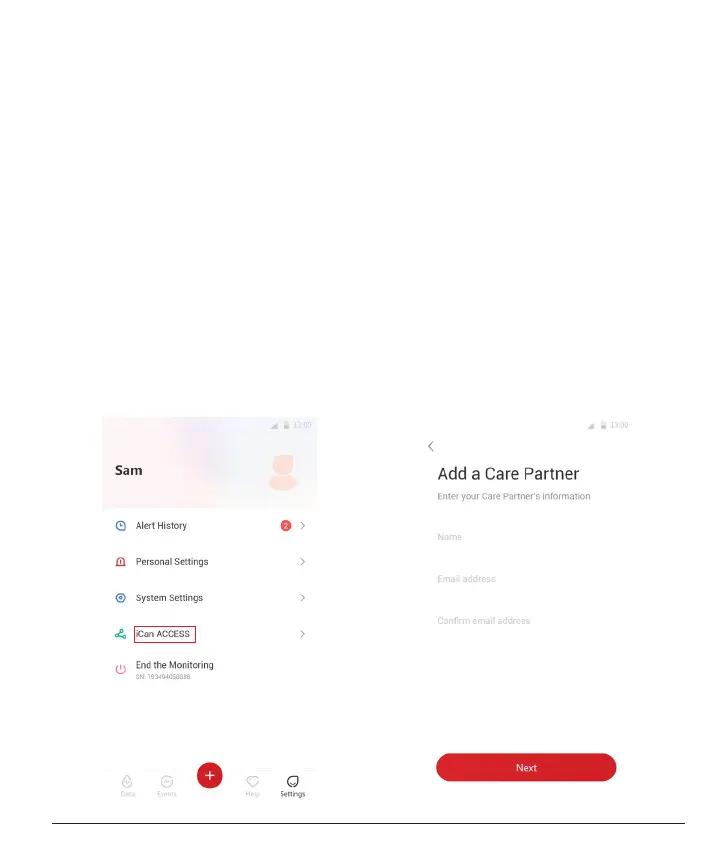
3.6.1 Invite “Care Partner”
Your “Care Partner” does not need to have the iCan CGM APP on their
mobile devices. They only need to download the iCan REACH APP. To
invite someone to follow you, go to
Settings > iCan ACCESS
. Then
follow the instructions on the APP screens. You can invite them by
entering their name and email.



 To Next Page