Need help?
Do you have a question about the SKF Enlight Collect IMx-1 and is the answer not in the manual?
The overall architecture of the SKF Enlight Collect IMx-1 System is illustrated by the figure below.
Details on system topology, mesh networks, communication protocols like Wi-Fi and Bluetooth, and configuration methods.
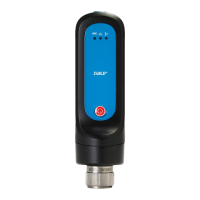
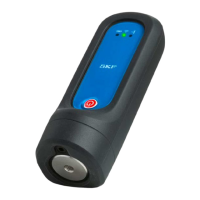
Description of the IMx-1 sensor, its measurements (Acceleration, Velocity, Enveloping, Temperature), and mounting.
Information on the Enlight Collect Gateway (CMWA 6600), its placement, capabilities, and limitations for sensor management.
Details on the gateway's IP-rated enclosure, built-in antennas, and IP-rated connectors for wired connections.
Explanation of how the gateway maintains Real Time Clock (RTC) settings using a backup power capacitor.
Details on configuring four data acquisition schedules (Interval and Interval alarm) for Scheduled Trend and Dynamic Data Storage.
How the gateway buffers measurement/event data in volatile and non-volatile memory to prevent data loss.
Information about the SKF Enlight Collect Manager app for Android devices used for system maintenance and commissioning.
Details on the use of TLS security for app communications with the gateway and certificate installation.
Information regarding licensed software and third-party libraries used in the product's development.
Overview of @ptitude Observer, its version requirements, and necessary prerequisites for IMx-1 system integration.
Explains how the gateway uses MQTT to communicate with @ptitude Observer, detailing configuration parameters.
Details on user roles and necessary security rights within @ptitude Observer for system access and configuration.
How to select engineering units for IMx-1 measurements in the @ptitude Observer Global Settings.
Steps for adding IMx-1 sensors to sub-machines in the @ptitude Observer Hierarchy and creating measurement points.
Description of the dedicated window for viewing gateway and sensor configuration, accessible from the On-line menu.
Details on gateway properties like Name, Self diagnostics status, Configuration, Connection, Hardware ID, and Firmware Version.
Details on sensor properties such as Name, Self diagnostics status, Configuration, Connection, Hardware ID, and Battery.
Configuration of gateway properties, including network connection (Ethernet/Wi-Fi) and server settings.
Details on sensor operating modes (Mesh, Leaf, Relay) and how to add relay nodes to the system.
Process for synchronizing configuration changes between the gateway and sensors to ensure consistency.
Procedure for clearing the Hardware ID of a gateway or sensor for replacement or re-commissioning.
Guidance on using machine templates in @ptitude Observer for creating new machines and recommended naming taxonomy.
General overview of installation and commissioning process, including system requirements and prerequisites.
Details on system commissioning using the SKF Enlight Collect Manager mobile app and security considerations.
Instructions for installing and commissioning the SKF Enlight Collect gateway.
Introduction to the SKF Enlight Collect gateway installation process and its purpose.
Information on power requirements for the SKF Enlight Collect Gateway, including DC input and PoE options.
Details on network connection options (Ethernet, Wi-Fi) and configuration for the gateway.
Configuration details for the wired Ethernet connection, including port information and cable requirements.
Information on using the built-in Wi-Fi module for network connection, including antenna details.
List of TCP and UDP ports used by the gateway for external connections and firewall considerations.
Note that the gateway does not currently support integrated mobile data, but external modems can be used.
Step-by-step guide on commissioning the gateway using the Enlight Collect Manager app and @ptitude Observer.
Information on USB service interface for gateway configuration and diagnostics.
Detailed guidance on installing and commissioning the SKF Enlight Collect IMx-1 wireless sensors.
Key considerations for sensor installation, including orientation, clearance, and mounting location.
Specific instructions and dimensions for mounting the IMx-1 sensor securely, including torque specifications.
Tasks to be completed before sensor commissioning, including populating database with configuration details.
Step-by-step guide for commissioning IMx-1 sensors using the Enlight Collect Manager app.
Procedure for commissioning relay nodes, including pre-commissioning tasks and using the app.
How to generate and view a commissioning report using the app after installation and configuration.
Maintenance procedures for the SKF Enlight Collect IMx-1 wireless sensor.
Steps to update sensor firmware remotely via the gateway and @ptitude Observer.
Procedure for decommissioning and replacing a faulty or end-of-life wireless sensor.
Information on general maintenance aspects for the IMx-1 hardware.
Guidance on monitoring sensor performance degradation and battery life.
Maintenance procedures for the SKF Enlight Collect gateway.
Steps to update gateway firmware remotely via the @ptitude Observer.
How to update gateway network configuration using the Enlight Collect Manager app without recommissioning.
Procedure for decommissioning a gateway for relocation or replacement.
Information on replacing a faulty or damaged gateway.
Information on general maintenance aspects for the gateway hardware.
Guidance on monitoring gateway performance and identifying potential issues.
Guidance on diagnosing and resolving common issues with the system.
Introduction to troubleshooting the system, including safety warnings and resource contacts.
How to access and interpret event logs, monitor service logs, and mesh network logs for diagnostics.
Specific troubleshooting steps for common issues encountered with IMx-1 sensors.
Specific troubleshooting steps for common issues encountered with the gateway.
Troubleshooting common problems encountered during the system commissioning process.
Diagnosing and resolving issues related to system connectivity and communication.
Information on accessing gateway interfaces for SKF personnel for maintenance and support.
Detailed technical specifications for the IMx-1 wireless sensor.
Physical dimensions, material, weight, IP rating, operating and storage conditions for the sensor.
Information on sensor operational modes, typical lifetime, and battery specifications.
Specifications for measurement types, resolution, dynamic range, and accuracy.
Details on wireless sensor signal processing, including frequency ranges and TWF samples.
Specifications for sensor interfaces, including WPAN, Proximity, Mesh network, and OTA FW update.
Information on certifications for the IMx-1 wireless sensor, including European and North American standards.
Detailed technical specifications for the Enlight Collect gateway.
Housing material, flammability, dimensions, mounting, weight, IP rating, and operating/storage conditions.
Specifications related to gateway power options, input voltage, and power consumption.
Details on internal measurement capabilities, including status, temperature, and other monitored parameters.
Specifications for gateway interfaces, including Sensor, OTA FW update, App, Network, Time synchronisation, and Data buffering.
Information on certifications for the Enlight Collect gateway, including European and North American standards.
Details on the gateway mounting plate dimensions and mounting instructions.
Explanation of product marks, symbols, and logos found on the device and packaging.
Explanation of various marks like CE, FCC, ATEX, Anatel, and WEEE.
Details of sensor labelling, including regulatory marks and identification information.
Details of gateway labelling, including manufacturing information, regulatory marks, and QR code.
Information on SKF's quality control standards, including ISO 9001:2015 certification.
Guidance on the proper recycling and disposal of electrical waste and equipment according to WEEE directive.
Details of the SKF Limited Warranty, including terms, conditions, and buyer's remedies.
Details of the SKF Limited Warranty, including terms, conditions, and buyer's remedies.
Details of the SKF Limited Warranty, including terms, conditions, and buyer's remedies.
Details of the SKF Limited Warranty, including terms, conditions, and buyer's remedies.
 General
| Brand | SKF |
|---|---|
| Model | Enlight Collect IMx-1 |
| Category | Accessories |
| Language | English |


 To Next Page