18
3059
23 2024
-
PJC 221 & 222
Menu System - Panel Setup
MC_0101
PANEL
• Move between parameters with the (stern) joystick.
• Press the button below to return to the previous menu.
• Press the button below to edit the selected parameter.
• Parameter value will start to blink, use joystick to alter value.
• Press the button below to save the edited parameter.
• Press the button below to cancel editing without saving.
SYSTEM PANEL
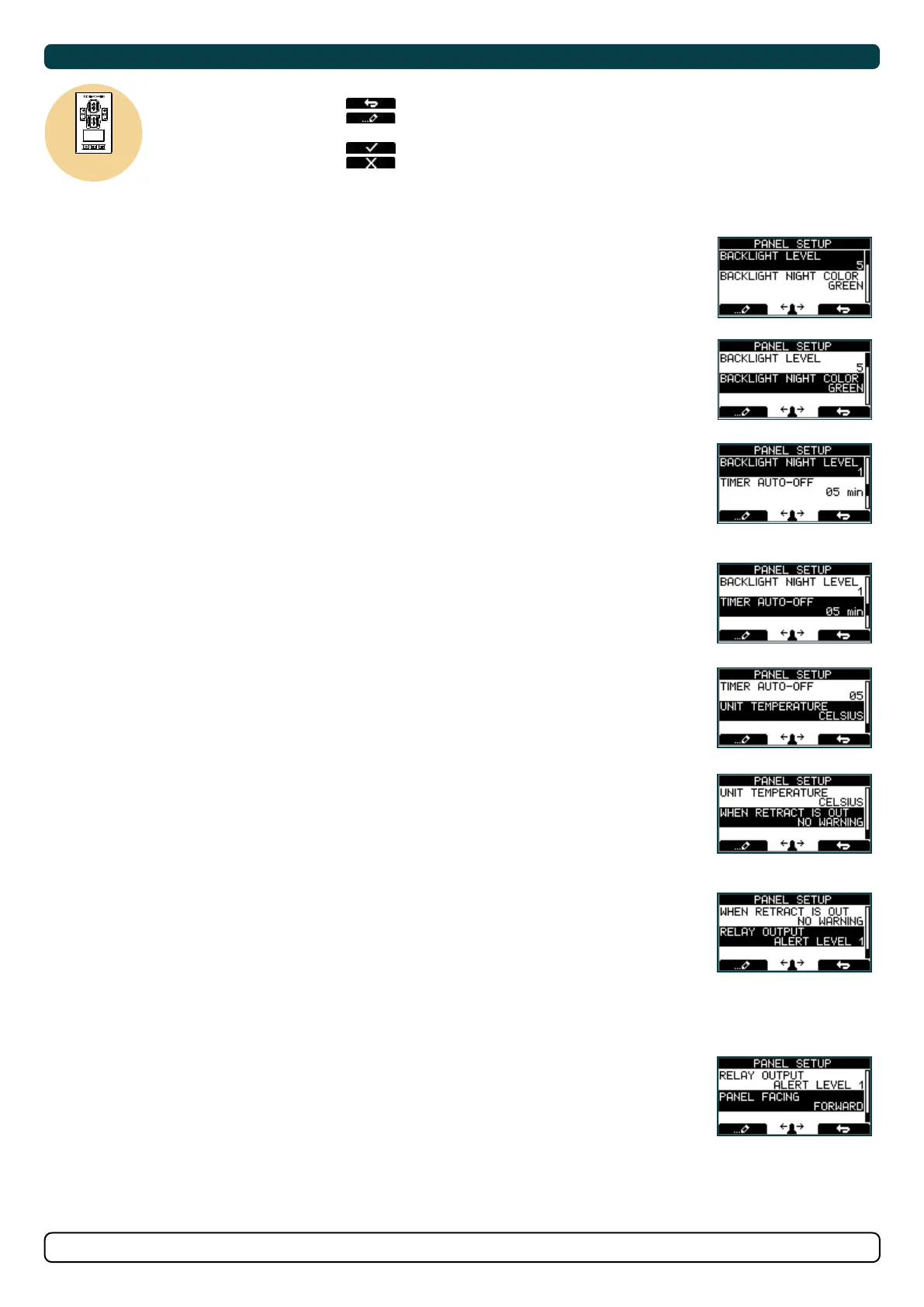
BACK LIGHT LEVEL
Values: 1-5
Set level of panel back light in daylight mode.
1 is lowest intensity, 5 is the highest.
BACKLIGHT NIGHT COLOUR
Values: GREEN, BLUE, RED, WHITE
Select colour of back light in night light mode.
BACK LIGHT NIGHT LEVEL
Values: 1-3
Set level of panel back light in daylight mode, 1 is lowest intensity, 3 is the highest.
TIMER AUTO-OFF
Values: OFF, 01-60 min
Set the time from last use to auto panel shut-down. Set from 1-60 minutes in 5 minute steps (1 minute steps
from 1 to 5 minutes) or OFF (panel will not turn off automatically). Values when retract on the boat: 1-30 min.
UNIT TEMPERATURE
Values: CELSIUS (Default), FAHRENHEIT
Set the panel temperature displaying unit.
WHEN RETRACT IS OUT
Values: NO WARNING (Default), WARNING EVERY 10sec
Select ‘WARNING EVERY 10sec’ for external buzzer or lamp warning every 10 seconds when retract is out. This
will activate the internal relay for 0.2 seconds every 10 seconds while the retract is out. See page 26 for buzzer
connections.
RELAY OUTPUT
Values: ALERT LEVEL 1 , ALERT LEVEL 2 , ALERT LEVEL 3 (Default)
ALERT LEVEL 1: When using the HOLD Function the relay output warns if the motor temperature is getting
high or if the voltage is getting low.
ALERT LEVEL 2: The relay output warns for all alarms and warnings in the S-link system only when any device
is sending thrust. Even when the panel is turned OFF.
ALERT LEVEL 3: The relay output warns for all alarms and warnings in the S-link system. Even when the panel
is turned OFF.
See ‘Alarm descriptions’ in “Ext. buzzer activation at Alert Level” column for specifi c alarm action.
PANEL FACING
Values: FORWARD (Default), AFT
FORWARD: Is when panel is facing forward
AFT: Is when panel is facing aft. Display view will rotate 180 degree and joysticks thruster
function will also rotate 180 degree.
17.1
17.0
17.2
17.3
17.4
17.5
17.6
17.7
17.8
SAC Power Management Status
MC_0758
Symbol alternating with AC motor symbol every 1sec.
*For detailed information on SAC power management operation see SAC user manual.
Power Not Available
Power Management System
is preventing the thruster
from operating.
Reduced Power Mode
Thruster output is limited
to 50 % thrust by Power
Management System.


 To Next Page