7
3059
23 2024
-
PJC 221 & 222
Hydraulic System - PHC024 Setup
MC_0095
PHC024 (Controller for hydraulic thrusters)
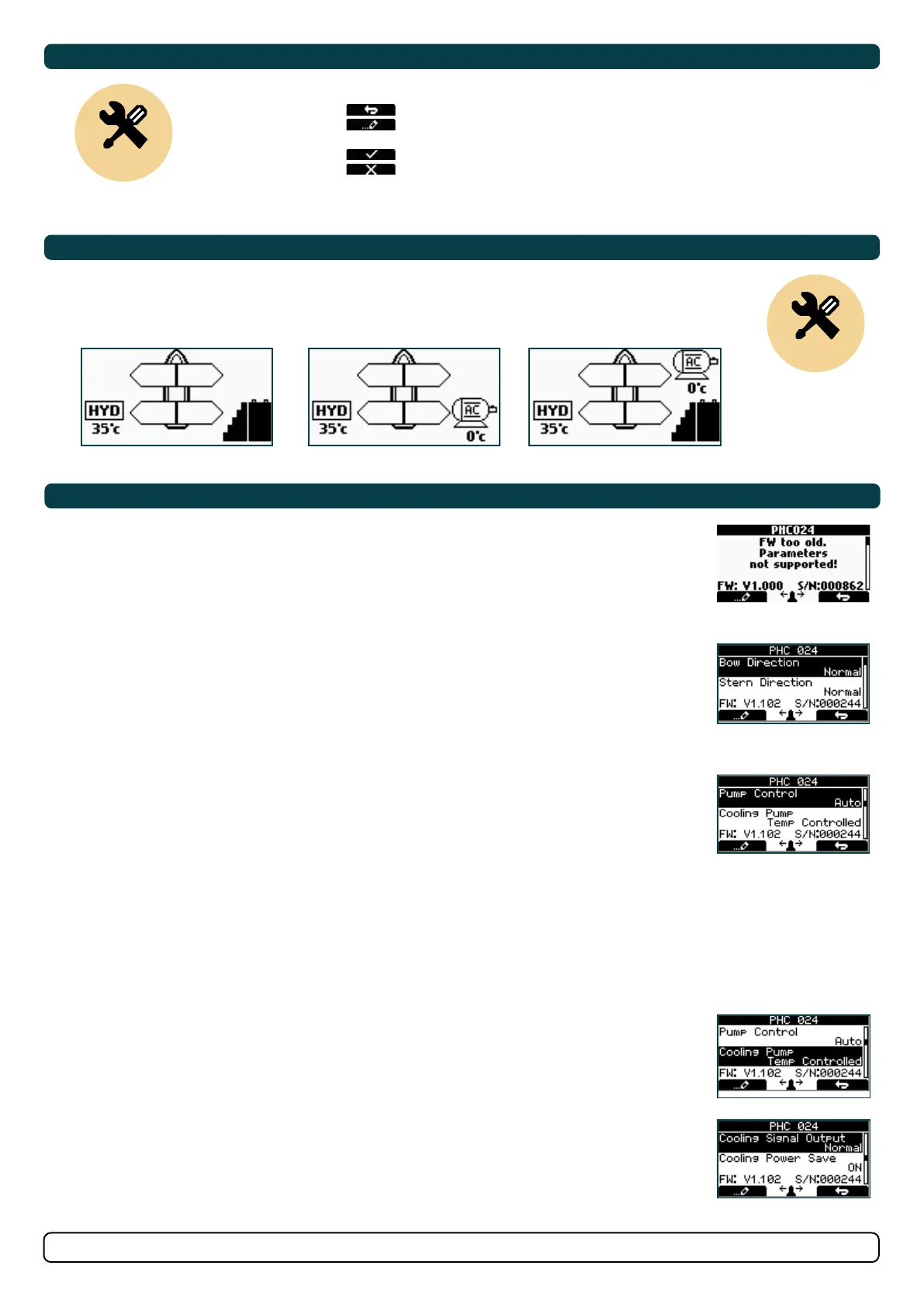
Confi guration of parameters is not supported with PHC024 fi rmware older than V1.101. This indicated by a
message stating:
FW too old. Parameters not supported!
Thruster can be operated with PHC024 fi rmware older than V1.101, but Danfoss service tool must be used
for confi guration.
Bow/Stern Direction (only available for PHC024 with FW V1.101 or higher):
Values: Normal (default)/Inverted
Switches between Normal and Inverted running direction for the thruster. Direction need to be inverted if
incorrect prop rotation.
Pump Control (only available for PHC024 with FW V1.101 or higher)
Values: Auto(default)/Always ON/Not Available
When «Pump Control» is set to «Auto», the system will automatically control load sharing between two PTO
pumps by deactivating the second PTO pump when not needed (two PTO pumps/control valves required) to
reduce heat generation in the system and save fuel/energy.
When any thruster is running, both PTO pumps will be active to ensure good performance. When an SPS
stabilizer system is active, one PTO pump will be deactivated to save power. If stabilizers are active and
the system pressure drops below 80bar, the system will activate the second PTO pump for 15 minutes
to increase the flow capacity and maintain required pressure. After 15 minutes the second pump will be
deactivated unless the pressure is still below 80 bar.
“Pump Control” is set to “Not Available” when “Thruster Stern” is set to “with Bypass Valve”. “Pump
Control” will then not be able to edit.
Cooling Pump (only available for PHC024 with FW V1.101 or higher)
Values: Always Running/Temp Controlled(default)
When the option “Temp Controlled” is selected, the cooling pump will start when oil temperature exceeds
50°C/122°F and stop when the oil temperature goes below 40°C/104°F. On systems with two oil tanks, this
setting will apply to both tanks.
Cooling Signal Output (only available for PHC024 with FW V1.101 or higher)
Values: Normal (default)/Inverted
Set to Normal when using a hydraulic cooling pump. Should be set to Inverted when using an electrical
cooling pump with a 10 2380A-12/24V relay box
Press the button below to return to the previous menu.
Press the button below
to edit the selected parameter.
Parameter value will start to blink, use joystick to alter value.
Press the button below to save edited parameter to device
Press the button below to cancel editing without saving.
Control Panel Setup Buttons
MC_0115
Setup
Default in systems
without stabilizers
Combining Stabilizer with AC & DC Thrusters
MC_0115
Setup
SETUP
NOTICE regarding following Location modes: If the boat has Sleipner stabilizer and AC or DC thrusters the thruster
location should be set as BOW-STB or STERN-STB. This so the hydraulic controller are shown at the left side in display
and thruster(s) at the right side of the display.
Default in systems
without stabilizers
HYD-DC HYD-AC HYD-AC-DC
3.0
3.1
3.2
3.3
3.4


 To Next Page