23
3059
23 2024
-
PJC 221 & 222
The ‘HOLD’ function is for auto-run ning of bow and stern thrusters together in the direction of the arrows at selected power.
Press “+” for more and “-” for less power (6 steps). The ‘HOLD’ function is normally used to hold the boat into the dock while mooring. The ‘HOLD’
function can be deactivated by running any thruster in the opposite direction from any control unit.
The ‘HOLD’ function can be calibrated to get balanced thrust from the bow and stern thruster.
See the PJC control panel manual on how to calibrate.
HOLD Function
Calibration
Warning Signals When Using ’HOLD’ Function
MC_0053
MC_0053
MC_0053
The internal and external (if fi tted) buzzer will give the following warning signals:
Warning signals Cause Effect
1. Single short beep every 2.4 sec. • Voltage below 9.3V/17.5V (12V/24V system).
• Temperature above 85
o
C/185
o
F.
None
2. Two short beeps every 2.4 sec. • Voltage below 8.9V/16.3V (12V/24V system).
• Temperature above 100
o
C/212
o
F.
None
3. Red backlight in display and continuous short
beeps.
• Voltage below 8.5V/15V (12V/24V system).
• Temperature above 110
o
C/230
o
F.
None
4. Red backlight in display and continuous short
beeps.
If one or more of the thrusters enters an alarm
state - Voltage below 8.0V/12.0V (12V/24V sys-
tem) or temperature above 120
o
C/248
o
F.
“HOLD” function are cancelled
and both thrusters will stop.
Temperature must drop below
110°C/230°F before the thruster
can be operated again. Low Voltage
alarm must be reset from panel.
Access menu system by pressing and
holding Menu button for 3 seconds.
Move around in menus by using joystick.
Follow instructions on the screen and press the
buttons below the symbols indicated on LCD screen.
BUTTON SYMBOLS
On the bottom line of the display, a symbol will be shown over the buttons below.
These symbols will show what function each corresponding button has in the selected menu entry.
Return to
previous menu.
Select highlighted
menu text / Save edited
parameter.
Edit highlighted
parameter.
Cancel editing
without saving.
This symbol
indicates that the (stern)
joystick is used to move
between menu items /
parameters.
MAIN MENU ITEMS:
Move between main menu items with the (stern) joystick.
Language Stabilizer
( If installed)
Setup Info Default settings Panel setup
MENU System
MC_0053
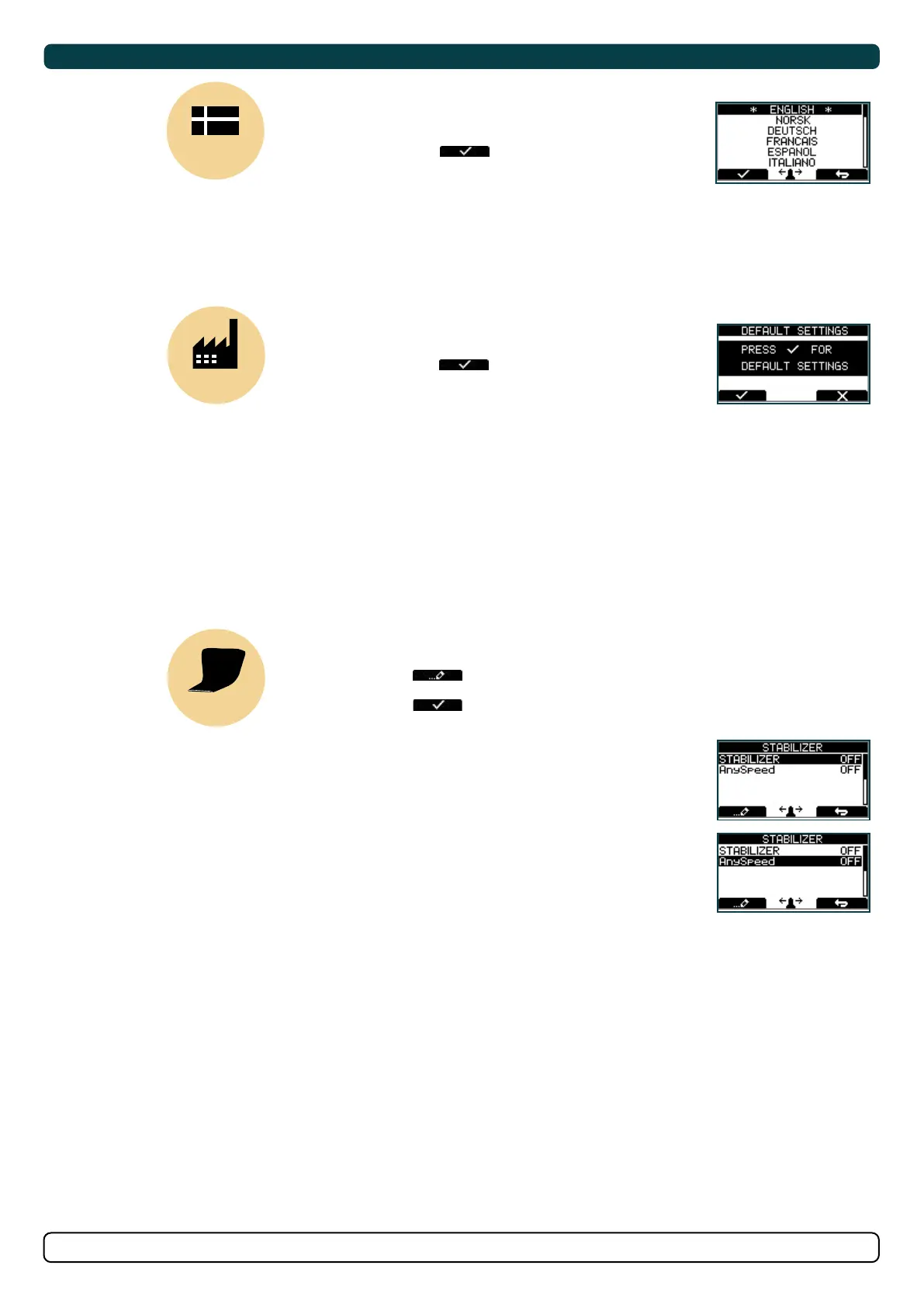
LANGUAGE
LANGUAGE
• Choose language by moving joystick:
English, Norwegian, German, French,
Spanish, Italian and Danish.
• Press the button below to set
the language to the highlighted menu
entry. A star (*) on each side indicates
the language set.
DEFAULT
DEFAULT SETTINGS
• Reset all settings to factory default
- follow instructions on screen
• Press the button below to confi rm reset
• The following parameters/values will be set to the
factory settings:
Language = English
Backlight Level = 5
Backlight Night Colour = Green
Backlight Nightlevel =1
Timer Auto-Off = 05 min
Hold Calibration =70% Bow and Stern
All system devices will be erased from memory.
(Setup procedure must be followed to reconfi gure the system)
STABILIZER
STABILIZER
(Shown only for yachts equipped with a Side-Power Stabilizer system)
Press the button below
to edit the selected parameter.
ON/OFF will start to blink, use joystick to alter value.
Press the button below to save edited parameter to device.
(Default in systems
with stabilizers)
2. AnySpeed:
• Values: ON/OFF
• Switches the zero speed/at
anchor stabilization ON or OFF.
1. Stabilizer:
• Values: ON/OFF
• Switches the stabilizer ON or OFF.


 To Next Page