25
3059
23 2024
-
PJC 221 & 222
Alarm Descriptions
MC_0053
1. PPC520, PPC820, PPC800, PPC840
2. Buzzer is only activated when any device is sending thrust on the S-link bus.
"Err.
No."
Errors shown in display
"Auto
Reset"
"Ext. buzzer
activation at
Alert Level"
Description Action
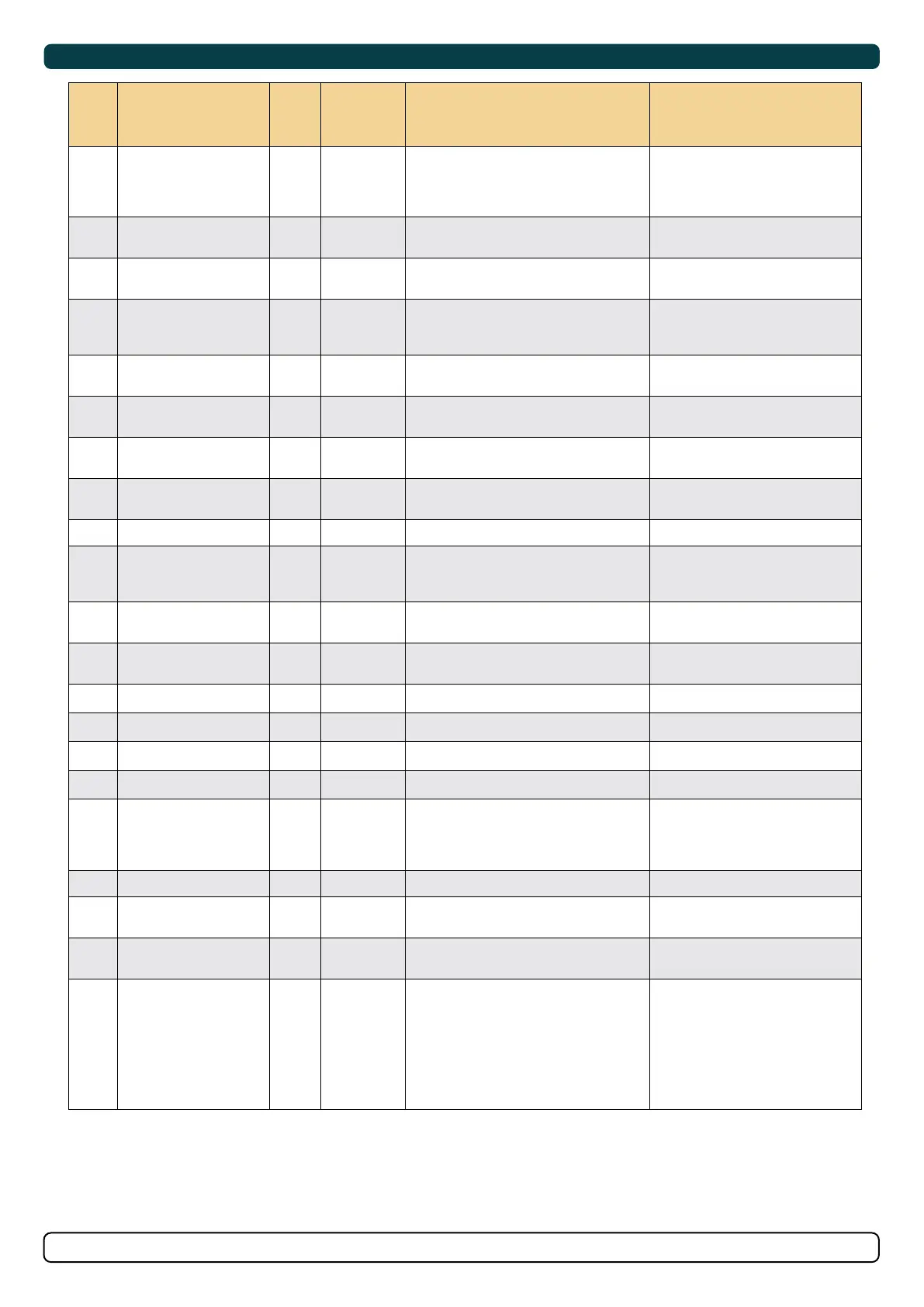
1 Motor Overcurrent
2
(
²
)
, 3 Motor current too high. "Thruster must be serviced by
authorized personnel, reset or power
OFF/ON PPC
(
¹
)
."
2 Motor Overtemp
Yes 2
(
²
)
, 3 "Motortemp has been over
120°C/248°F."
Motor cool down below 110°C /230°F.
3 Controller Overtemp
2
(
²
)
, 3 "PPC
(
¹
)
temp has been over
80°C/176°F."
PPC
(
¹
)
cool down below 45°C/113°F.
4 Controller Overtemp
2
(
²
)
, 3 "SR150000 temp has been over
80°C/176°F."
SR150000 cool down below 45°C
/113°F.
5 Low Voltage
2
(
²
)
, 3 Low motor voltage alarm when motor
is running.
12V thruster below 8.00V
24V thruster below 12.00V
Recharge battery, reset or power OFF/
ON device.
6 Thermoswitch
Yes 2
(
²
)
, 3 Thermo switch input is activated and
there is an open circuit.
The thruster needs to cool down before
operating again.
7 IPC Error
2
(
²
)
, 3 Motor relay fault "Turn off thruster battery main switch.
Thruster must be serviced by authorized
personnel."
8 Critical Error
2
(
²
)
, 3 PPC
(
¹
)
output fail PPC
(
¹
)
must be sent for service.
9 Low Motor Current
2
(
²
)
, 3 Thruster uses no power Check thruster connections or motor
dead!
10 Motor Contactor
2
(
²
)
, 3 No current on motor relay coil. Check motor relay connections, short
circuit or relay dead!
11 System Error
2
(
²
)
, 3 Fatal error Device must be serviced by authorized
personnel
12 No Communication
2
(
²
)
, 3 No communication with device Check S-Link cables and power
connections.
13 Motor Temp Sensor
2
(
²
)
, 3 Motor temperature sensor fail Check for an open circuit on the temp
sensor on the motor
14 Supply Voltage Fault
2
(
²
)
, 3 No power Check power connections
15 Fuse Blown
2
(
²
)
, 3 Fuse blown Replace fuse or check if main cable from
battery and main cable to thruster has
been switched
16 Manual Override
Yes 2
(
²
)
, 3 Main switch manually overridden Pull main switch
17 Motion OUT Fault
2
(
²
)
, 3 Retract obstructed while deploying Turn off all panels. Go for lower speed/
deeper water and retry.
18 Motion IN Fault
2
(
²
)
, 3 Retract obstructed while retracting Turn panel on and manually override
main switch. Remove obstruction and
try again.
Below are Generic Fault Codes listed. For legacy reasons this system is used on old products and products with old fi rmware versions.
Alarm Descriptions
MC_0053
1. PPC520, PPC820, PPC800, PPC840
2. Buzzer is only activated when any device is sending thrust on the S-link bus.
"Err.
No."
Errors shown in display
"Auto
Reset"
"Ext. buzzer
activation at
Alert Level"
Description Action
19 Actuator Fault 2
(
²
)
, 3 Actuator not getting any power "Check actuator connection or power
to actuator. Reset alarm in alarm
menu on PJC 211/212/221/222 or
recycle power."
20 Pos.Sensor Fault 2
(
²
)
, 3 Retract position sensor fail Check position sensor cables and for
sensor damage.
21 In Service Mode Yes 2
(
²
)
, 3 "Retract controller in service mode. Switch
no. 4 is ON."
Check dip switch setting on retract
control box.
22 High Oil Temp Yes 1, 2
(
²
)
, 3 "Hydraulic oil temperature is higher than
75°C /167°F."
"Stop running and wait for
temperature to drop.
Check if cooling pump is running."
23 Low Oil Level 1, 2
(
²
)
, 3 Hydraulic oil level is to low Fill more hydraulic oil to the
hydraulic tank.
24 Warning Return Filter Yes 2
(
²
)
, 3 Return fi lter element required
replacing.
25 Warning Pressure Filter Yes 2
(
²
)
, 3 Pressure fi lter element required
replacing.
26 Warning High Speed Yes 1, 2
(
²
)
, 3 "WARNING! High Speed.
Stabilizer not active!"
27 Stabilizer Fault Yes 1, 2
(
²
)
, 3 Any Stabilizer alarm. See stabilizer panel for more info.
28 AC Motor Overtemp Yes 1, 2
(
²
)
, 3 "Hydraulic AC motor power pack overtemp.
Higher than
120°C/248°F."
Stop running and wait for
temperature to drop.
29 AC Motor Sensor Fail 2
(
²
)
, 3 "Hydraulic AC motor power pack temp
sensor open circuit"
Check sensor cables.
30 Temperature Warning Yes 2
(
²
)
, 3
(
²
)
High temperature warning. Warns that the motor temperature is
getting high.
31 Motor Overtemp Yes 1, 2
(
²
)
, 3 High temperature Alarm. See SAC manual for more details.
32 VFD Warning Yes 2
(
²
)
, 3 There is an warning from VFD. Check VFD for more details.
33 VFD Not Ready Yes 2
(
²
)
, 3 The VFD is not ready. Check VFD for more details.
34 VFD Fault 1, 2
(
²
)
, 3 VFD has an Alarm. Check VFD for more details.
35 Warning Low Voltage Yes 2
(
²
)
, 3
(
²
)
Low motor voltage warning when motor is
running.
12V thruster below 9.30V
24V thruster below 17.50V
36 Not Calibrated Yes 2
(
²
)
, 3 Shaft Not Calibrated See manual for how to calibrate.
37 VFD Com. Fault 2
(
²
)
, 3 No Modbus communication with VFD Check VFD Modbus cables and
power.
38 Cooling Fan Fault 2
(
²
)
, 3 Cooling fan stopped running, or running
too slow
Device must be sent for service
39
Interlock
2
(
²
)
, 3 S-link communication between PPC and
retract controller are missing
-Check PPC or retract controller has
power.
-Check S-Link connections to PPC
and retract controller.
-Check if not PPC or SR150000/
SR61242 is wrongly setup as SRP or
SRVP/SRLP.
S-Link Fault Codes
MC_0472
Fault situations in S-Link compliant products generates Fault Codes which are broadcasted on the S-Link bus. If a control panel receives a Fault Code,
it will trigger an alarm in the control panel and the user will be able to get information about which product that reports the fault and the reason for the
fault. Please see the user manual of your S-Link compliant control panel for more information on how to access Fault Code information in case of an
alarm situation.
All Sleipner S-Link compliant products have product specifi c Fault Codes. For legacy reasons some control panels display Generic Fault Codes for
certain products.


 To Next Page