HRX-OM-O021
Chapter 5 Display and setting of various functions
HRS Series 5.10 Anti-freezing function
5-29
5.10.2 Anti-freezing function setting and checking
The table below explains the setting items of the anti-freezing function and
the initial values.
Table 5.10-1 List of set anti-freezing function
Display Item Contents
Initial value
(Default setting)
Anti-freezing Sets anti-freezing OFF
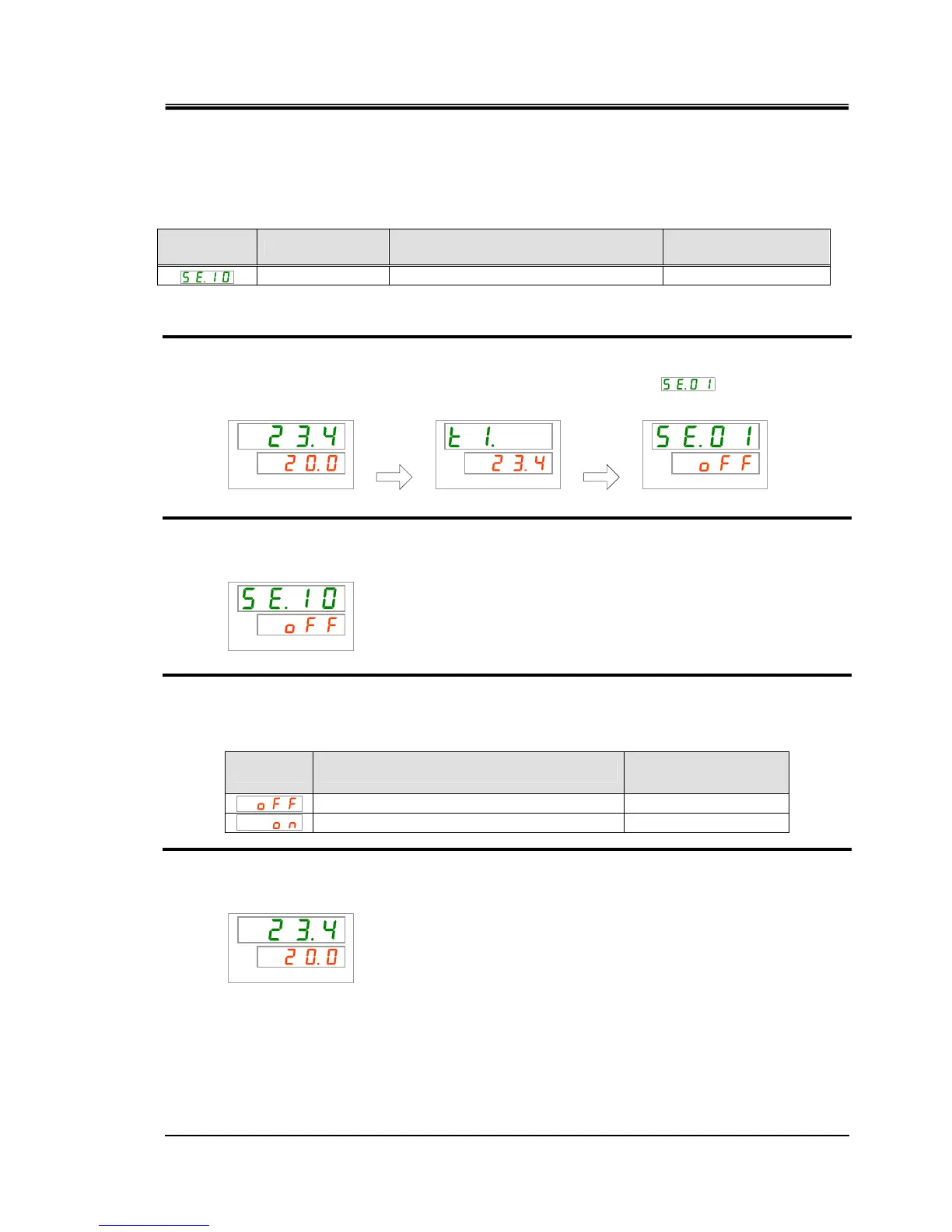
1. Press and hold the [MENU] key for approx. 2 sec.
Repeat pressing the key until the setting screen for key-lock [
] appears on the
digital display.
PV
SV
PV
SV
PV
SV
Anti-freezing Setting and checking
2. Press the [SEL] key 9 times.
The set screen of anti-freezing is displayed on the digital display.
PV
SV
3. Select anti-freezing from the table below with [▲] key or [▼] key, and confirm by
pressing “SEL”.
Table 5.10-2 List of set value
Set value Explanation
Initial value
(Default setting)
Anti-freezing function OFF
○
Anti-freezing function ON
4. Press the [MENU] key once.
Return to the main screen (screen displaying the circulating fluid temperature).
PV
SV
[MENU]
Press and
hold
[MENU]
Press and
hold


 To Next Page
 Loading...