EasyManua.ls Logo

SMC Networks IP8001 Series - User Manual

Default Icon
89 pages
Print Icon
To Next Page IconTo Next Page
Loading...
No. IP8S-OM00009-B
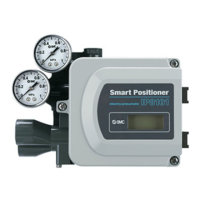
SMART POSITIONER (LEVER TYPE)
PRODUCT NAME
IP8001 Series
MODEL/ Series

Table of Contents

Questions and Answers

  • E
    Erin LynchAug 17, 2025
    Why is there no air output from the OUT1 or OUT2 ports on my SMC Networks Valve Positioners?
    • C
      Catherine HarmonAug 17, 2025
      Several factors can cause this issue. The supplied pressure could be incorrect, so check the regulator's supply pressure setting. Ensure the correct input current (4 to 20 mADC) is being supplied. Air leaks in the piping can also be a culprit, so inspect the piping and fittings. The operation mode (auto, manual) may be incorrect. Clogged fixed orifices and nozzles can prevent airflow, so inspect and clean the pilot valve. Finally, the balance current might need adjustment.
  • A
    angelturnerAug 19, 2025
    What to do if my SMC Networks Valve Positioners show low accuracy (Linearity, hysteresis)?
    • S
      Sheryl CruzAug 20, 2025
      Several factors could be the cause. First, ensure that the span adjustment has been performed. The dead band value might be too high, so adjust it using the parameter mode. Verify that the supply pressure is correct for the actuator, and that the supply pressure isn't fluctuating. Check the positioner mounting threads to make sure they haven't loosened. Also, confirm that the positioner and actuator are properly connected. An unstable input current system can also cause this, so calibrate the input current with the parameter mode.
  • M
    millerjosephAug 23, 2025
    What causes large air consumption in SMC Networks Valve Positioners?
    • W
      Wayne JamesAug 23, 2025
      Excessive air consumption can be caused by air leaks. Check the piping and stop any leaks. It could also be due to a seating failure of the pilot valve, in which case you should replace the pilot valve unit.
  • A
    Autumn GriffinAug 26, 2025
    What causes a hunting problem in SMC Networks Valve Positioners?
    • E
      edavisAug 26, 2025
      A hunting problem can arise from several causes: the actuator may be uncalibrated, so calibrate it using the parameter mode. If using a special valve, the PID constant after calibration might be improper, so adjust it with the parameter mode. Play in the mounting of the feedback lever and actuator can cause hunting, so eliminate any play and mount them properly. An unstable input current can also be a factor, so check the input current system and ensure proper grounding. Significant rotation resistance of the actuator due to ground and piston packing can also contribute, so reduce rotation resistance as much as possible.
  • S
    Scott HarrisAug 28, 2025
    How to troubleshoot low sensing in SMC Networks Valve Positioners?
    • C
      carl43Aug 28, 2025
      Low sensing can be attributed to a few potential issues. A faulty input current resolution may be the cause, so check the input current system. High sliding resistance in the actuator can also lead to low sensing; reduce the sliding resistance as much as possible and check for stick-slip movement. A high dead band value could be the reason; change the dead band with the parameter mode. In some cases, the actuator's large capacity may simply require more time to operate, so allow sufficient time for the actuator to fill with air.
  • J
    Jordan FrazierAug 30, 2025
    What causes actuator operation error in SMC Networks Valve Positioners?
    • E
      Eric ReyesAug 31, 2025
      An actuator operation error can occur if pressure has not been supplied, so ensure pressure is supplied. Check that piping has been connected to the actuator. Perform a simple balance adjustment using parameter code C20. Also, check that the potentiometer output and torque motor lines are not broken, and that the terminal has been connected. If the torque motor line is broken, calibrate again after checking. (parameter code: C30).
  • B
    Barbara AndersonSep 2, 2025
    How to fix a feedback lever installation angle failure in SMC Networks Valve Positioners?
    • E
      Elaine MooneySep 2, 2025
      A feedback lever installation angle failure can occur if the feedback lever installation angle is out of the adjustable range from -30 to 30 (parameter code: C10). Recheck the angle (parameter code: C10). Also, if the angle of the feedback lever is out of the standard stroke range (from 10 to 30 degrees), ensure that the angle of the feedback lever is within 10 to 30 degrees. If it’s out of the above range, reselect the actuator.
  • R
    Roy DavisSep 5, 2025
    Why is automatic calibration unavailable on my SMC Networks Valve Positioners?
    • B
      broachSep 5, 2025
      Automatic calibration might be unavailable if the angle of the feedback lever exceeds –30/+30 degrees on both ends of the actuator. Adjust the angle to –30/+30 degrees or less. The standard positioner stroke is from 10 to 30 degrees. Use it within 10 to 30 degrees.
  • E
    Erik SmithSep 8, 2025
    What to do if hunting does not subside in SMC Networks Valve Positioners?
    • E
      elizabeth20Sep 8, 2025
      If hunting doesn't subside, it could be due to a small actuator size or choking inside the piping. Try stopping the hunting with the PID constant setting (parameter code: 800).
  • W
    williamsandrewSep 12, 2025
    What to do if I cannot check the balance current on my SMC Networks Valve Positioners?
    • A
      Anne JacksonSep 12, 2025
      If you cannot check the balance current, recalibrate the positioner (parameter code: C30) after performing a simple balance adjustment (parameter code: C20).

Summary

Safety Instructions

Hazard Levels and User Responsibilities

Explains hazard levels, user responsibility, and need for trained personnel.

Special Conditions, Warranty, and Compliance

Covers precautions for special conditions, warranty terms, and compliance requirements.

Introduction and Specifications

Parameter Settings List

Workflow of IP8001 Positioner Setup

Operating Principle

Mechanical Installation

Mounting Procedures

Provides instructions and warnings for securely mounting the positioner onto an actuator.

Feedback Lever and Piping Connections

Details feedback lever connection and piping for air supply.

Electrical Wiring and ATEX Safety

Electrical Wiring Procedures

Provides crucial safety warnings and procedures for electrical wiring.

ATEX Explosion Protection and Barriers

Covers safety for explosion-protected environments and associated barriers.

Component Description and LCD Display

Initial Adjustment and Calibration

Setup Parameters and Calibration Procedures

Guides through initial parameter changes, feedback lever check, and auto calibration.

Input Current Calibration

Details the process for calibrating input current values.

Mode Operation

Mode Change on LCD

Explains how to switch between Auto, Manual, and Parameter modes.

Auto and Manual Mode Usage

Describes using the positioner in automatic and manual control modes.

Parameter Code Detail

Actuator, Direction, and Split Range Settings

Covers actuator type, direction, and split range settings.

Zero;Span, PID, and Alarm Settings

Details zero/span, PID, and alarm settings.

Analog Output and Calibration Functions

Explains analog output and various calibration functions.

Parameter Setting Procedures

Basic Parameter Procedures

Guides setting actuator direction, split range, and zero/span.

Advanced Parameter Procedures

Covers forced close/open, dead band, and valve characteristics.

PID, Alarm, and Output Configuration Procedures

Details PID, alarm, and analog output configuration procedures.

Improved Controllability

Maintenance and Operational Precautions

Maintenance and Check Procedures

Outlines procedures for routine maintenance and checking the positioner.

Handling, Air Supply, and Environment

Provides handling advice, air supply requirements, and environmental considerations.

Troubleshooting and Error Codes

Troubleshooting Common Issues

Lists common problems, their causes, and countermeasures.

Error and Check Code Lists

Details specific error codes and check codes with solutions.

How to Order

Drawings and Parts List

SMC Networks IP8001 Series Specifications

General IconGeneral
Input Signal4-20 mA
TypeElectro-pneumatic
Supply Pressure1.4-7 bar
ProtectionIP65
Ambient Temperature-20°C ~ +80°C
Housing MaterialAluminum

Related product manuals