
EasyManua.ls Logo

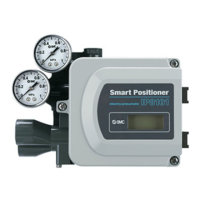
SMC Networks IP8101 Series - User Manual

SMC Networks IP8101 Series
85 pages
Print Icon
To Next Page IconTo Next Page
Loading...
No. DIG-31900-OM002-H
SMART POSITIONER (ROTARY TYPE)
PRODUCT NAME
IP8101 Series
MODEL/ Series

Table of Contents

Questions and Answers

  • K
    ksavageAug 4, 2025
    What to do if there is no air output from OUT1 or OUT2 ports in SMC Networks IP8101 Valve Positioners?
    • C
      Courtney TylerAug 4, 2025
      If there's no air coming from the OUT1 or OUT2 ports, and the valve positioner isn't moving, here's what you can check: * First, make sure the supply pressure setting of the regulator is correct. * Next, ensure the correct input current (4 to 20 mADC) is being supplied. * Inspect the piping and fittings for any air leaks. * Verify the correct operation mode is selected (auto or manual). * Check the pilot valve for clogs in the fixed orifice and nozzle, and clean if necessary. * Finally, adjust the balance current.
  • J
    James SotoAug 19, 2025
    How to troubleshoot an SMC Networks Valve Positioner with no LCD display?
    • B
      Brian SnyderAug 19, 2025
      If the LCD display is not working, consider the following: * Verify that the wires are properly connected to the positioner to ensure the input current is connected. * Check the output current of the input current generator to confirm there is output from the input current power supply. * Ensure that the correct input current power is being supplied and that it is within the appropriate range.

Summary

Safety Instructions

General Safety Guidelines

Instructions to prevent hazards and damage, including warning levels and precautions.

Limited Warranty and Compliance Requirements

Product warranty period, limitations, and compliance requirements for safe use.

Introduction and Specifications

Product Overview

Introduction to the IP8101 smart positioner and its primary function.

Technical Specifications

Detailed specifications including input, output, pressure, and environmental ratings.

Setup and Installation Procedures

Parameter Settings List

List of configurable parameters and their functions for positioner setup.

Workflow of IP8101 Positioner Setup

Step-by-step guide for installing and initially adjusting the positioner.

Mounting the Positioner

Procedures for securely mounting the positioner onto an actuator with bracket examples.

Feedback Shaft Connection

Procedures for connecting the feedback shaft and adjusting the fork lever-type fitting.

Fork Lever-Type Fittings and Body Cover

Details on different fork lever fittings and body cover options.

Piping

Guidelines and procedures for connecting air supply and output lines for actuators.

Electrical Wiring

Instructions for performing electrical wiring connections for the positioner.

Initial Adjustment Procedures

Detailed process for performing zero/span adjustment, calibration, and input current calibration.

Operation and Configuration

Operating Principle

Explanation of how the positioner's internal mechanism functions.

How to Operate

Methods for operating the positioner via buttons or HART communication.

Mode Change and Operation Modes

How to switch between Auto, Manual, and Parameter modes for operation.

Setting Parameters

Procedures for accessing and modifying various operational parameters via the parameter code system.

Maintenance and Troubleshooting

Maintenance and Checks

Regular maintenance routines and checks for ensuring proper positioner function.

Handling and Safety Precautions

Safety guidelines for handling, air supply, and environmental considerations during use.

Troubleshooting Common Issues

Guide to diagnosing and resolving common positioner malfunctions.

Error and Check Code Lists

Reference lists for error codes and check codes detected during operation or calibration.

SMC Networks IP8101 Series Specifications

General IconGeneral
BrandSMC Networks
ModelIP8101 Series
CategoryValve Positioners
LanguageEnglish

Related product manuals