BTP-P33 User’s Manual
- 14 -
Caution:
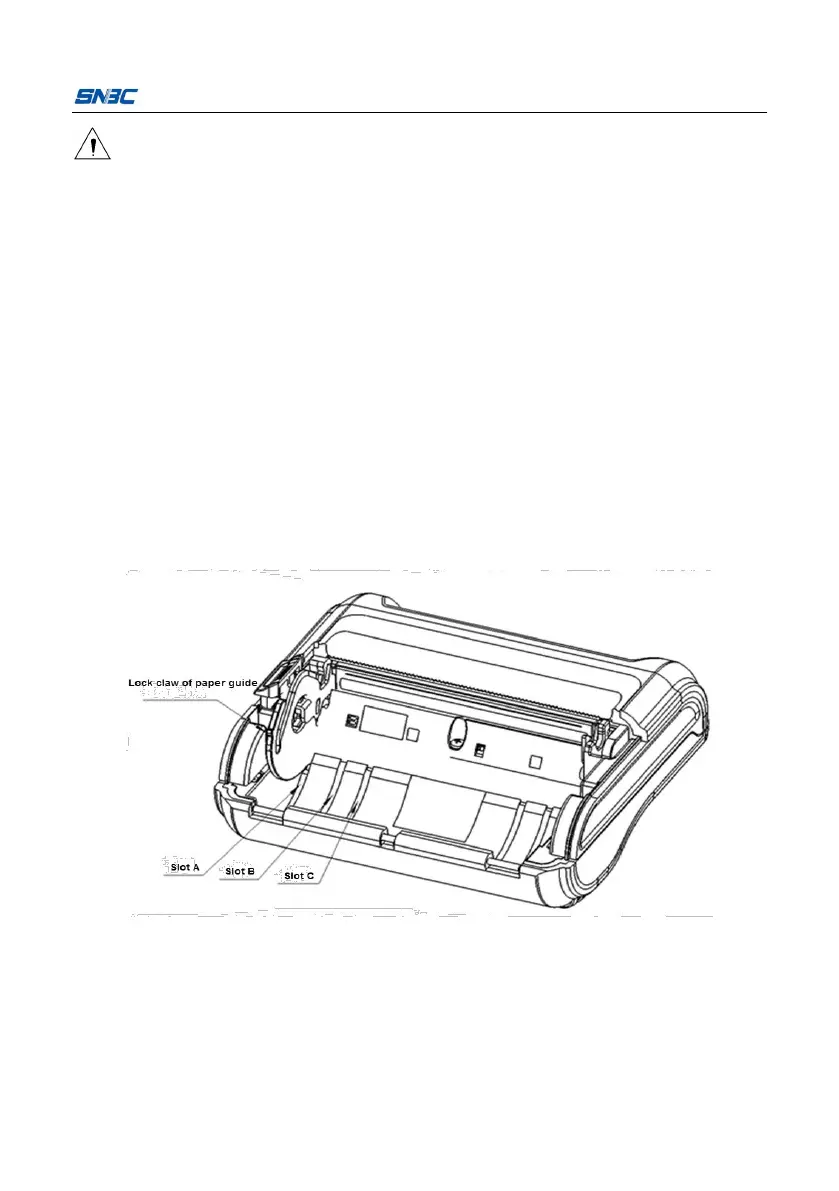
Adjust the position of paper guide to adjust the width of paper cabinet
according to the papersizeused: grasp the round hole on the back of
paper guide and press down the lock claw of paper guide, rotate it
upward and remove it; select appropriate position to insert the paper
guide according to the paper width; note that the paper winding
direction of paper roll should meet therequirements of printer;
Ensure thatthe paper is wound tightly on the paper roll, otherwise it
maycausepaper jamorother faults;
The paper roll should be placed smoothly in the paper cabinet without
tilt; otherwise it will affectthe printing.
Notes:
Paper guide is inserted in slot A: 80±0.5mm
Paper guide is inserted in slot B: 60±0.5mm
Paper guide is inserted in slot C: 44±0.5mm



 To Next Page