EasyManua.ls Logo

SNBC BTP-P33 - Appearance and Components; Printer Component Identification; Button Functions Overview

SNBC BTP-P33
28 pages
Print Icon
To Next Page IconTo Next Page
To Previous Page IconTo Previous Page
Loading...
BTP-P33 User’s Manual
- 9 -
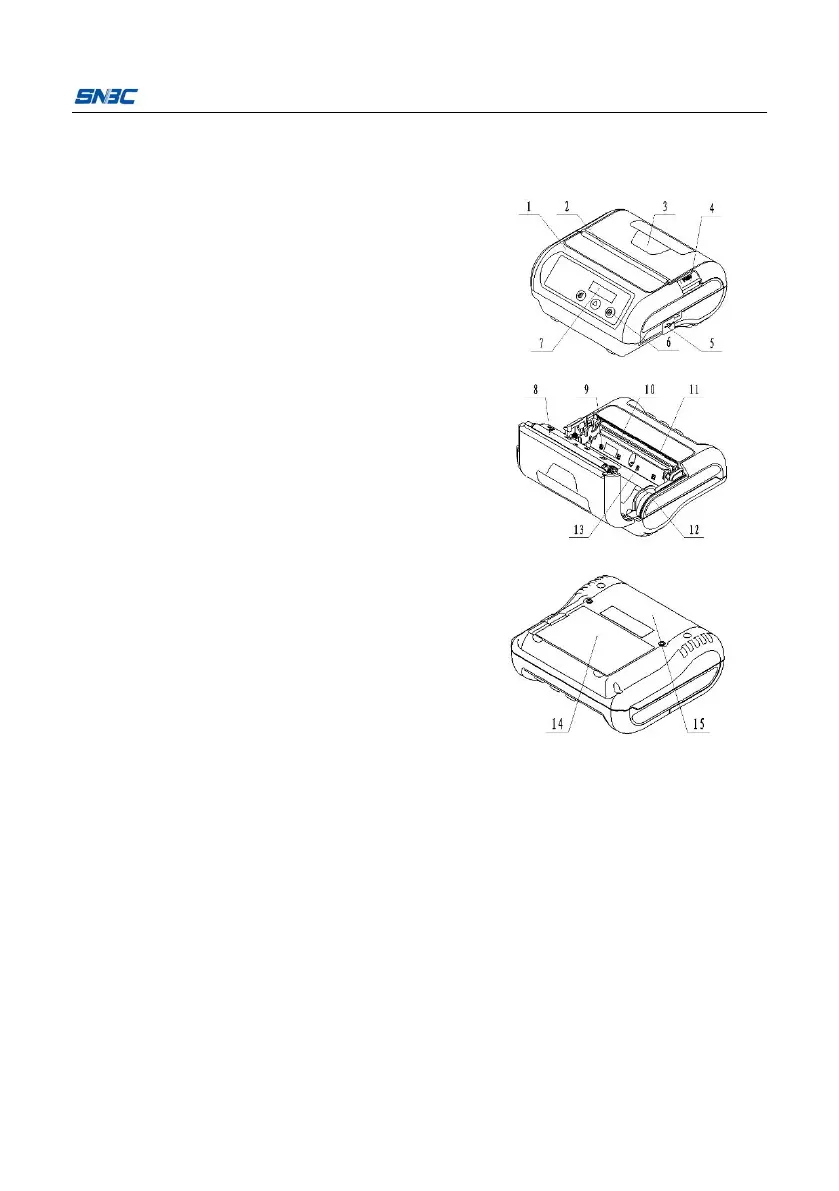
3Appearance and components
3.1 Apperance and components
1 Middle cover
2 Dust-proof rubber
3 Top cover
4 Cover open button
5 Power/Serial/USB interface
6 Button
7 LCD
8 Platen roller
9 Black mark sensor
10 Print head
11 Tear off bar
12 Paper guide
13 Paper end/Label sensor
14 Bottom cover
Button and component function:
Power button
Press the power button for a long time can turn on/off the printer;
under sleep mode, press the button can wake the printer.
Set button
Press the button under standby status to enter configuration mode;
press the button to switch configuration items under configuration


Related product manuals