28
MASTERYS BC 100-120 kVA - Ref.: IOMMASBCXX07-EN 05
5.2-3
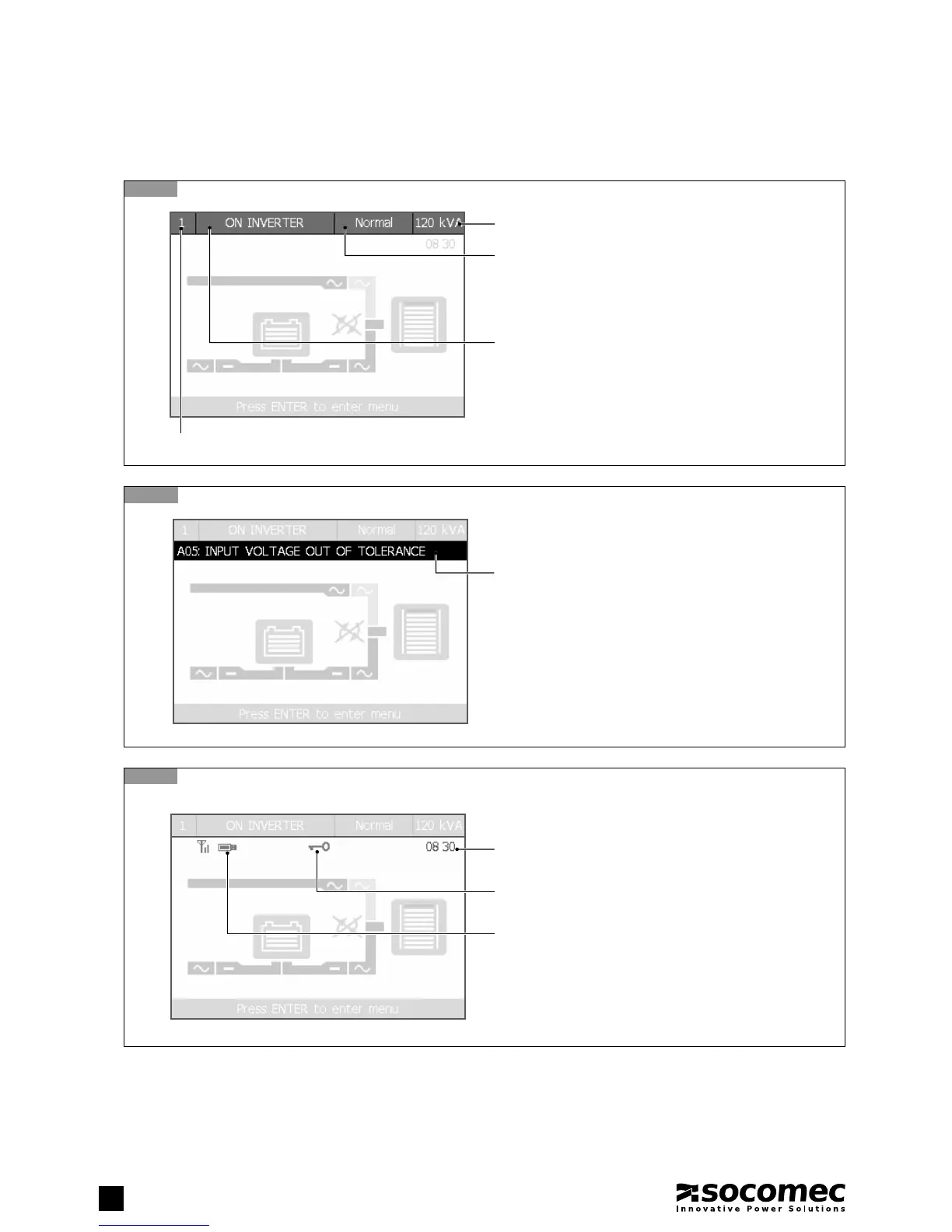
Status icons
5.2-2
Alarms area
5.2-1
Status bar (always displayed)
5. HUMAN MACHINE INTERFACE
UPS Rated Power (kVA)
Unit panel reference
Operating modes:
Normal (Normal mode), Eco (Eco mode), En. Saver
(Energy Saver mode – parallel confi gurations only),
Standby (Standby program mode), Service.
Alarms area
Present when an alarm is active.
Enter ALARMS menu to display the complete alarms list
(see chapter 9).
Key icon:
Displayed if the keypad has been locked.
Time:
UPS current time (hours and minutes, with ':' fl ashing).
USB icon:
Displayed if a USB memory stick is inserted.
It must be formatted with FAT32 fi le system.
Foreword: Status icons and Time are only visible if there are no
pending alarms, as the alarm bar overwrites the icons when active.
Unit status:
• Displayed messages: ON MAINT. BYPASS, IMMINENT STOP,
ON BATTERY, BATTERY TEST, ON INVERTER, ON AUTO
BYPASS, UNIT AVAILABLE, UPS ON STANDBY, LOAD OFF.
- Flashing: imminent UPS shutdown
- Black: Load not powered or battery circuit open
5.2. MIMIC PANEL OVERVIEW





 To Next Page