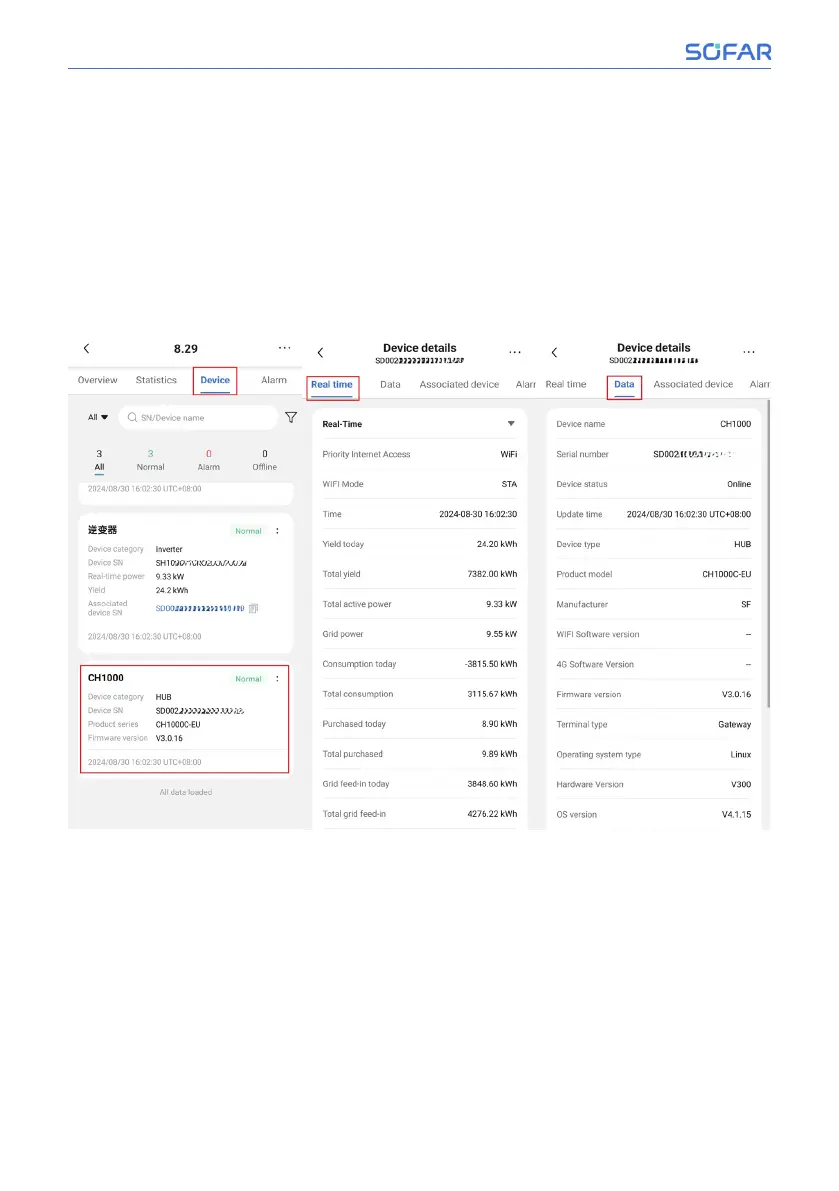
8.3.5 Device Details8.3.5 Device Details
1. 1. CH1000 device details
After entering the plant, click “Device”. Users can see the status (online, oine),
device type, device SN, firmware version and other information of CH1000.
Clicking on the SN of CH1000, users can enter CH1000 device details, and view
CH1000 device basic information, real-time information, communication pa-
rameters and other information in the “Real-time” and “Data” pages. As shown
in the figure below.
2. 2. Inverter device details
After entering the plant, click “Device”, and then click the SN of the inverter,
users can enter the inverter equipment details. On the “Real-time” page, you
can view the real-time information of the inverter, such as equipment status,
current power generation, daily power generation, power generation time, and
so on. In “Data” page, you can view the basic information of the inverter, such
as device name, model, version, and so on. View the history information of the
inverter, such as the total power and power generation in day, month and year
on the “Statistics” page. View the current and recovered alarms of the inverter
on the “Alarms” page.
80/92 SOFAR CH1000
SOFAR Cloud /APP Operation



 To Next Page