Home
Sofar
Battery Pack
PowerMagic
Page 111 (Historical Data Interface)
Sofar PowerMagic - Historical Data Interface
114 pages
Manual
Save Page as PDF
To Next Page
To Next Page
To Previous Page
To Previous Page
Loading...
Pow
erMagic
400V
C&
I
E
ne
rg
y
S
t
o
rag
e
S
y
st
em
U
se
r
Ma
nu
al
10
7
8.
1
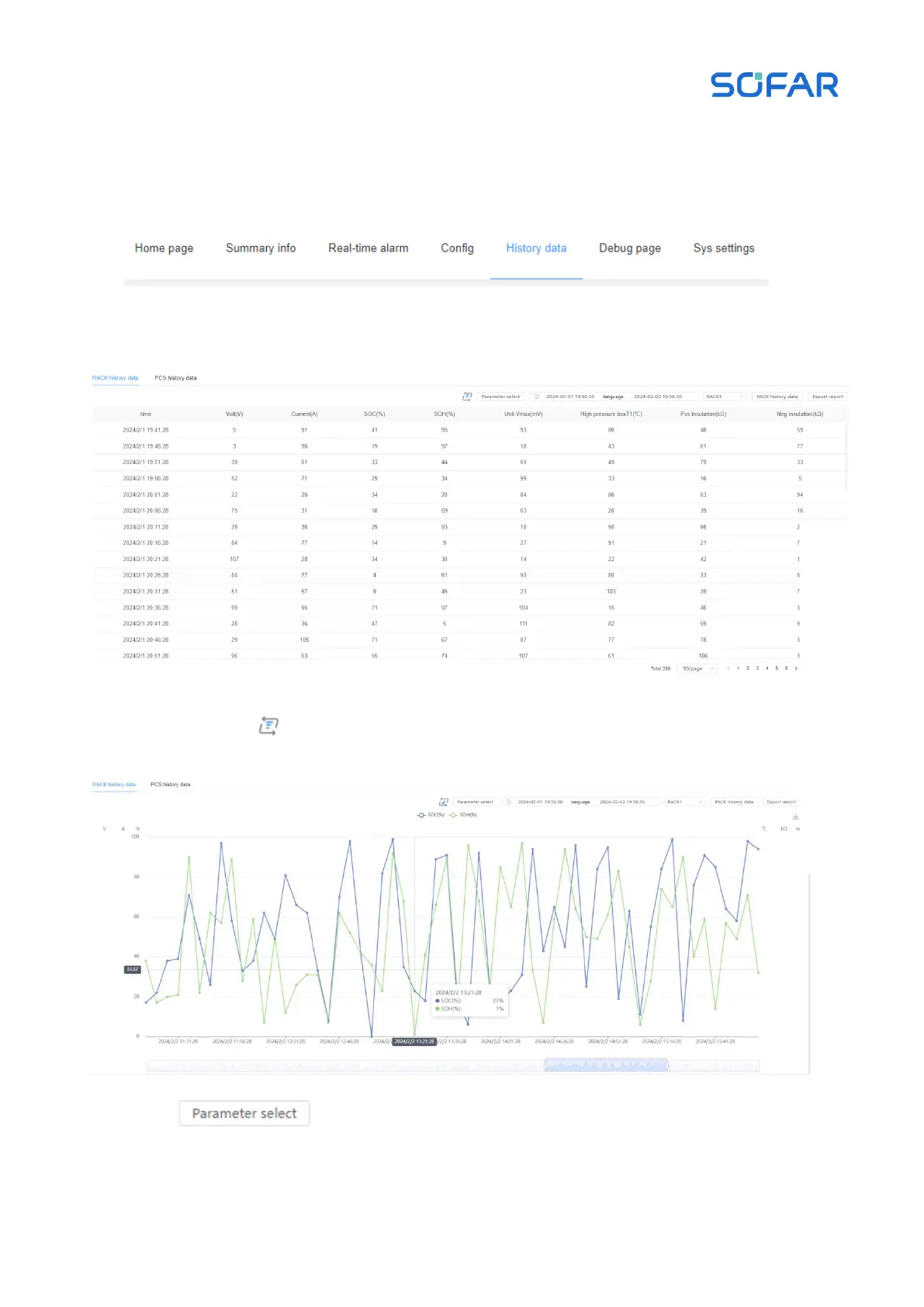
1 Historical Data Interface
Click on the Historical Data icon
, as shown in Figure 8.31.
Click on the icon
to switch charts, as shown in Figure 8.32.
Click
to filter the data to be displayed.
Figure 8.31 Historical Data Graph
Figure 8.32 Switching Historical Data Graph
110
112
Table of Contents
Main Page
Default Chapter
2
Table of Contents
2
About this Manual
5
Caution
5
Target Group
5
Copyright Statement
5
Symbol Explanations
5
Abbreviations
6
Revision History
6
1 Safety Precautions
7
Statement
7
Personal Safety
7
Equipment Safety
10
Energy Storage System Safety
10
Battery Safety
11
Environmental Requirements
12
2 Product Introduction
15
Product Description
15
Functions and Features
15
Description of the Model
17
System Architecture Description
19
Overall Dimension
20
Components Introduction
23
3 Transport and Storage
29
Transport Considerations
29
Storage Requirements
31
4 Installation
33
Installation Requirements
33
Installation Environment Requirements
33
Installation Operation Requirements
33
Foundation
34
Foundation Construction Requirements
34
Requirements for Installation Space
36
Recommended Foundation Drawing
39
Optional Customized Steel Base
41
Hoisting and Fixing
41
Preparation Tools
41
Check before Installation
44
Installation and Fixing Work
44
Fixed Operation of Cabinets Connection Scheme
50
Customized Steel Base Installation
52
5 Electrical Connection
55
Safety Precautions
55
Wiring Requirement
55
Short-Circuit Protection
56
Grounding Requirement
57
Antistatic Requirements
58
Wiring Preparation
58
Preparation of Installation Tools
58
Prepare Cables
59
Cable Compression and Connection
60
Open the Cabinet Doors and Equipment Compartment Doors
62
Cable Entrance Design
63
Ground Connection
63
Cable Wiring between Cabinets
64
AC Power Cord Connection of PCS
73
Signal Terminal Wiring
75
Communication Cable Connection
78
Operations after Cable Wiring
80
6 Powering up and Shutdown Operation Specificat-Ions
82
Indicator Lights and Status Descriptions
82
Power-On Operation
83
Check before Powering on
83
Steps for Powering up under Normal Conditions
84
Power-Down Operation under Normal Conditions
87
Emergency Power-Down Operation
89
Maintenance Work (Semi-Annually to Annually)
91
Maintenance Work (Every One to Two Years)
92
Maintenance Work (Every Two Years)
93
8 Monitoring System Commissioning
95
Communication Cable Wiring
95
Communication Settings
95
Login Interface
95
Home Main Interface
97
CSU System Management Interface
103
CSU System Upgrade Interface
104
CMU Homepage Main Interface
104
Status Data Display on the Home Page
105
Charge/Discharge Power Curve
105
Cumulative Charge and Discharge Quantity Statistics
105
Topological Graph
106
Control Commands
106
Operation Log
107
Fault Log
108
CMU Summary Information Screen
109
Real-Time Alarm Interface
109
Click on the Real-Time Alerts Icon
109
Parameter Configuration Interface
110
Historical Data Interface
111
Log out
113
9 Contact Information
114



 To Next Page