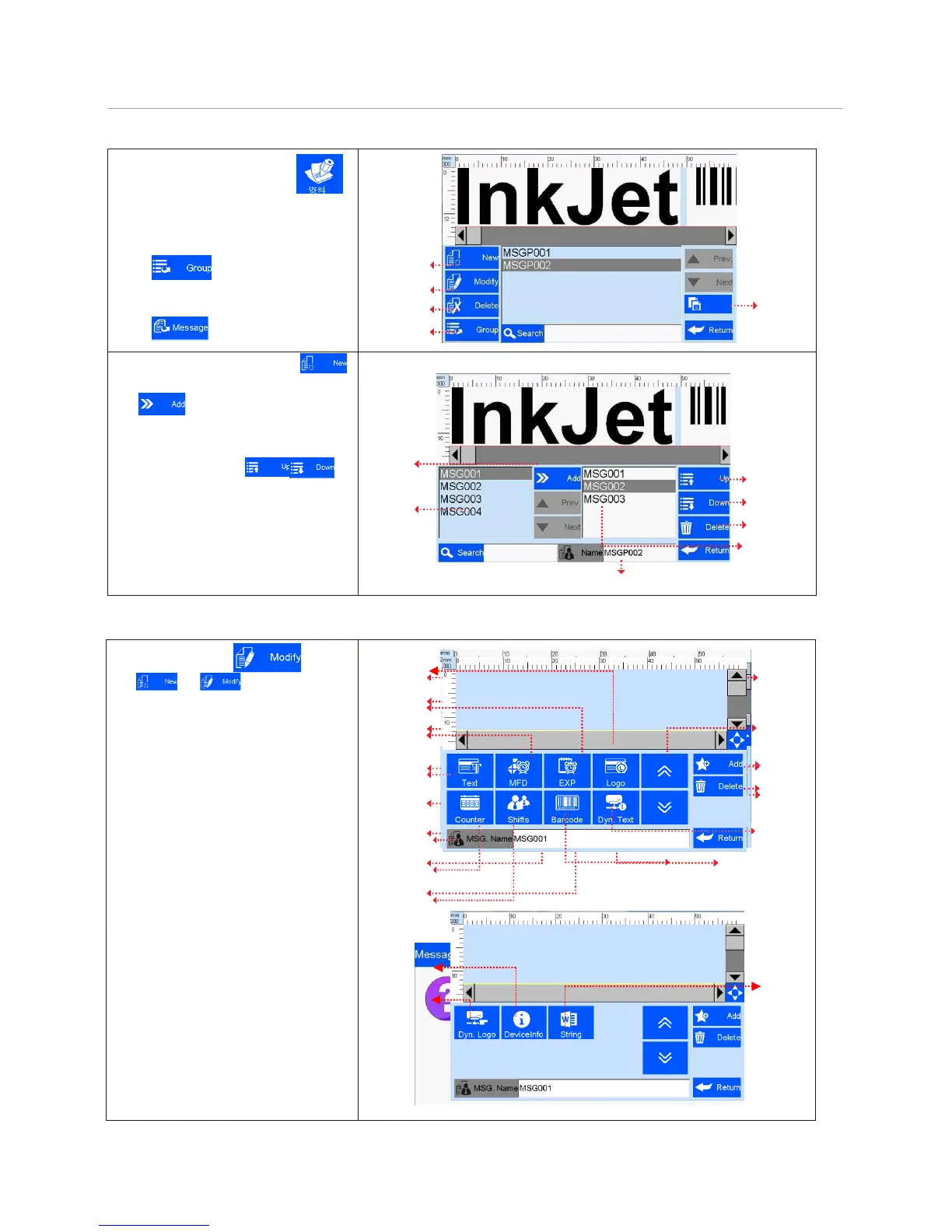
5.3 Data Management or Multiple Files Group.
From the main interface click ,
enter the Files Management interface,
user can create, edit and delete the file
(s) or Multiple Files Group(s);
Click switch to Multi-Files
Group.
Click switch to single files.
New
Modif
y
Delet
e
Files & Multi-Files
Group Switch
Create new multi-files group: click :
A. Add new file: select the file from the list,
click , add it to the multi-files group,
when there is no multi-files group exist, need
B. Files’ sequence: click to
adjust the sequence of the files.
C. Delete: delete the file(s) in the group.
D. Search: User can search the needed file.
E: Group Name: Maximum 15 characters,
unique and cannot be null.
Clip or on data
management interface to enter data edit
interface.
A. New: text, counter, shifts, production
data, expiration data, image logo,
barcode, dynamic text, dynamic logo,
device information, string;
B. Edit: data in printing process cannot
be edited;
C. File name: maximum 15 characters,
empty file name or repeated file name
are not allowed.



 To Next Page