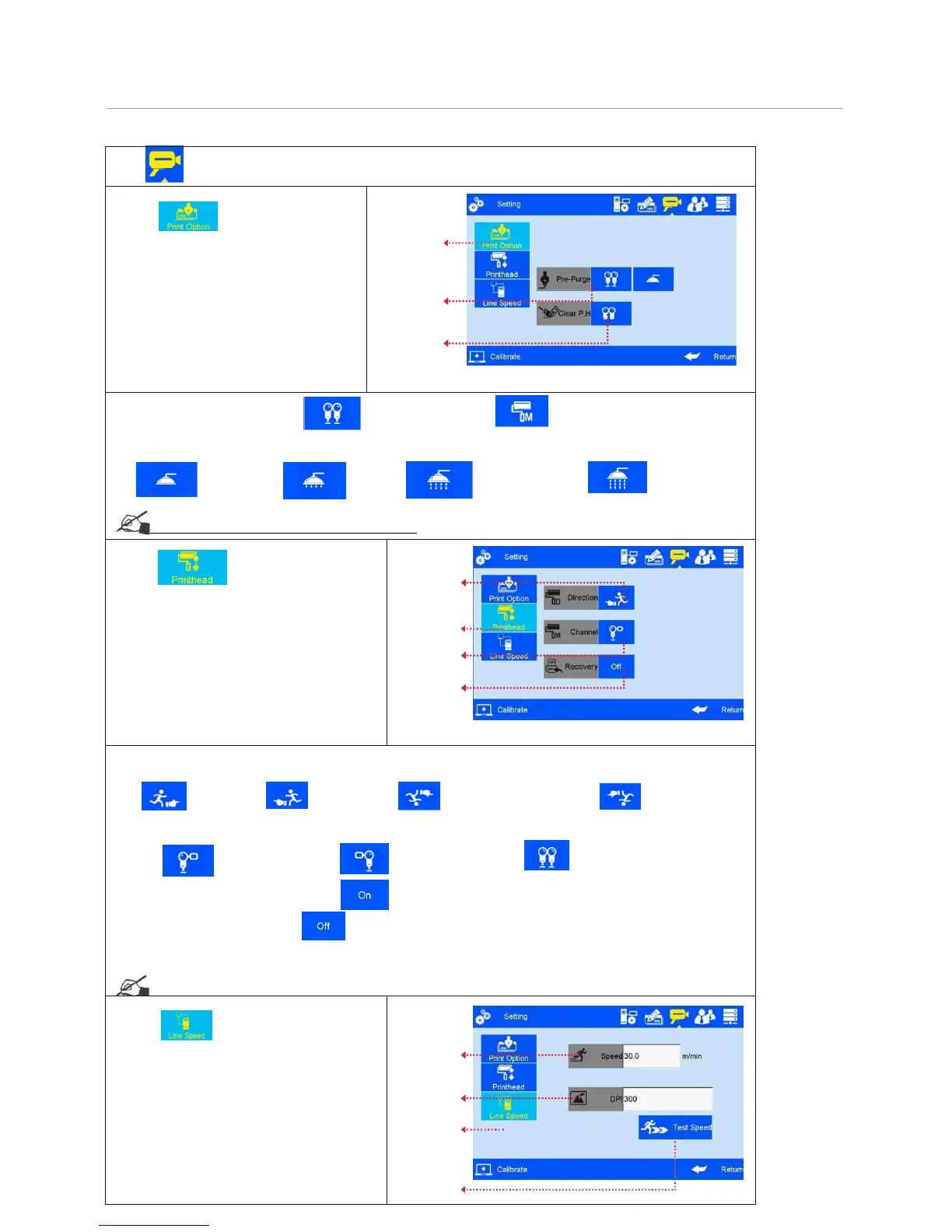
Note: 1) Pre-purge Mode: 2 modes: both right & left nozzles; the working nozzles only.
2) Pre-purge: four shifts: OFF, low, medium, high. see the following figures:
--Off
;
--Low; --Medium; --High
see Appendix 1: Terms and Definitions 6, 7.
3 Note: printing direction: system default from left to right.
1) Four directions optional: left-to-right, right-to-left, mirror sides of left-to-right and right-to-left, see figures as follows:
--Left-to-right; --Right-to-left; -Mirror side of left-to-right; --Mirror side of right-
to-left.
2) channel switch: Left channel, Right channel, Dual channel, see the figures as follows:
--Left channel; --Right channel; --Dual channel.
3)
Printing Recovery: when the set is , printer will resume printing automatically when the power
continue. The default setting is .
Note: When the printing contains counter, and the Printing Recovery setting is "ON", operator need to check on
the counter value and do needful adjustment.
see Appendix 1: Terms and Definitions 8.



 To Next Page