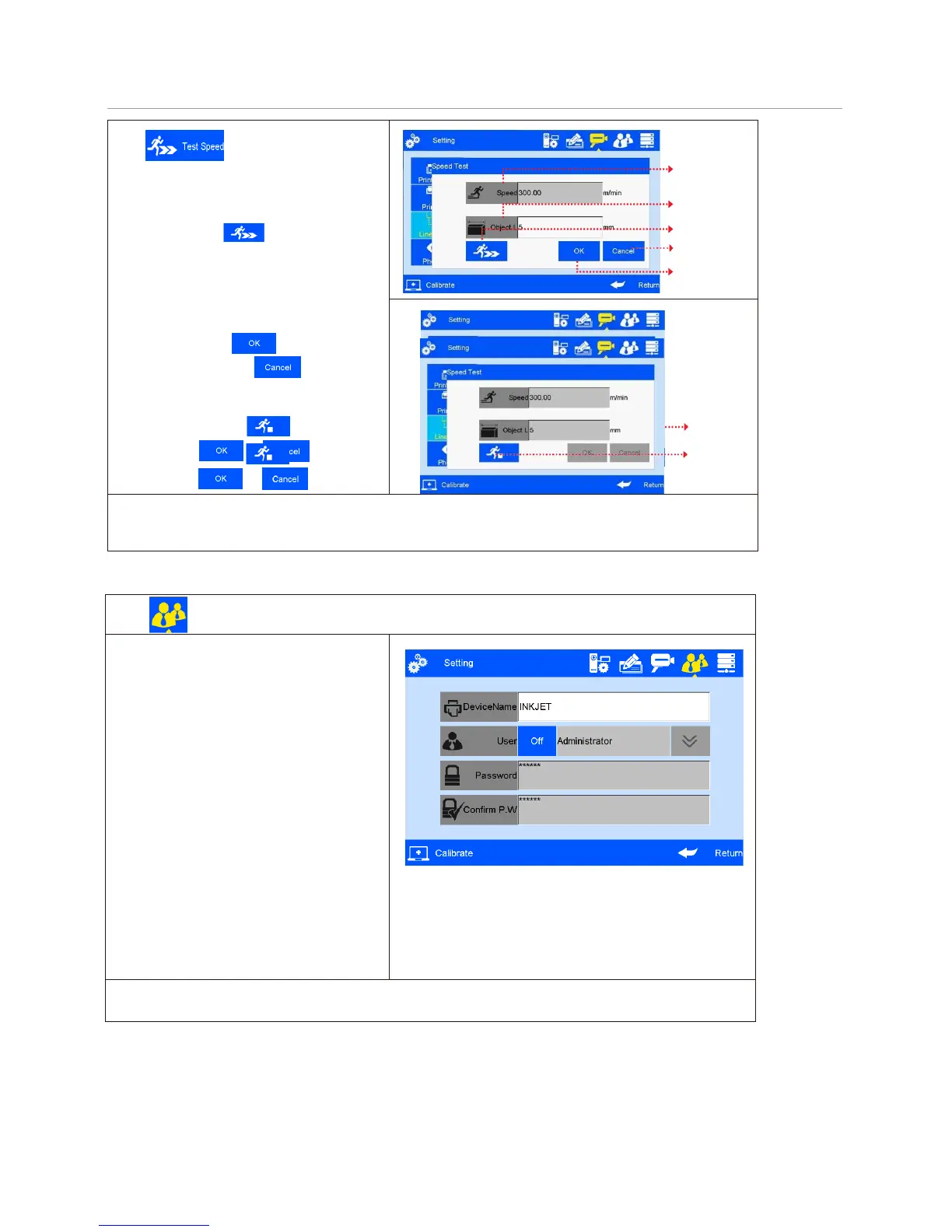
Click on line speed setting
interface to run speed test
(see Figure 35, 36).
Line speed test: input test object length
0~3000mm, click to enter speed test
startup interface, then start production line,
put test object onto production line, the
photocell will be sensing the object, and the
machine will calculate line speed
automatically. Click to save current
speed test result. Click , current
speed test value will not be saved. If test
repeated, system will take average value of
multiple results. Click to stop speed
test, and click or to save or
give up test result.
Speed
Test object
length
Run speed test
Give up
Save
(Figure 35)
Stop speed
test
(Figure 36)
Note: if external encoder is connected, system can detect automatically, and switch line speed
interface to encoder DPI setting interface. User cannot programme line speed setting
when external encoder is connected.
Click on system management interface to enter user
A.Device name: can be defined, the maximum is 15
characters.
B.User permission management switch: system
default OFF. A login dialogue box requests user
name and password for access to operation of the
printer when machine power is switched on.
C.User name: different names for different access
permission. Administrator is of best authority, with
access to all settings including password
modification. Engineer is with access to data
management and printing management; and
operator is with access to printing management
only.
D.Password and password confirmation:
administrator creates user name and set
password. Maximum 15 characters for password.
Note: Please contact local dealer or our company for printer unlocking when you forget
administrator password.



 To Next Page