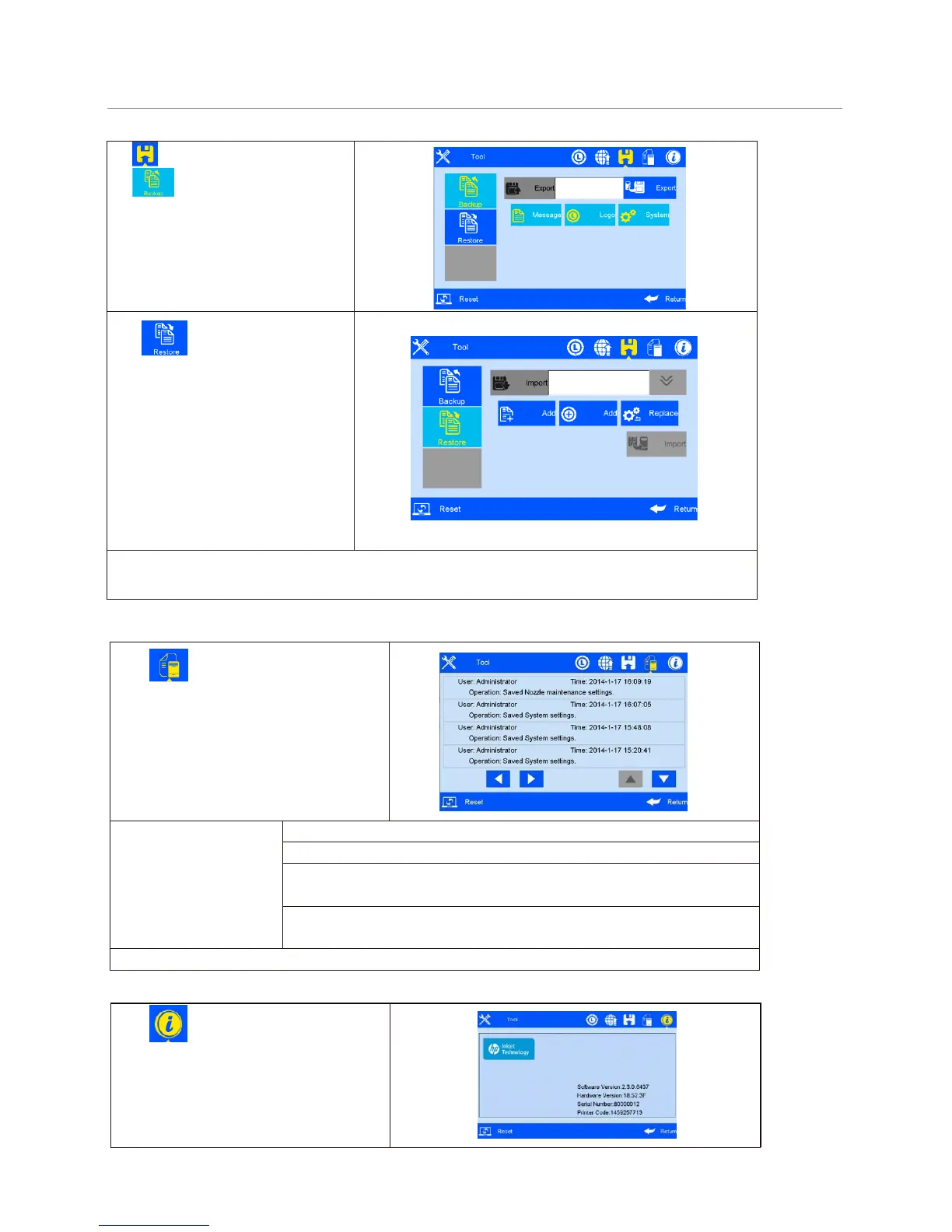
Clip to enter backup management.
Clip to enter backup operation
interface;
Export backup: include message, logo and
system setting
Clip to enter the backup restore
interface; can restore the message, image and
setting of USB disk to the device;
Data optional:
1、 New: copy the data of USB disk to the
device
2、Replace: replace the same name data
3、Delete: delete existing data of device
4、Cancel: Not need to choose data
Image optional: new, replace, delete and cancel
optional
Setting optional: replace and cancel optional
Note: Please check USB connection status and disk space is normal when execute backup import and export. Backup document route: USB
Disk/InkJet/Backup.
export. Backup document route: USB Disk/InkJet/Backup.
Click to enter system record viewing
interface. All operation activities including
operator, operation and operation time will
be shown.
System record
information includes:
1) The printing activities: printing start and stop, initial values.
The printing activities: initial values setting diary.
3) All operation activities in system management
(including touch screen correction).
4) Image import and delete activities, system upgrade, backup,
and reset activities.
Note: System record does not include querying and viewing activities.
to enter equipment information
viewing interface.
Information displays current hardware
version, software version, machine serial
number, dealer code, company Logo,
company name and website.



 To Next Page