70
Description of terminals on the back
Note
In this version of the MaxWeb XPN, only the relay output 1 (terminals NC1,
C1, NO1) can be used to display alarms.
Additional functions for the relay outputs 2
– 4 will be implemented in later
versions of the MaxWeb XPN.
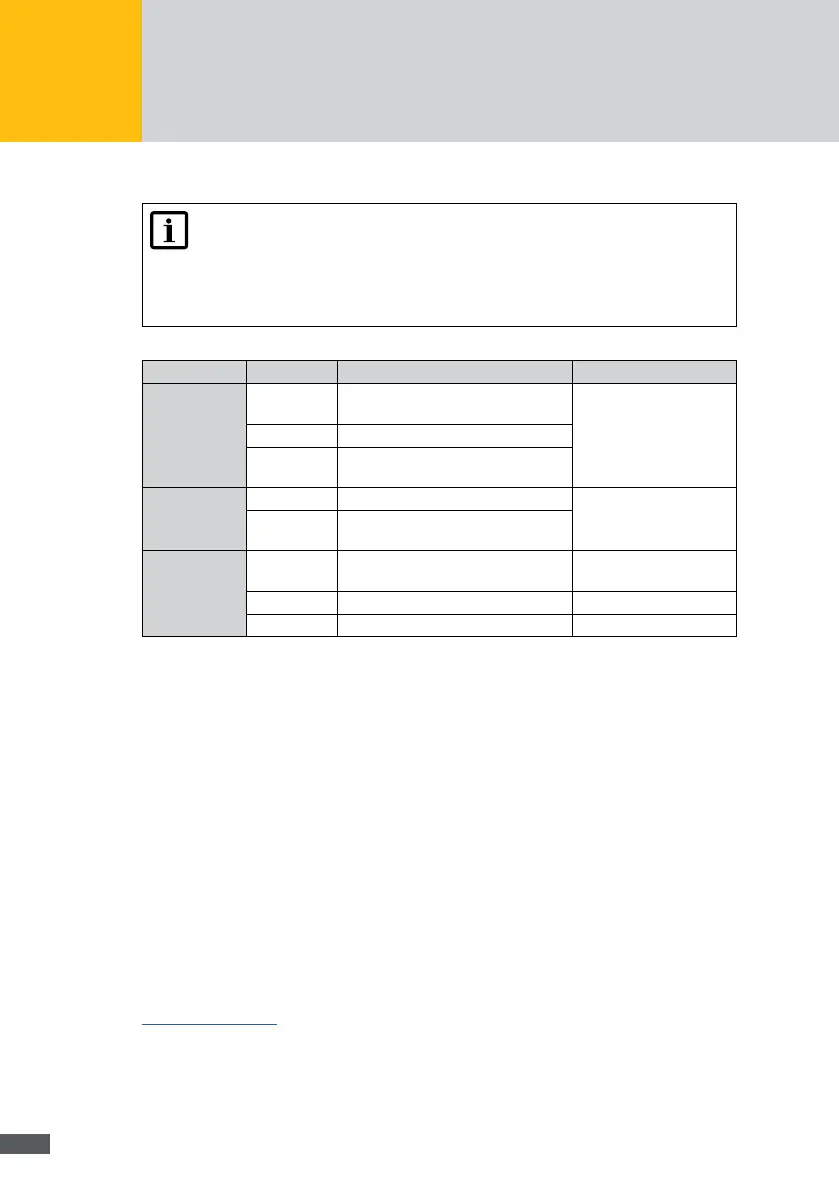
Terminal Function Limit values
Relay
outputs
NC1…NC4 Closed to C during normal operation
or in inactive state (normally open)
Maximum switching
capacity:
DC 30 V / 1 A
C1 … C4 Reference for NO and NC
NO1 … NO4 Closes to C in the event of an
inverter fault (normally closed)
Alarm
inputs
IN_A Alarm input A For each input
– open: 15 V
– closed: <10 mA
IN_B Alarm input B
Digital
inputs
V+ Power supply for the relays of the
radio ripple control receiver
15 … 24Vdc / max. 0,5 A
GND GND for V+
IN1 … IN8 Digital inputs 15 Vdc
9 Troubleshooting
SolarMax Service Center
If you have technical questions or difculties, our Service Center will be happy to help you.
We need the following information from you:
Device type
Serial number S / N
Installation location
Information on the present failure (status message, etc.)
Availability
The contact details of the SolarMax Service Center can be found overleaf or at
www.solarmax.com.
SolarMax Produktions GmbH
Zur Schönhalde 10
D-89352 Ellzee



 To Next Page