Introduction 7828 Density Transmitter Technical Manual
4-12 78285000_AB
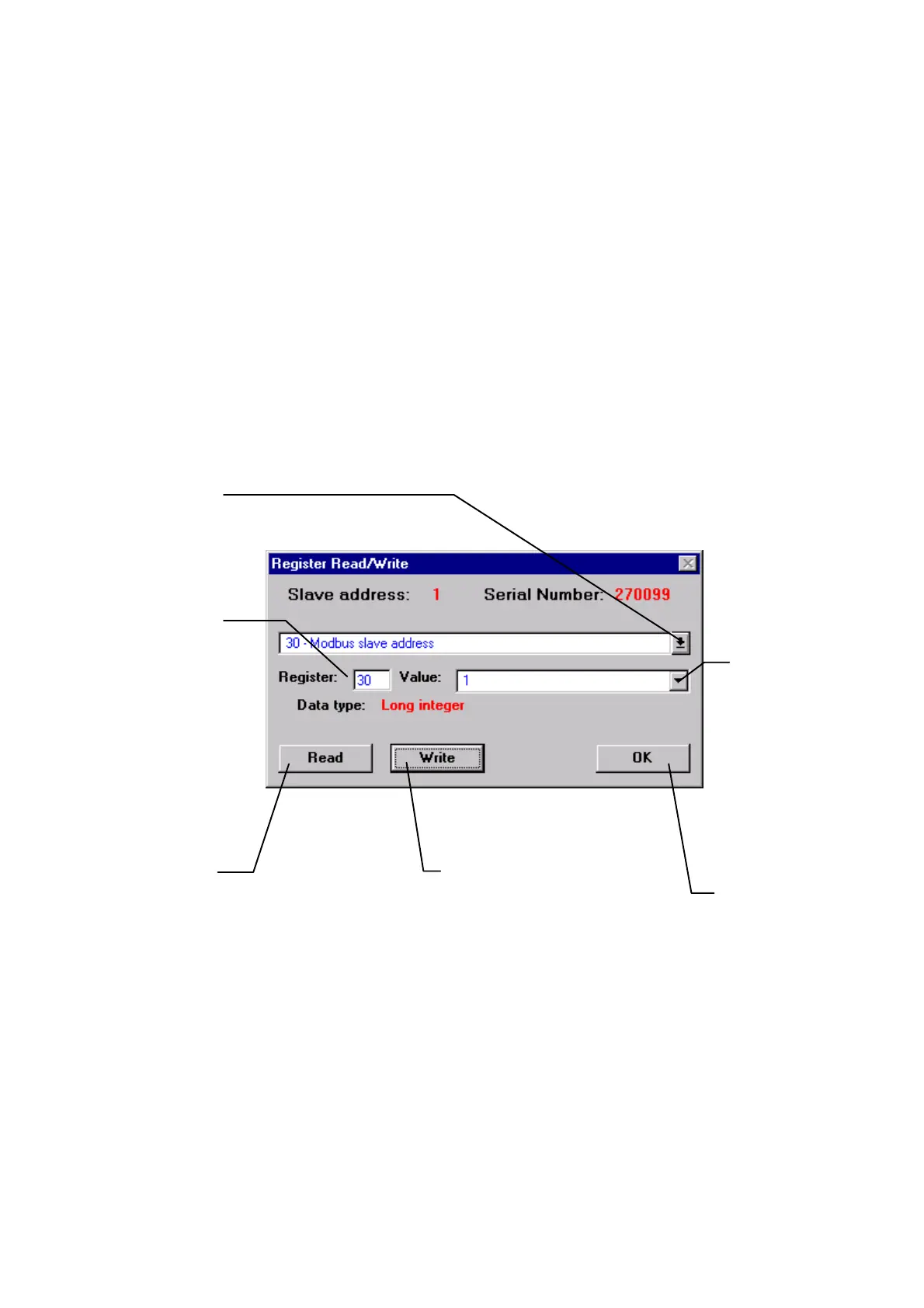
4.4.7 REGISTER READ/WRITE
In a few cases, it may be useful to write directly to a single Modbus register. (See
Appendix D for a complete list of 7828’s registers.) Two likely occasions are to set the
Slave Address of the unit, and to configure a density offset.
Warning: Before making any changes to individual registers, you should save the
current configuration to a file (section 4.4.5), to safeguard your configuration
if anything goes wrong.
From ADView’s menu bar, select Tools -> Register Read/Write.
Click here to see
complete list of
Modbus register
numbers and
descriptors.
Choose the one
you want to
access.
For non-
numerical
values, click here
to see complete
list of possible
entries and
select one to
write into the
register.
Enter numerical
values directly.
The current
register number
appears here.
This button
causes the
current value of
the chosen
register to be
displayed.
This button
causes the
current value to
be written to the
selected register.
You can read and
write to any numbe
of registers.
When you have
done all you want to,
click this button.



 To Next Page