18
Copyright © 2015 Somfy SAS. All rights reserved.
EN
Images not contractually binding
Example for a 3A control point:
Torque in Nm Maximum number of motors
6 5
10 4
20 2
T o i n t e g r a t e a m o t o r i n t o a S o m f y s y s t e m , u s i n g a S o m f y m o t o r c o n t r o l l e r, t h e c o n n e c t i o n
requirements in the controller manual must be followed carefully.
C o n t r o l l e r s w i t h “ s e m i c o n d u c t o r “ r e l a y s m u s t n o t b e u s e d .
2. 3. COMMISSIONING
1
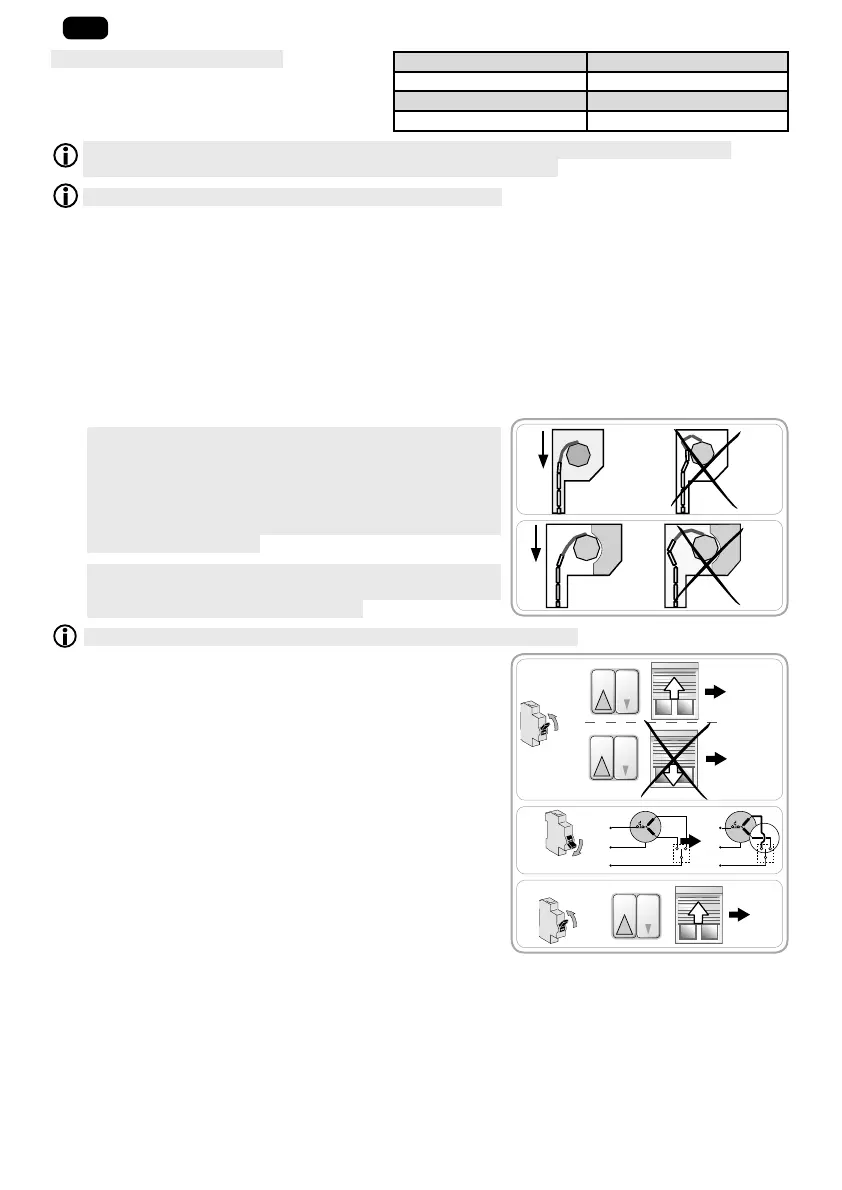
A - e r h a v i n g a ffi x e d t h e r o l l e r s h u t t e r t o t h e r o l l e r t u b e ,
check that when the roller shutter is in the lower end limit
position, the rigid link is correctly positioned and that the
first slat is vertically between the runners (as per F). If
necessary, adjust the number of slats used to improve the
position of the rigid link when the roller shutter is in the
lower end limit position.
1
A l w a y s r e f e r t o t h e m a n u f a c t u r e r ' s s i z e a n d w e i g h t c h a r t s
and fitting recommendations for the rigid links to select
those suited to the roller shutter used.
Use at least 2 rigid links to attach the roller shutter to the roller tube.
1) Switch the power back on.
- Press the "Up" button at the control point:
• I f t h e r o l l e r s h u t t e r r i s e s , t h e w i r i n g i s c o r r e c t a n d
commissioning is finished.
• I f t h e r o l l e r s h u t t e r i s l o w e r e d , g o t o t h e n e x t s t e p .
2) Switch off the power.
- Reverse the brown wire and the black wire connected to the
control point.
3) Switch the power back on.
- Press the "Up" button to check the direction of rotation.
F
F
1
2
3
ON
ON
OFF
OK
2
OK






 To Next Page