100
Managing Audio Tracks
on the Music Jukebox
(HDD only)
You can erase or label artists/albums/tracks
on the HDD.
1 Press SYSTEM MENU.
The System Menu appears.
2 Select “Music Jukebox,” and press
ENTER.
3 Select “Listen to Music / Edit,” and
press ENTER.
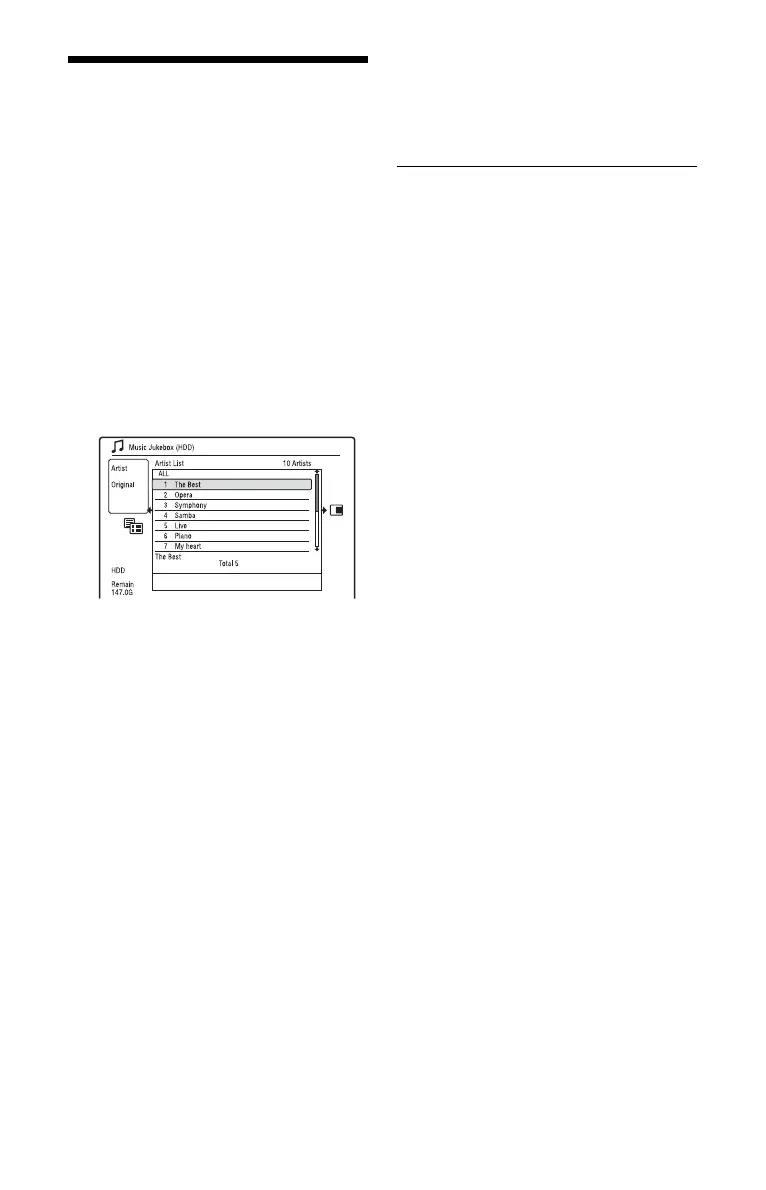
The “Music Jukebox (HDD)” appears.
4 Select an artist, album, or track, and
press ,.
To display an album list, select an artist
using M/m, and press ENTER.
To display a track list, select an album
using M/m, and press ENTER.
5 Select an option, and press ENTER.
“Erase”: Erases the selected artist/
album/track. Select “Yes” when asked
for confirmation.
“Edit”: Allows you to make the
following edits.
• “Artist Name”: Allows you to enter or
re-enter an artist name (page 40).
• “Album Name”: Allows you to enter
or re-enter an album name (page 40).
• “Track Name”: Allows you to enter or
re-enter a track name (page 40).
• “Copy Album”: Allows you to copy an
album (page 96).
• “Copy Track”: Allows you to copy a
track (page 96).
“Repeat”: Repeats playback of artist/
album/track (page 98).
“Add to Play List”: Allows you to add
tracks to a Playlist (page 98).
“Play List Name”: Allows you to enter
or re-enter a Playlist name (up to 12
characters) (page 40).
b Note
You cannot edit audio tracks on the connected
USB device.



 To Next Page