37
Seven Basic Operations — Getting to Know Your DVD Recorder
3. Playing the Recorded
Programme (Title List)
To play a recorded title, select the title from
the Title List.
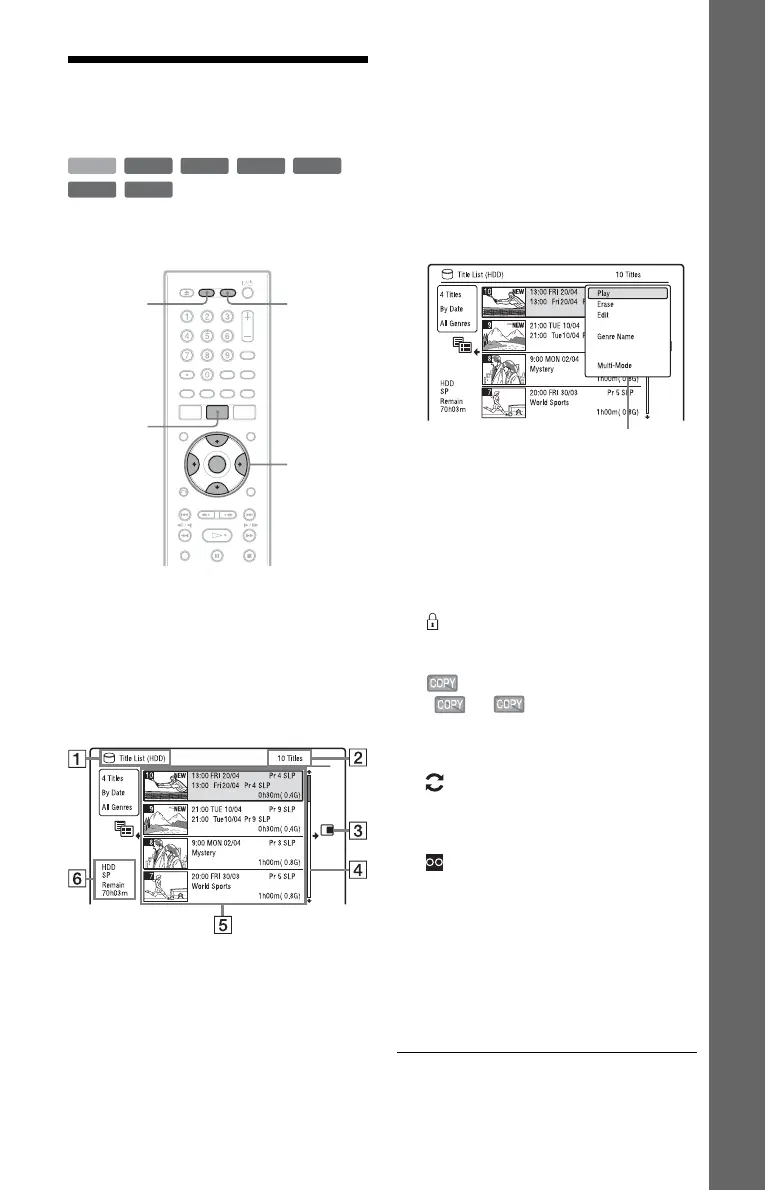
1 Press HDD or DVD.
If you select DVD, insert a DVD (see “1.
Inserting a Disc” on page 34).
Playback starts automatically depending
on the disc.
2 Press TITLE LIST.
Example: 4-Title List for HDD
A Disc type:
Displays the media type, HDD or DVD.
B Total number of titles
C Sub-menu:
Press , to display the sub-menu.
The sub-menu displays options
applicable only to the selected item. The
displayed options differ depending upon
the model, situation, and disc type.
D Scroll bar:
Appears when all of the titles do not fit
on the list. To view the hidden titles,
press M/m.
E Title information:
“Recording”: Indicates that the title is
currently being recorded.
: Indicates a protected title.
“NEW”: Indicates that the title is newly
recorded (not played back) (HDD only).
: Press DISPLAY to display
“ .” “ ” indicates titles
containing “Copy-Once” copy
protection signals (HDD only)
(page 150).
: Indicates that the title is recorded
using the Update function.
Genre icons: Indicates the title’s genre
(HDD only).
: Indicates a bilingual programme
(HDD only).
F Remaining time of the current disc in
the current recording mode (example:
SP mode)
3 Select a title using M/m, and press
ENTER.
Playback starts from the selected title.
+
RW
-
RWVR
-
RW
Video
+
R
HDD
-
RVR
-
R
Video
</M/m/,,
ENTER
HDD DVD
TITLE LIST
Sub-menu
,continued











 To Next Page