65
Playback
Playback
Playing
RDR-AT105/AT107/AT205
RDR-AT100/AT200
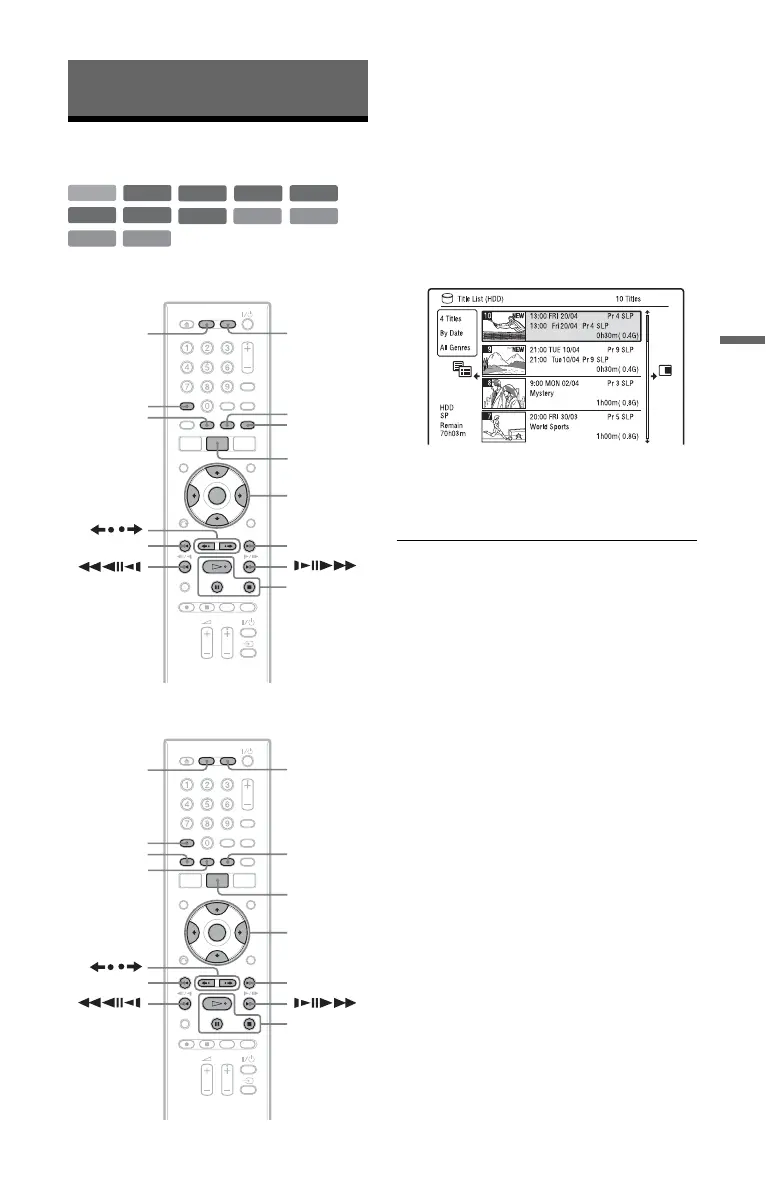
1 Press HDD or DVD.
• If you select DVD, insert a disc (see
“1. Inserting a Disc” on page 34).
• If you insert a DVD VIDEO, VIDEO
CD, DATA DVD or DATA CD, press
H. Playback starts.
2 Press TITLE LIST.
If the Title List is already displayed, skip
this step.
Example: HDD
3 Select a title using M/m, and press
ENTER.
Playback starts from the selected title.
z Hint
You can also use the H button in step 3 to start
playback.
b Note
When any video titles are recorded on a DATA
DVD, the MP3 audio tracks on that DATA DVD
cannot be played.
To use the DVD’s Menu
When you play a DVD VIDEO, or a
finalised DVD+RW, DVD-RW (Video
mode), DVD+R, or DVD-R (Video mode),
you can display the disc’s menu by pressing
TOP MENU or MENU.
b Note
The H button is not available in the disc’s menu.
+
R
DVD
VCD
-
RWVR
-
RW
Video
+
RW
-
RVR
HDD
-
R
Video
DATA DVD
CD
DATA CD
TITLE LIST
AUDIO
/
HDD DVD
>
.
SUBTITLE
H/X/x
</M/m/,,
ENTER
PLAY
MODE
ANGLE
TITLE LIST
SUBTITLE
AUDIO
/
HDD DVD
>
.
H/X/x
</M/m/,,
ENTER
PLAY
MODE
ANGLE
,continued











 To Next Page