49
GUIDE Plus+ (RDR-AT105/AT107/AT205 only)
Listing Up Your
Favourite Programme
Information (My TV)
You can set a profile and list up only your
favourite programme information.
1 Press GUIDE.
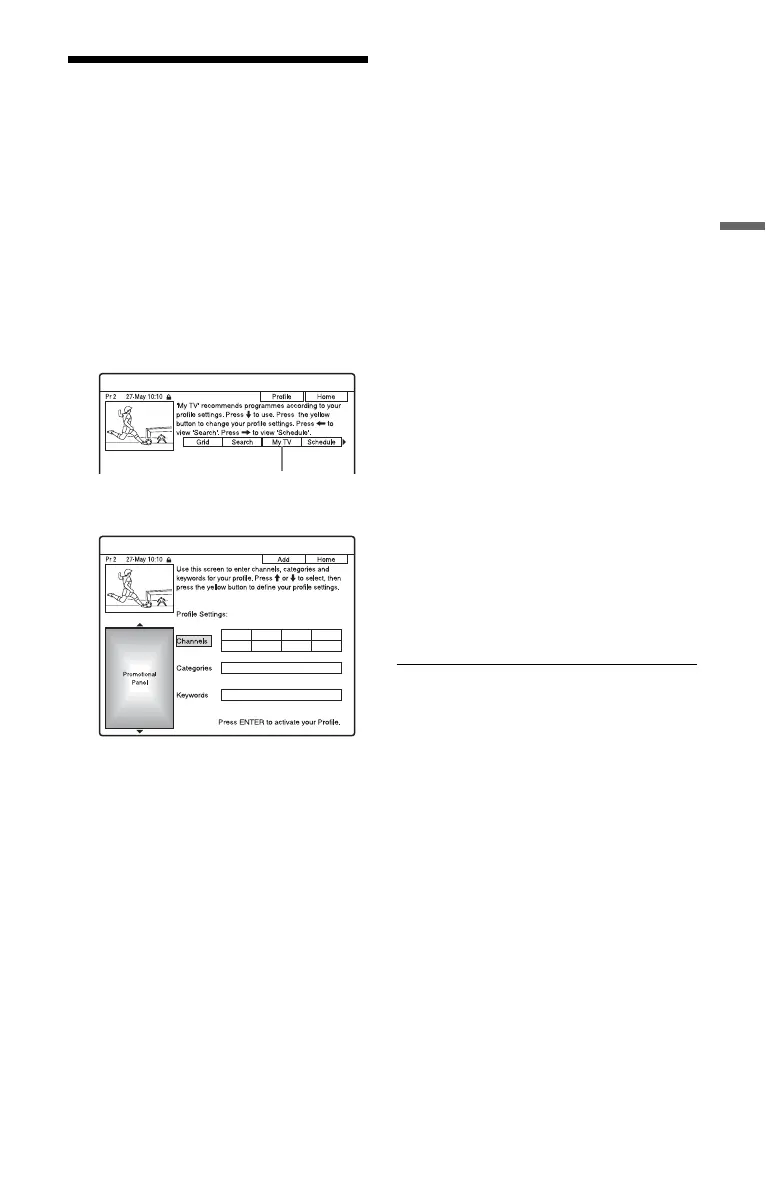
2 Press M to move the cursor to the
Menu Bar.
3 Select “My TV” using </,.
4 Press the yellow button (“Profile”).
5 Select “Channels,” “Categories,” or
“Keywords,” and press the yellow
button (“Add”).
“Channels”: Select the programme
position using </M/m/,, and press
ENTER. To add more programme
positions, press the yellow button
(“Add”). You can register up to 16
programme positions.
To cancel the registration, select a
programme position, and press the red
button (“Delete”).
“Categories”: Select the category using
</M/m/,, and press ENTER. To add
more categories, press the yellow button
(“Add”). You can register up to 4
categories.
To cancel the registration, select a
category, and press the red button
(“Delete”).
“Keywords”: Enter a keyword. See “To
search for a programme by keyword” on
page 53. To add more keywords, press
the yellow button (“Add”). You can
register up to 16 keywords.
To cancel the registration, select a
keyword, and press the red button
(“Delete”).
6 Press ENTER.
To change the profile settings
Repeat from step 3 above.
To select and watch a programme from
“My TV”
1 After step 3 above, press ENTER.
The programmes that match the profile
conditions are displayed.
2 Select a programme using </M/m/,,
and press ENTER.
“My TV”











 To Next Page