80
Creating and Editing a
Playlist
Playlist edit allows you to edit or re-edit
without changing the actual recordings. You
can create up to 99 Playlist titles.
b Note
Playlist titles containing titles recorded with the
“Copy-Once” copy protection signal cannot be
dubbed or moved (page 150).
1 Press TITLE LIST, and switch to the
Playlist.
For details on switching to the Playlist,
see page 75.
2 Press ,.
The sub-menu appears.
3 Select “Create,” and press ENTER.
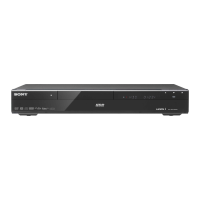
The original titles in the Title List
appear.
4 Select an original title to add to the
Playlist, and press ENTER.
The selected title is added to the Playlist.
5 Repeat steps 3 and 4 to select all of
the titles you want to add to the
Playlist.
1 Press TITLE LIST, and switch to the
Playlist.
For details on switching to the Playlist,
see page 75.
2 Select a Playlist title, and press ,.
The sub-menu appears.
3 Select “Edit,” and press ENTER.
4 Select “Move,” and press ENTER.
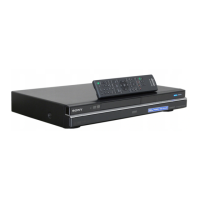
5 Select a new location for the title
using M/m, and press ENTER.
The title moves to the new location.
• To move more titles, repeat from step
2.
1 Press TITLE LIST, and switch to the
Playlist.
For details on switching to the Playlist,
see page 75.
2 Select a Playlist title, and press ,.
The sub-menu appears.
3 Select “Edit,” and press ENTER.
4 Select “Combine,” and press ENTER.
5 Select a title you want to combine,
and press ENTER.
6 Select “Yes,” and press ENTER.
The titles are combined.
You can divide a Playlist title. For
instructions, see page 77.
Moving a Playlist title (Move)
-
RWVR
-
RVR
Combining multiple Playlist
titles (Combine)
Dividing a Playlist title (Divide)











 To Next Page