18
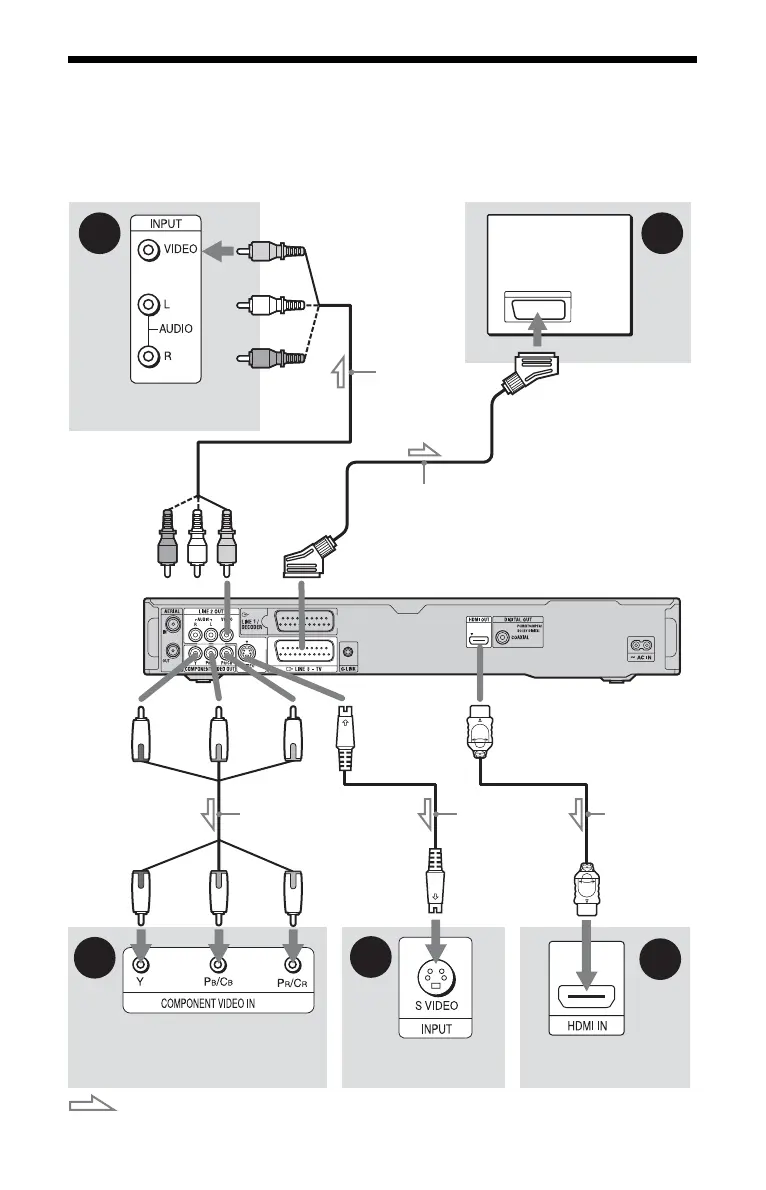
Step 2: Connecting the Video Cords/HDMI Cord
Select one of the following patterns, A through E, according to the input jack on your TV
monitor, projector, or audio component such as an AV amplifier (receiver). This will enable
you to view pictures.
D
B
E
C
A
Audio/video
cord (not
supplied)
Component video
cord (not supplied)
(yellow)
TV, projector, or audio
component
TV, projector, or
audio component
(green)
S-video cord
(not supplied)
TV, projector, or audio
component
(red)(blue)
: Signal flow
to COMPONENT
VIDEO OUT
to LINE 2 OUT
(S VIDEO)
to LINE 2 OUT
(VIDEO)
SCART cord (not supplied)
to T LINE 3 – TV
DVD recorder
TV
HDMI cord
TV, projector, or audio
component
to HDMI OUT
(green)
(red)(blue)











 To Next Page