129
Settings and Adjustments
Selects the picture quality in pause mode.
Playback of some DVD VIDEOs can be
limited according to a predetermined level,
such as the age of the users. Scenes may be
blocked or replaced with different scenes.
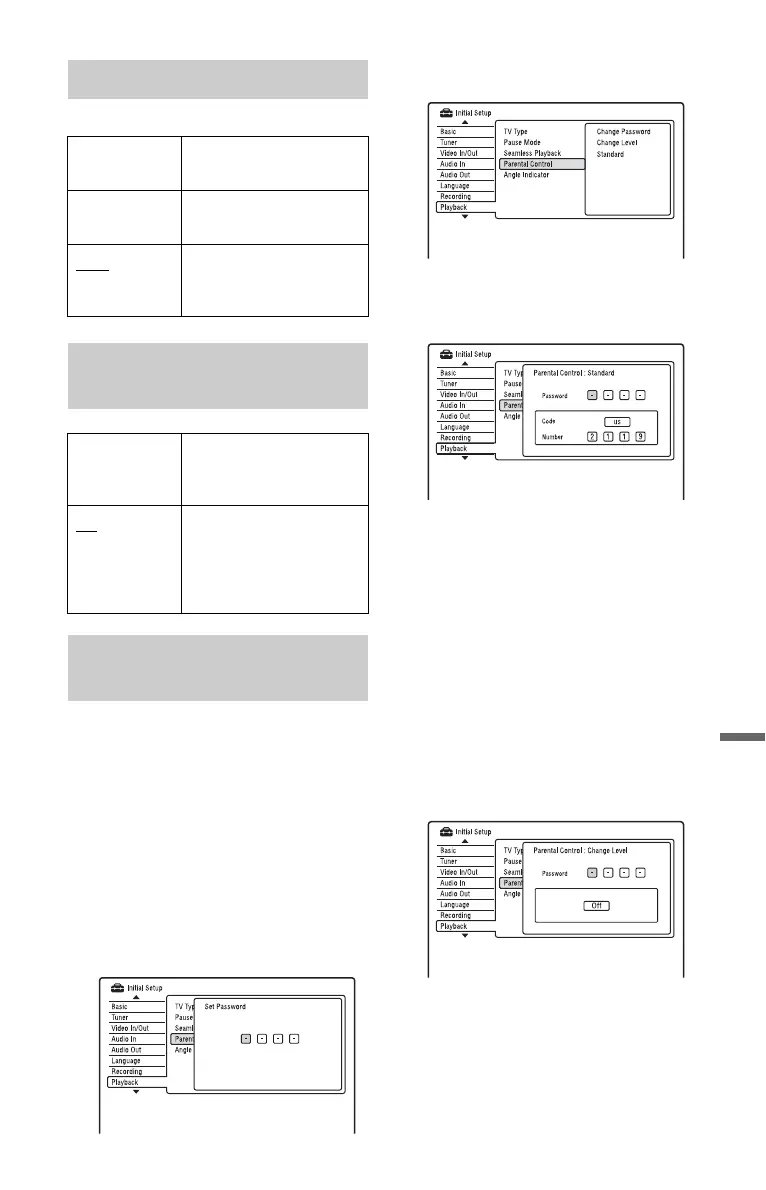
1 Select “Parental Control” in “Playback,”
and press ENTER.
When you have already registered a
password, go to step 4.
2 Select “Set Password,” and press
ENTER.
The display for registering a new
password appears.
3 Enter your four-digit password using the
number buttons, and press ENTER.
4 Select “Standard,” and press ENTER.
The “Parental Control : Standard”
display appears.
5 Enter your four-digit password using the
number buttons, and press ENTER.
6 Select “Code” (geographic area) as the
playback limitation level, and press
ENTER.
The area is selected.
• When you select “Number,” press the
number buttons to select and enter a
country/area code in the table
(page 151), and press ENTER.
7 Select “Change Level,” and press
ENTER.
The “Parental Control : Change Level”
display appears.
8 Enter your four-digit password using the
number buttons, and press ENTER.
9 Select the level.
The lower the value, the stricter the
limitation.
Discs rated higher than the selected
level will be restricted.
Pause Mode
Field Outputs a stable, generally
shake-free image.
Frame Outputs a sharp image, but
may be prone to shake.
Auto Outputs a generally less
sharp but more stable still
image.
Seamless Playback (HDD/DVD-
RW/DVD-R in VR mode only)
On Playback is smooth, but
with a trade-off against the
accuracy of the edit points.
Off You may notice
momentary interruption at
edited points during
playback of a VR mode
Playlist.
Parental Control (DVD VIDEO
only)
,continued











 To Next Page