77
Erasing and Editing
z Hint
You can exit “Multi-Mode” by pressing , and
selecting “Single-Mode” while selecting titles.
You can select a section (scene) in a title and
erase it. Note that erasing scenes in a title
cannot be undone.
1 After step 2 of “Erasing and Editing a
Title,” select “Edit,” and press
ENTER.
2 Select “A-B Erase,” and press
ENTER.
For the HDD, select a type of editing,
and press ENTER. For details, see
page 75.
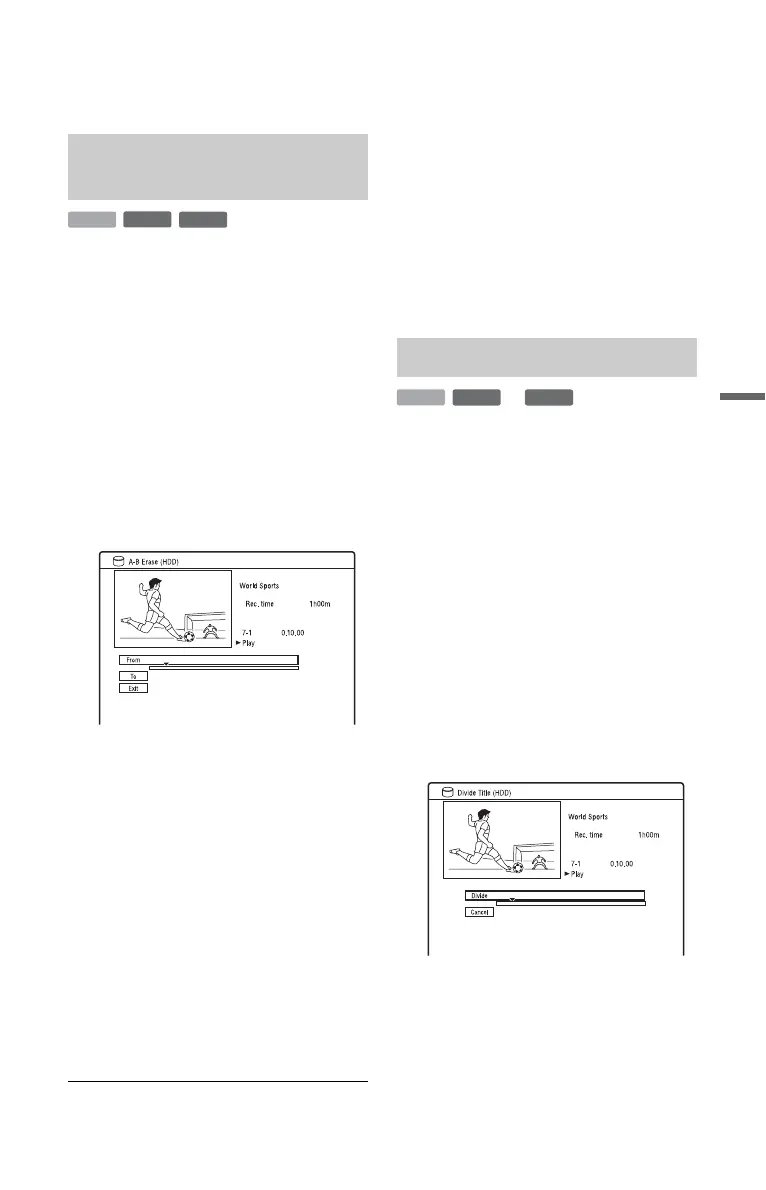
The display for setting point A appears.
The title starts to play.
3 Select point A using m/M or H,
and press X
.
• To return to the beginning of the title,
press X and then press ..
4 Select “From,” and press ENTER.
The position of point A is displayed.
5 Press H.
6 Select point B using m/M or H,
and press X.
7 Select “To,” and press ENTER.
The position of point B is displayed.
8 Select “Yes,” and press ENTER.
The scene is erased.
To cancel “A-B Erase”
Press O RETURN. The Title List appears.
z Hint
A chapter mark is inserted after the scene is erased.
The chapter mark divides the title into separate
chapters on either side of the mark.
b Notes
• Images or sound may be momentarily
interrupted at the point where you erase a section
of a title.
• Sections shorter than five seconds may not be
erased.
If you want to dub a long title to a disc but do
not want to reduce the picture quality, divide
the title into two shorter titles. Note that
dividing a title cannot be undone.
* Only playlist titles can be divided for DVD-
RWs/DVD-Rs in VR mode.
1 After step 2 of “Erasing and Editing a
Title,” select “Edit,” and press
ENTER.
2 Select “Divide,” and press ENTER.
For the HDD, select a type of editing,
and press ENTER. For details, see
page 75.
The display for setting the dividing
point appears.
The title starts to play.
3 Select the dividing point using m/
M or H, and press X.
• To return to the beginning of the title,
press X and then press ..
Erasing a section of a title
(A-B Erase)
-
RWVR
HDD
-
RVR
Dividing a title (Divide)
-
RWVR
HDD
-
RVR
**
,continued











 To Next Page