:!
Easy
Setup
-
HOM
I
RllsoNtion
:!
Easy
Setup·
Component
Resotutlon
Select
the
resolution
to
output
to
the
TV.
"Auto"
is
the
standird
stlectlon.
The
\/ideo
switch"
for
30
secooos
'Nhen
this
setting
is
changed.
Check
that
there
are
no
problems
with
the
video.
Nothing
is
dlspAayed
on
the
screen
If
the
resolution
is
incorrect.
7
Select
a
video
output
resolution
for
the
connected
TV,
and
press
ENTER.
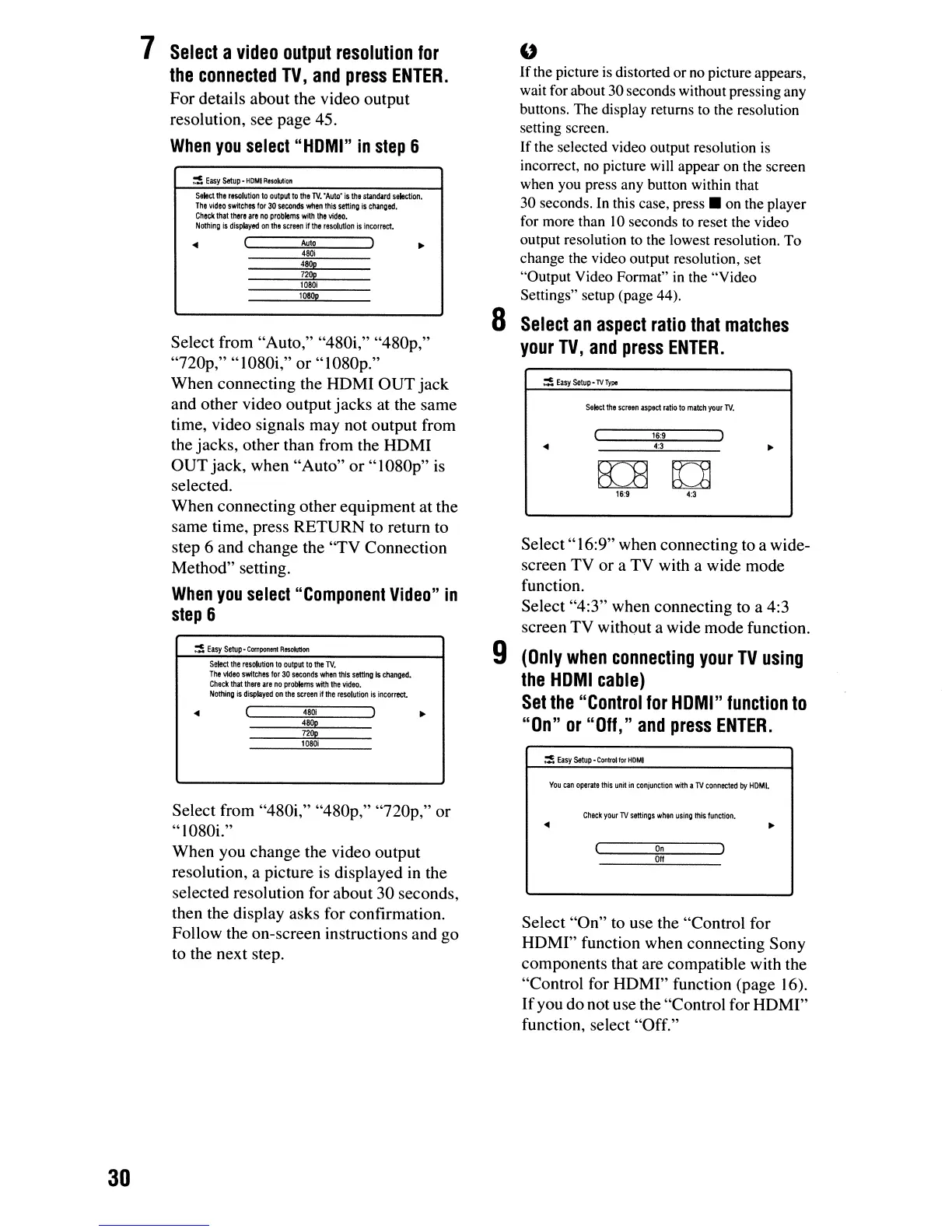
For details about the video output
resolution, see page 45.
When
you
select
"HOMI"
in
step
6
4:3
16:9
E[B
[]
16:9
4:3
...
~
Easy
Setup
-
TV
Type
Select"
16:9" when connecting to a wide-
screen TV or a TV with a wide mode
function.
Select "4:3" when connecting to a 4:3
screen TV without a wide mode function.
9
(Only
when
connecting
your
TV
using
the
HOM
I
cable)
Set
the
"Control
for
HOMI"
function
to
"On"
or
"Off,"
and
press
ENTER.
Select
the
screen
aspect
ratio
to
match
your
TV.
"
If
the picture is distorted orno picture appears,
wait for about 30 seconds without pressing any
buttons. The display returns to the resolution
setting screen.
If the selected video output resolution
is
incorrect,
no
picture will appear on the screen
when you press any button within that
30 seconds. In this case,
press.
on the player
for more than
10
seconds to reset the video
output resolution
to
the lowest resolution. To
change the video output resolution, set
"Output Video Format"
in
the "Video
Settings" setup (page 44).
8
Select
an
aspect
ratio
that
matches
your
TV,
and
press
ENTER.
480p
480;
720p
Auto
480p
480;
720p
10801
1080p
Select
the
resolution
to
output
to
the
TV.
The
'Meo
switches
for
30
seconds
when
this
setting
is
changed.
Check
that
there
are
no
problems
with
the
video.
Nothing
is
displayed
on
the
screen
it
the
resolution
is
incorrect.
...
...
Select from "Auto," "480i," "480p,"
"nop,"
"1080i," or "1080p."
When connecting the HDMI
OUT
jack
and other video output jacks at the same
time, video signals may not output from
the jacks, other than from the HDMI
OUT
jack, when "Auto"
or"
1080p"
is
selected.
When connecting other equipment at the
same time, press RETURN to return to
step 6 and change the "TV Connection
Method" setting.
When
you
select
"Component
Video"
in
step
6
1080;
~
Easy
setup·
Control
lor
HOMI
You
can
operate
this
uni1
in
conjunction
wi1h
a
TV
connected
by
HOMI.
Select from "480i," "480p,"
"nop,"
or
"1080i."
When you change the video output
resolution, a picture
is
displayed
in
the
selected resolution for about 30 seconds,
then the display asks for confirmation.
Follow the on-screen instructions and go
to the next step.
Check
your
lV
settings
when
using
this
function
•
...
On
Off
Select "On" to use the "Control for
HOMI" function when connecting Sony
components that are compatible with the
"Control for HOMI" function (page 16).
If
you do not use the "Control for HOMI"
function, select "Off."
30













 To Next Page