EasyManua.ls Logo

Sony BDP-S550 - Easy Setup: Finalizing Settings; BD Internet Connection Settings

Sony BDP-S550
94 pages
Print Icon
To Next Page IconTo Next Page
To Previous Page IconTo Previous Page
Loading...
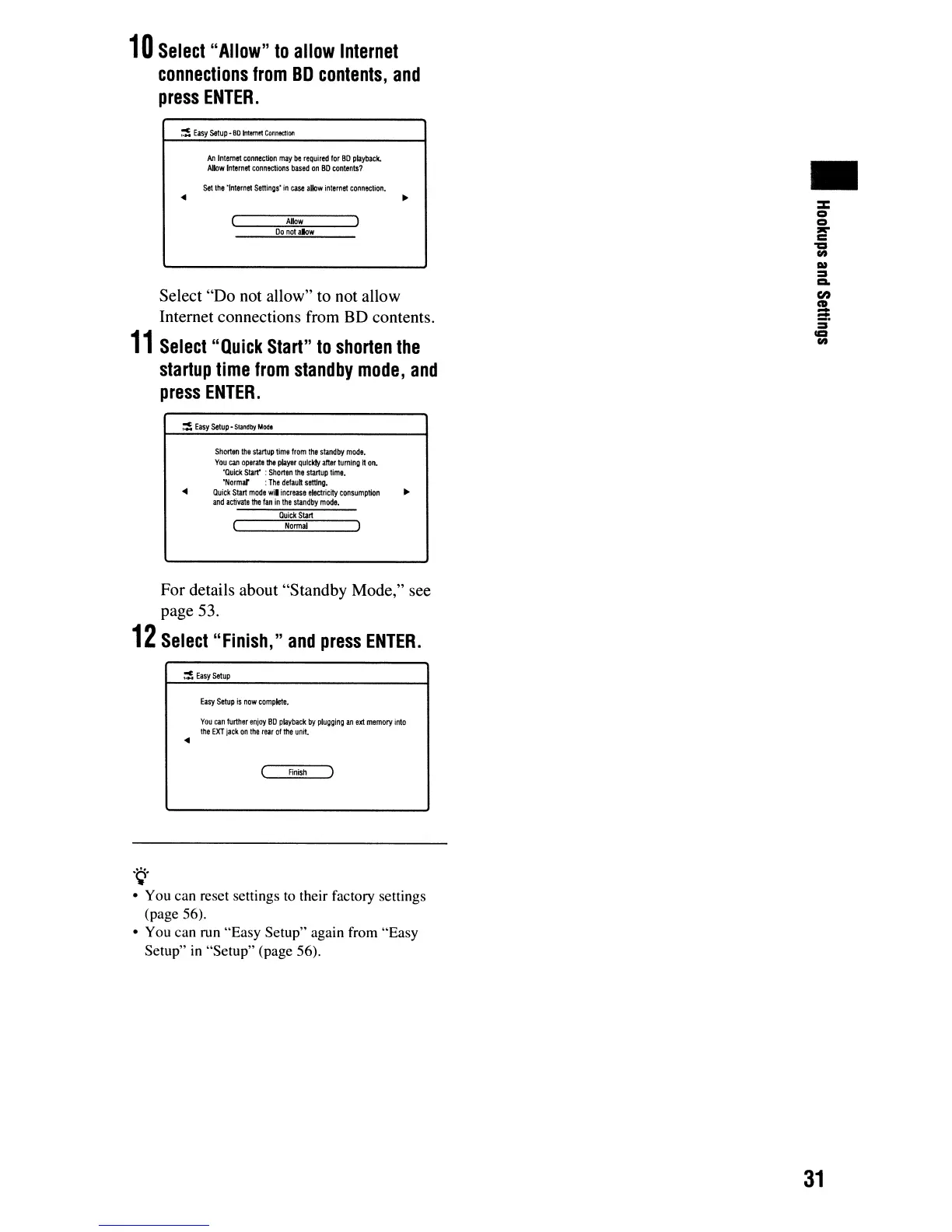
10
Select
"Allow"
to
allow
Internet
connections
from
BO
contents,
and
press
ENTER.
~
Easy
setup
~
80
Intem!t
Connectioo
ArIlnteme1
connection
may
be
required
lor
80
playback.
Allow
Internet
conn8C1ions
based
on
80
contents?
Set
the
'Internet
Settings'
in
case
allow
intemet
connection
.
•
...
Do
not
aIow
Allow
Select
"Quick
Start"
to
shorten
the
startup
time
from
standby
mode,
and
press
ENTER.
Select "Do not allow" to not allow
Internet connections from BD contents.
11
~
Easy
setup·
Slifldby
Mod.
...
Shorten
the
startup
time
from
the
standby
mode.
You
can
operate
the
player
qulckt;'
after
turnIng
tt
on.
"Qulck
Starr
:
Shorten
the
startup
time.
"Normd :
The
default
setting
•
Quick
Start
mode
wi.
increase
etectricity
consumption
and
activate
the
fan
in
the
standby
mode.
OuickStart
Nonna!
For details about "Standby Mode," see
page 53.
12
Select
"Finish,"
and
press
ENTER.
~
Easy
setup
Easy
setup
is
now
complete.
You
can
further
enjoy
80
playback
by
plugging
an
ext
memory
into
the
EXT
jack
on
the
rear
of
the
unit
•
...
Finish
"Q'
• You can reset settings
to
their factory settings
(page 56).
• You can run "Easy Setup" again from "Easy
Setup"
in
"Setup" (page 56).
31