2
Select
"Size,"
"Distance,"
and
press
ENTER.
3
Select
a
setup
item
using
t/"',
and
press
ENTER.
4
Select
or
set
a setting
using
t/"',
and
press
ENTER.
+Size
Selects
the size
of
the speakers.
•
Front
Large
Normally select this
position.
Small
Select this when the
speakers cannot reproduce
adequate low frequencies.
•
Center
Large
Normally select this
position.
Small
Select this when the speaker
cannot reproduce adequate
low frequencies.
None
Select this
if
you
do
not
connect a center speaker.
•
Surround
Large
Normally select this
position.
Small
Select this when the
speakers cannot reproduce
adequate low frequencies.
None
Select this if you
do
not
connect surround speakers.
•
Surround
Back
Large
Normally select this
position.
Small
Select this when the
speakers cannot reproduce
adequate low frequencies.
None
Select this
if
you do not
connect surround back
speakers.
•
Subwoofer
Yes
Select this
if
you connect a
--
subwoofer to output the
LFE (low frequency effect)
signals from the subwoofer.
None
Select this if you do not
connect a subwoofer.
u
• Depending on
the
settings
of
other speakers,
the
subwoofer may output excessive sound.
• When
you
playa
BD
or DVD that does not have
subwoofer output recorded,
no
sound
is
produced
from the subwoofer, even if"Subwoofer"
is
set
to
• Since subwoofer use
is
set
as
the player default
setting, "Subwoofer" cannot
be
set
to
"None"
when "Front"
is
set
to
"SmaIL"
• When connecting
the
front speakers that cannot
reproduce adequate
low
frequencies and a
subwoofer
is
not connected, set "Front"
to
"Large," and "Subwoofer"
to
"None."
+
Distance
Sets the
distance
from
your
listening
position
to the
speakers.
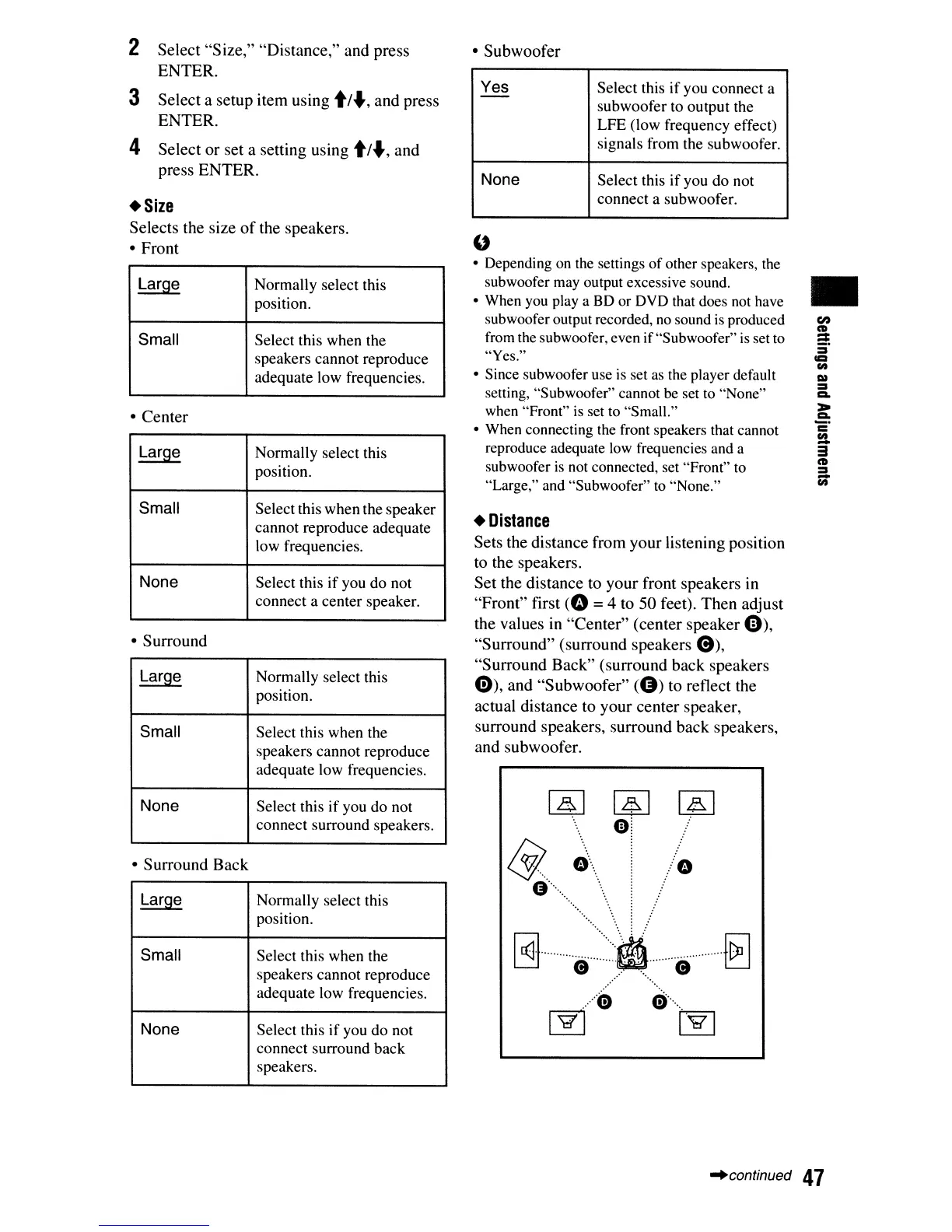
Set
the
distance
to
your
front
speakers
in
"Front"
first
(0
=4 to
50
feet).
Then
adjust
the
values in
"Center"
(center
speaker
Gh
"Surround"
(surround
speakers
e),
"Surround
Back"
(surround
back
speakers
0),
and
"Subwoofer"
(8)
to reflect the
actual
distance
to
your
center
speaker,
surround
speakers,
surround
back
speakers,
and
subwoofer.
~
&/.
0···
....
G
',
.
. .
.......
.
....
'.
'.
Gj···········e·······:···:·.·········e···········{8
........
. .
.
.....
$
e·····
..
~ ~
•
"continued
47













 To Next Page