2
3
7 Select
"Off'
using t/", and press
ENTER.
+
Test
Tone
+
Level
You can vary the level
of
each speaker as
follows.
Be
sure to set
"Test
Tone"
to
"On"
for easy adjustment.
.~.
To
adjust the
level
without listening
to
the
test
tone,
select "Level"
in
step 2
and
press
ENTER,
then
adjust
the
level
using t/.,
and
press
ENTER.
On
The player emits a test tone
in
sequence from the
MULTICHANNEL
OUTPUTjacks
to
adjust the
sound level from each
speaker. When you select
one
of
the "Speaker
Settings" items, the test tone
is
emitted from the selected
speaker.
Off
The test tone
is
not emitted
-
from the speakers.
Front
Adjust the level
of
the
Left
front speakers
(-I
2 dB to
Front
odB, 0.5 dB increments).
Right
(0 [dB])
Center
Adjust the level
of
the
center speaker
(-12
dB to
odB, 0.5 dB increments).
(Q
[dB])
Surround
Adjust the level
of
the
Left
surround speakers
(-12
dB
Surround
to 0 dB, 0.5 dB
Right
increments).
(Q
[dB])
Surround
Adjust the level
of
the
Back
surround back speakers
Left
(-12
dB to 0 dB, 0.5 dB
Surround
increments).
(Q
[dB])
Back
Right
Subwoofer
Adjust the level
of
the
subwoofer
(-12
dB to
odB, 0.5 dB increments).
(Q
[dB])
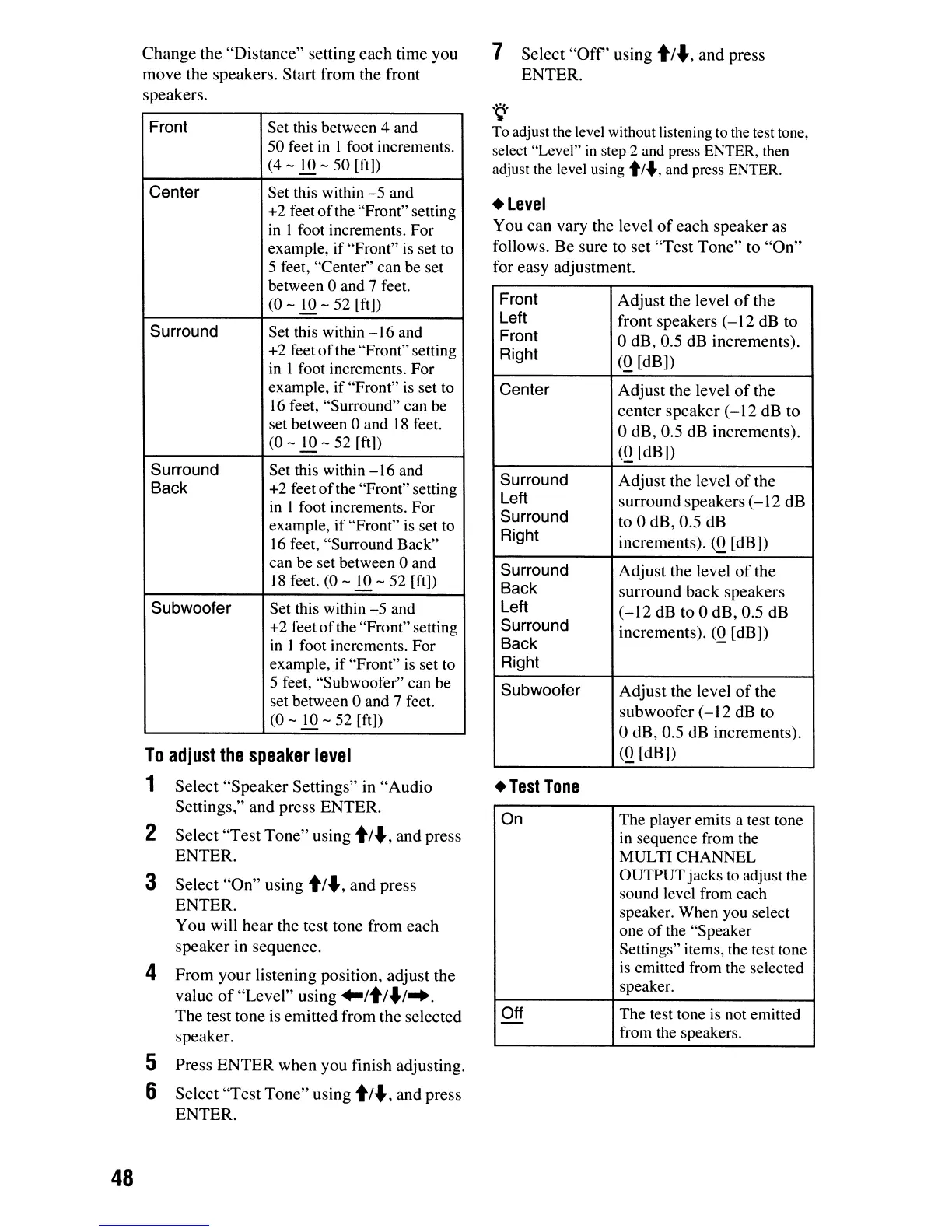
Change
the
"Distance"
setting
each
time you
move the speakers. Start from the front
speakers.
Select
"Speaker
Settings" in
"Audio
Settings," and press ENTER.
Select
"Test
Tone"
using t/", and press
ENTER.
Select
"On"
using t/", and press
ENTER.
You will hear the test tone from each
speaker in sequence.
4
From
your listening position, adjust the
value
of
"Level"
using
..
/t/
..
I
....
The
test tone is emitted from the selected
speaker.
5 Press
ENTER
when you finish adjusting.
6 Select
"Test
Tone"
using t/", and press
ENTER.
To
adjust
the
speaker
level
1
Front
Set this between 4 and
50 feet
in
I foot increments.
(4 -
10
- 50
[ft])
Center
Set this within
-5
and
+2
feet
of
the "Front" setting
in
I foot increments. For
example, if "Front"
is
set
to
5 feet, "Center" can be set
between
0 and 7 feet.
(0
- to -
52
[ft])
Surround
Set this within
-16
and
+2
feetofthe
"Front" setting
in
I foot increments. For
example, if "Front" is set to
16
feet, "Surround" can be
set between
0 and
18
feet.
(0 -
.!Q
-
52
[ft])
Surround
Set this within
-16
and
Back
+2
feet
of
the "Front"setting
in
I foot increments. For
example, if "Front"
is
set
to
16
feet, "Surround Back"
can be set between
0 and
18
feet.
(0
- to -
52
[ft])
Subwoofer
Set this within
-5
and
+2
feet
of
the "Front" setting
in
1 foot increments. For
example,
if
"Front"
is
set to
5 feet, "Subwoofer" can be
set between
0 and 7 feet.
(0 - to -
52
[ft])
48













 To Next Page