6-19
CCD-TRV138/TRV238E/TRV338/TRV438E
10.Auto White Balance Adjustment
RadarW
RadarW
RadarW
Adjust to the proper auto white balance output data.
If it is not correct, auto white balance and color reproducibility
will be poor.
Mode CAMERA
Subject Clear chart
(Color reproduction adjustment
frame)
Filter Filter C14 for color temperature
correction
Adjustment Page F
Adjustment Address 2E to 31, 3E to 41
Note 1: Perform “Auto White Balance Standard Data Input” be-
fore this adjustment.
Note 2: Check that the data of page: 0, address: 10 is “00”.
Note 3: Check that the data of page: 6, address: 02 is “00”. If
not, turn the power of unit OFF/ON.
Note 4: NTSC model: CCD-TRV138/TRV338
PAL model: CCD-TRV238E/TRV438E
Switch setting:
1) NIGHTSHOT PLUS ........................................................ OFF
2) DIGITAL ZOOM (Menu setting).................................... OFF
3) STEADYSHOT (Menu setting)
(CCD-TRV338/TRV438E only)...................................... OFF
4) DISPLAY (Menu setting) ................................................ LCD
Adjusting method:
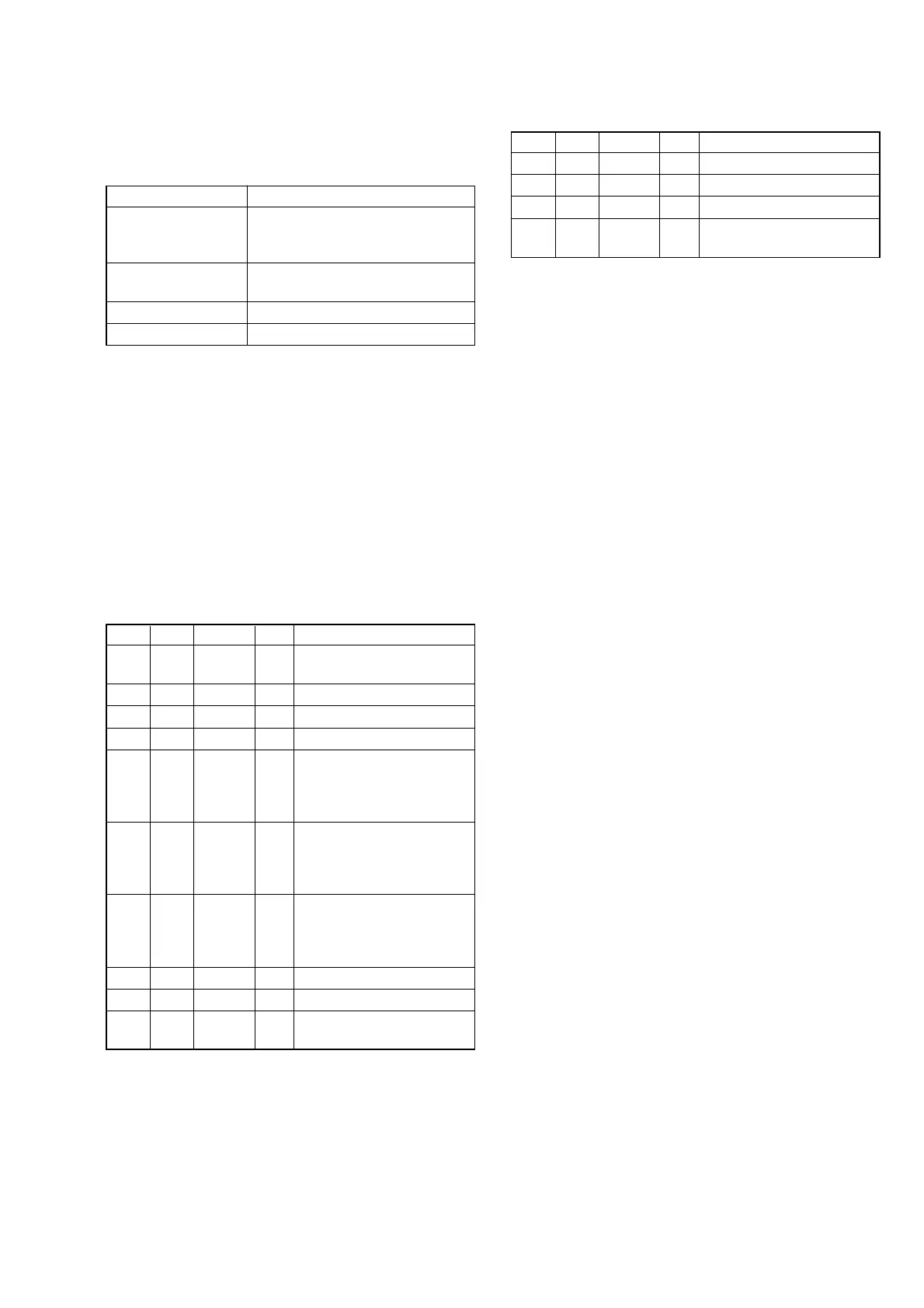
Order Page Address Data Procedure
1
Place the C14 filter on the
lens.
20 0101
36 4801
4F 3E 2C Press PAUSE button.
5F 3F
Set the following data, and
press PAUSE button.
80: NTSC model
40: PAL model
6F 40
Set the following data, and
press PAUSE button.
58: NTSC model
59: PAL model
7F 41
Set the following data, and
press PAUSE button.
10: NTSC model
C0: PAL model
86 01 83 Press PAUSE button.
96 01 81 Press PAUSE button. (Note 5)
10 6 02
Check the data changes to
“01”.
Note 5: The adjustment data will be automatically input to page:
F, address: 2E to 31.
Processing after completing adjustment:
Order Page Address Data Procedure
16 01 00 Press PAUSE button.
26 4800
30 0100
4
Remove the C14 filter on the
lens.




 To Next Page