Using special effects - Picture effect
Yon call digitally process images to obtain special effects like those in films o1"on TV.
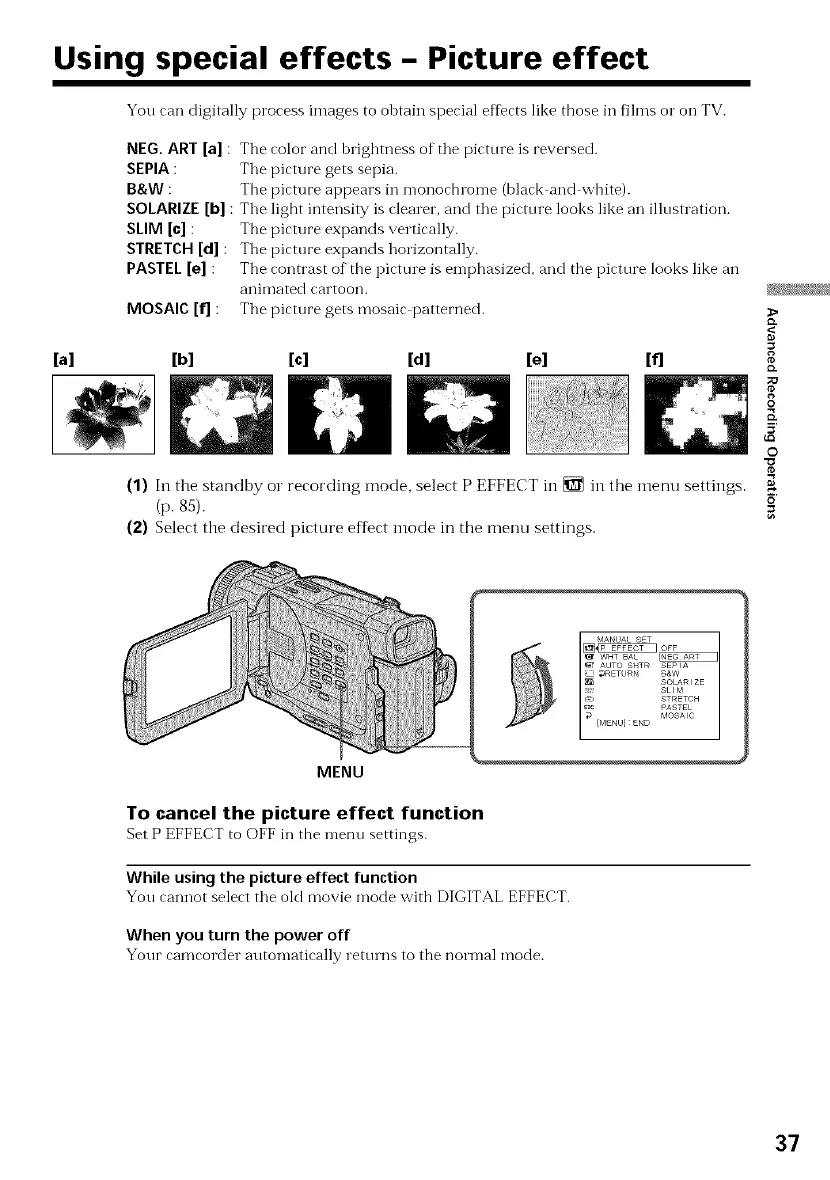
NEG. ART [a]
SEPIA :
B&W :
SOLARIZE [b]
SLIM [c] :
STRETCH [d] :
PASTEL [e] :
MOSAIC [f] :
The color and brightness of the picture is reversed.
Tile picture gets sepia.
The picture appears ill monochlome (black and white).
Tile light intensity is clearer, and tile picture looks like an illustration.
The picture expands vertically.
The picture expands horizontally.
The contrast of the picture is emphasized, and the picture looks like an
aniI_lated cartoon.
The picture gets mosaic patterned.
[a] [b] [c] [d] [e] [f]
(1) In the standby or recording mode, select P EFFECT in _ in the menu settings.
(p. 85).
(2) Select the desired picture efDct mode in the menu settings.
>
g
{D.
;O
O
5'
©
MENU
To cancel the picture effect function
Set P EFFECT to (-OFFill the menu settings.
While using the picture effect function
You cannot select the old movie mode with DIGITAL EFFECT.
When you turn the power off
Your camcorder automatically rettuns to tile norn-lal mode.
37



 To Next Page