-- Customizing Your Camcorder --
Changing the menu settings
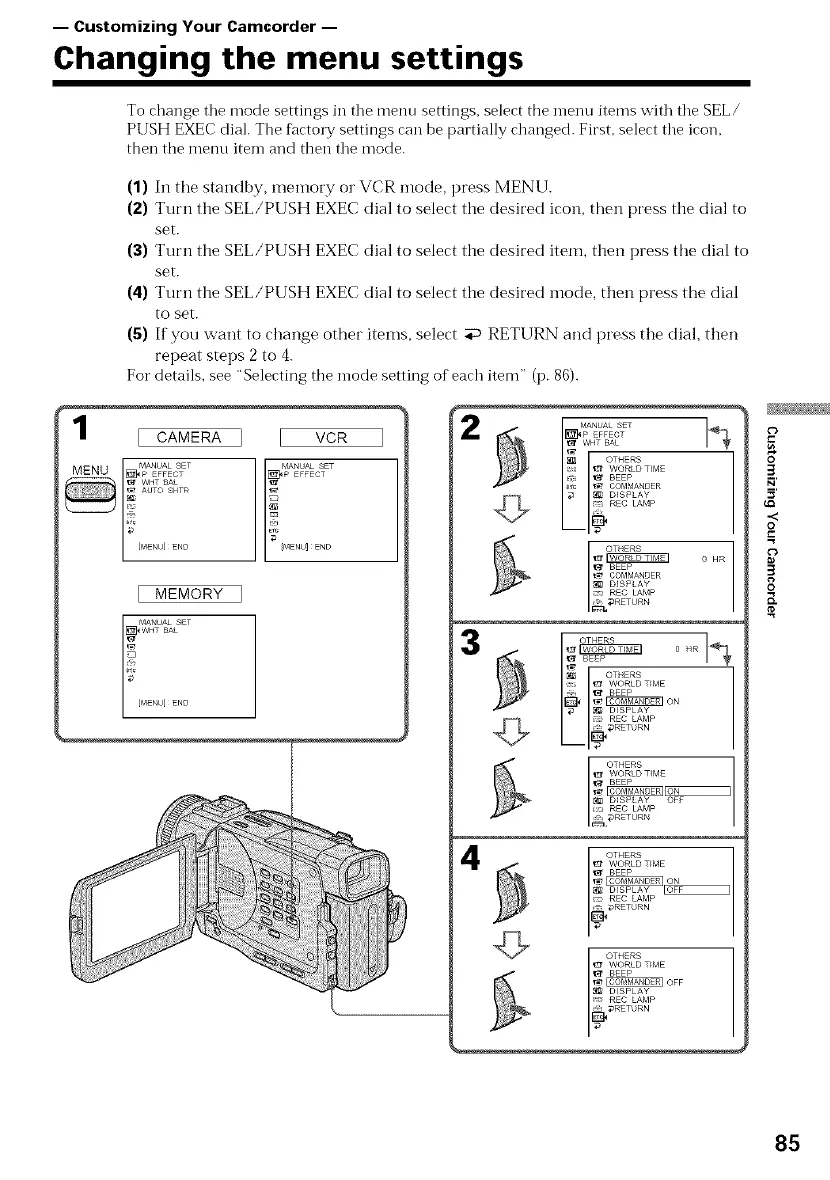
To change tile mode settings in tile menu settings, select the menu items with tile SEL/
PUSH EXEC dial. The factory settings can be partially changed. First, select tile icon.
then the menu item and then tile mode.
1
(1) In the standby, memory or VCR mode, press MENU.
(2) Turn the SEL/PUSH EXEC dial to select the desired icon, then press the dial to
set.
(3) Turn the SEL/PUSH EXEC dial to select the desired item, then press the dial to
set.
(4) Turn the SEL/PUSH EXEC dial to select the desired inode, then press the dial
to set.
(5) If you want to change other items, select _ RETURN and press the dial, then
repeat steps 2 to 4.
For details, see "Selecting the mode setting of each item" (p. 86).
WHT BAL
OTHERS
WORLD TIME
C7 I_ BEEP
_rc _ COMMANDER
7 _ _ {i_ DISPLAY
REC LAMP
o HR
3
BEEP
{:_ OTHERS
WORLD TIME
J _ BEEP
_ DISPLAY
REC LAMP
DRETURN
I CAMERA VCR
MANUAL SET
7Z,
I MEMORY
MANUAL SET
WHT BAE
_[MENU]END
4
G
¢')
8'
3
.<
O
3
8
85



 To Next Page