Using special effects - Digital effect
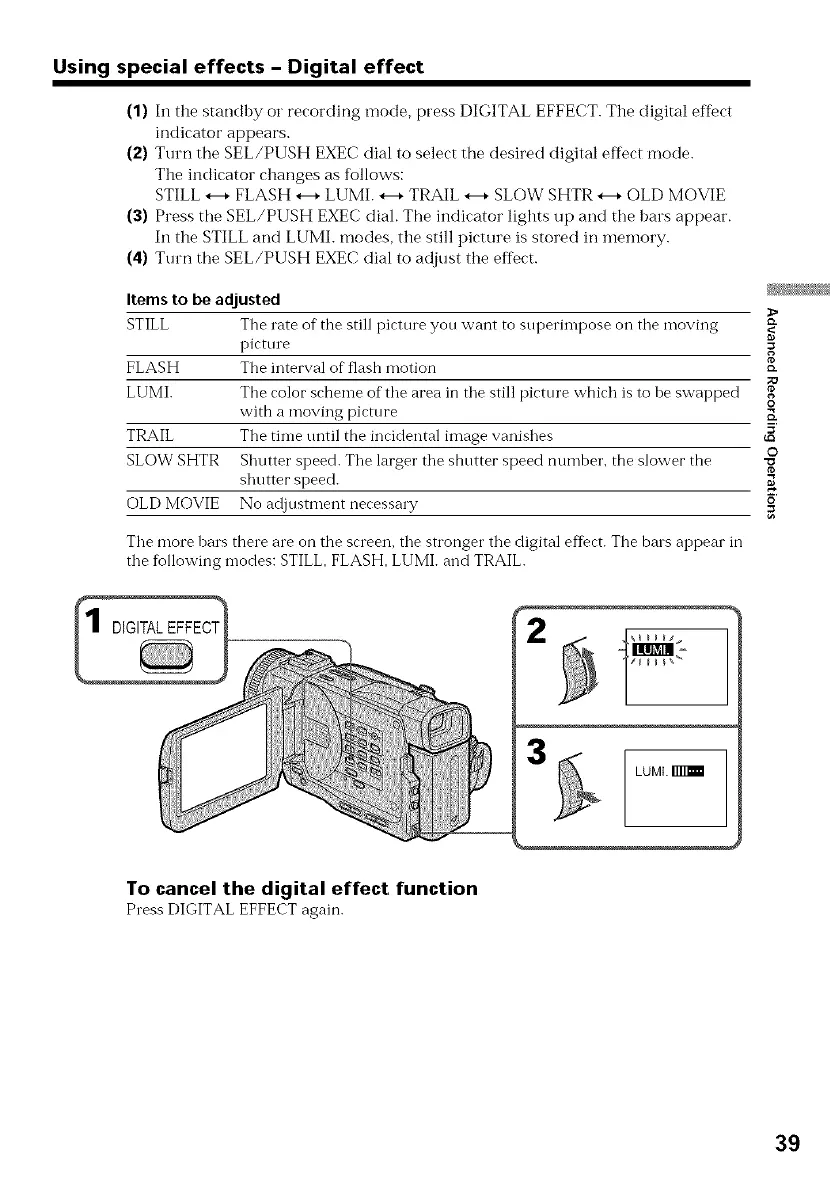
(1) In the standby or recording mode, press DIGITAL EFFECT. The digital effbct
indicator appears.
(2) Turn the SEL/PUSH EXEC dial to select the desired digital effect mode.
The indicator changes as follows:
STILL *--+FLASH *--+LUMI. *--+TRAIL *--+SLOW SHTR *--+OLD MOVIE
(3) Press tile SEL/PUSH EXEC diah The indicator lights up and the bars appear.
In the STILL and LUMI. modes, the still picture is stored in memory.
(4) Turn the SEL/PUSH EXEC dial to adjust the effect.
Itemsto be adjusted
STILL The rate of tile still picture you want to superhnpose on the moving
picttue =
g
FLASH The interval of flash motion _-
LUMI. Tile color"scheme of tile area in tile still picture which is to be swapped
o
with a moving picture _.
TRAIL The time tmtil the incidental image vanishes _'
O
SLOW SHTR Shutter speed. Tile larger"tile shutter speed number, the slower the
shutter speed. _
OLD MOVIE No adjusmlent necessa W _'
Tile more bars there are on the screen, the stronger the digital effect. The bars appear in
tile following modes: STILL, FLASH, LUMh and TRAIL.
3
LUML
To cancel the digital effect function
Press DIGITAL EFFECT again.
39


 To Next Page