Step 1 Preparing the power supply
Use tile battery pack afer charging it.
Your camcorder operates only with tile "InfoLITHIUM" battery pack (L series).
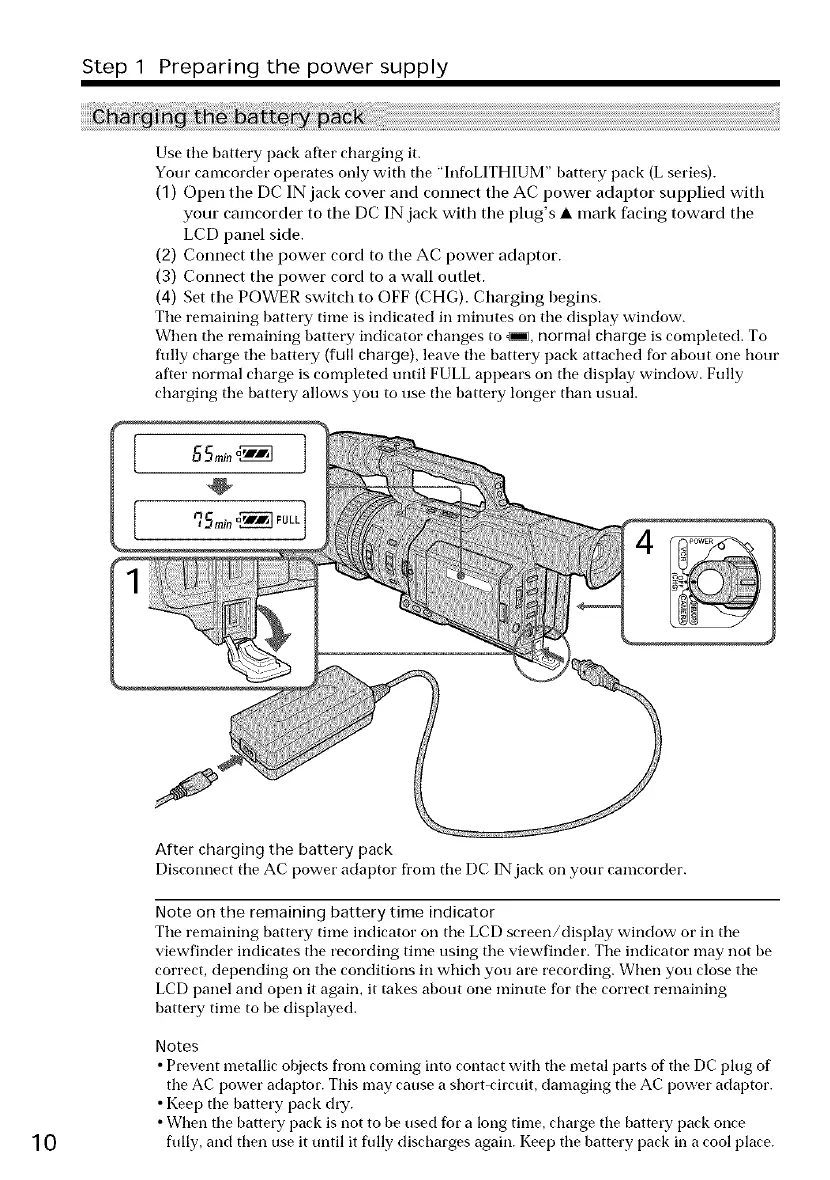
(1) Open the DC IN jack cover and connect the AC power adaptor supplied with
your camcorder to the DC IN jack with the plug's • mark facing toward the
LCD panel side.
(2) Connect the power cord to the AC power adaptor.
(3) Connect the power cord to a wall outlet.
(4) Set the POWER switch to OFF (CHG). Charging begins.
Tile remaining battery time is indicated in minutes oil tile display window.
When tile remaining battery indicator changes to _, normal charge is completed. To
filly charge tile battery (full charge), leave tile battery pack attached for about one hour
after normal charge is completed tmtil FULL appears on tile display window. Fully
charging tile battery allows you to use tile battery longer than usual.
10
ARer charging the battery pack
Disconnect tile AC power adaptor fore tile DC IN jack on your camcorder.
Note on the remaining battery time indicator
Tile remaining battery time indicator on tile LCD screen/display window or in tile
viewfinder indicates the recording time using the viewfinder. Tile indicator may not be
correct, depending on the conditions in which you are recording. When you close the
LCD panel and open it again, it takes about one minute for the correct remaining
battery time to be displayed.
Notes
• Prevent metallic objects from coming into contact with tile metal parts of tile DC plug of
the AC power adaptor. This may canse a short-circnit, damaging tire AC power adaptor.
• Keep tile battery pack dry.
• When tire battery pack is not to be used for a long time, charge tire battery pack once
flflly, and then use it until it flflly discharges again. Keep the battery pack in a cool place.















 To Next Page