Using special effects - Picture effect
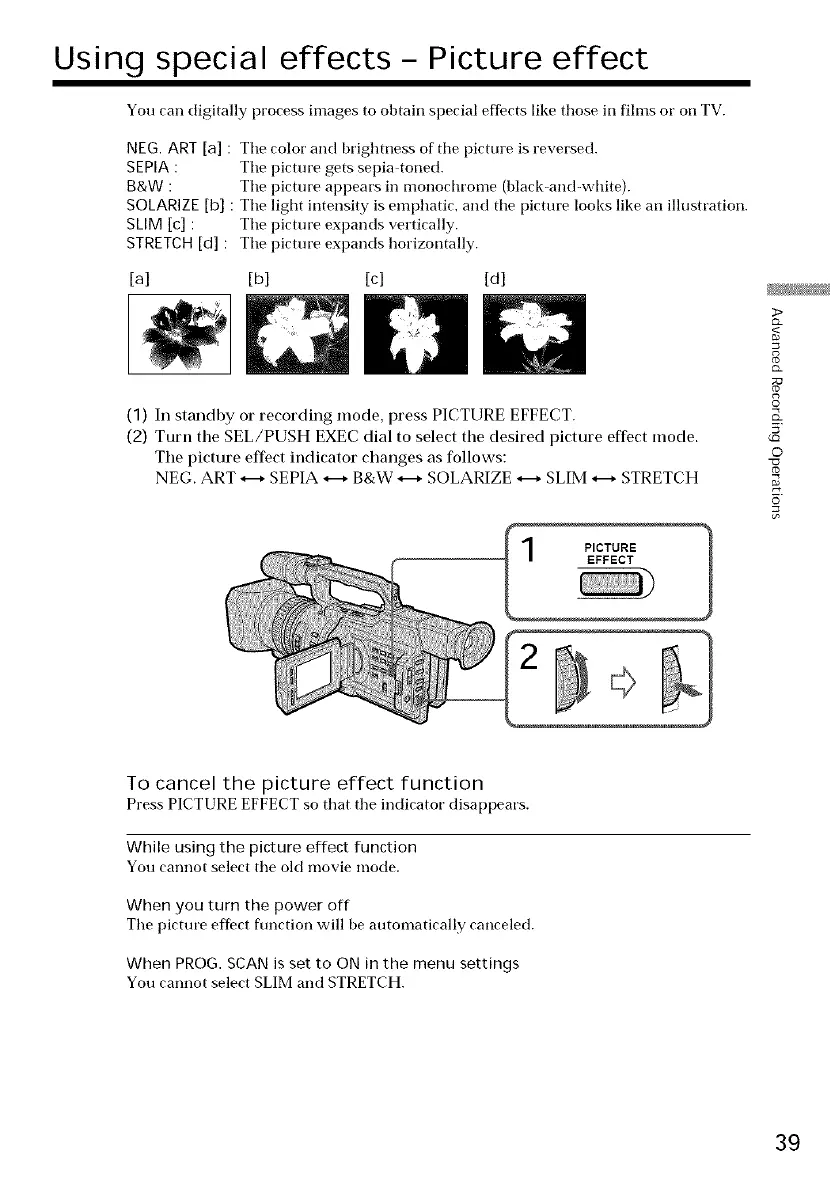
You can digitally process images to obtain special effects hike those in films or on TV.
NEG. ART [a] : Tile color and brightness of tile picture is reversed.
SEPIA : Tile picture gets sepia toned.
g&w : Tile picture appears in monochrome (black-and-white).
SOLARIZE [b] : Tile light intensity is emphatic, and tile picture looks like an illustration.
SLIM [c] : Tile picture expands vertically.
STRETCH [d] : Tile picture expands horizontally.
[a] [b] [c] [d]
(1) In standby or recording mode, press PICTURE EFFECT.
(2) Turn the SEL/PUSH EXEC dial to select the desired picture effect mode.
The picture effect indicator changes as follows:
NEG. ART H SEPIA H B&W _ SOLARIZE _ SLIM _-+ STRETCH
I PICTURE 1
EFFECT
>
g
g
©
5'
LC_
©
To cancel the picture effect function
Press PICTURE EFFECT so that tile indicator disappears.
While using the picture effect function
You cannot select tile old movie mode.
When you turn the power off
Tile picture effect function will be automatically canceled.
When PROG. SCAN is set to ON in the menu settings
You cannot select SLIM and STRETCH.
39















 To Next Page