Superimposing a still image in a "Memory
Stick" on a moving picture - MEMORY MIX
You can superimpose a still image you have recorded on a "Memory Stick" on the top
of the moving picture you are recording.
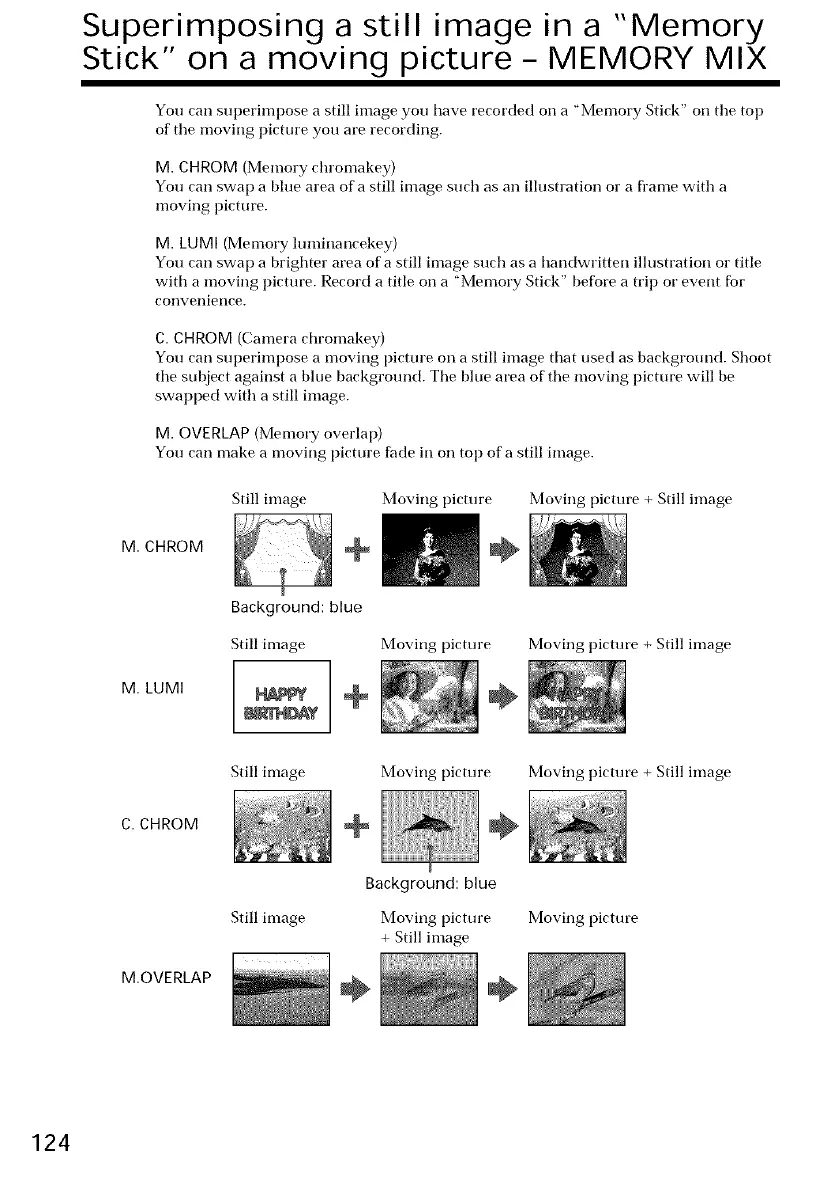
M. CHROM (Memory chromakey)
You can swap a blue area of a still image such as an illustration or a fl'ame with a
moving picture.
M. LUMI (Memory luminancekey)
You can swap a brighter area of a still image such as a handwritten illustration o1"title
with a moving picture. Record a title on a "Memory Stick" before a trip o1"event fbr
convenietlce.
C.CHROM (Camera chromakey)
You can superimpose a moving picture on a still image that used as background. Shoot
the subject against a blue background. The blue area of the moving picture will be
swapped with a still image.
M. OVERLAP(Memory overlap)
You can make a moving picture fade in on top of a still image.
M. CHROM
Still image
Background: blue
Still image
Moving pictm'e
÷
Moving pictm'e
Moving picture + Still image
Moving picture + Still image
M. LUMI
÷
Still image
C. CHROM
Moving pictm'e Moving picture + Still image
+ ÷
M.OVERLAP
Still image
Background: blue
Moving pictm'e Moving picture
+ Still image
÷ ÷
124















 To Next Page