Writing a print mark- Print mark
You can specify the recorded still image to be printed out. This flmction is useflll for
printing out still images later.
Your camcorder confbrms with the DPOF (Digital Print Order Format) standard for
specifying the still images to print out.
Before operation
Insert a "Memory Stick" into your camcorder.
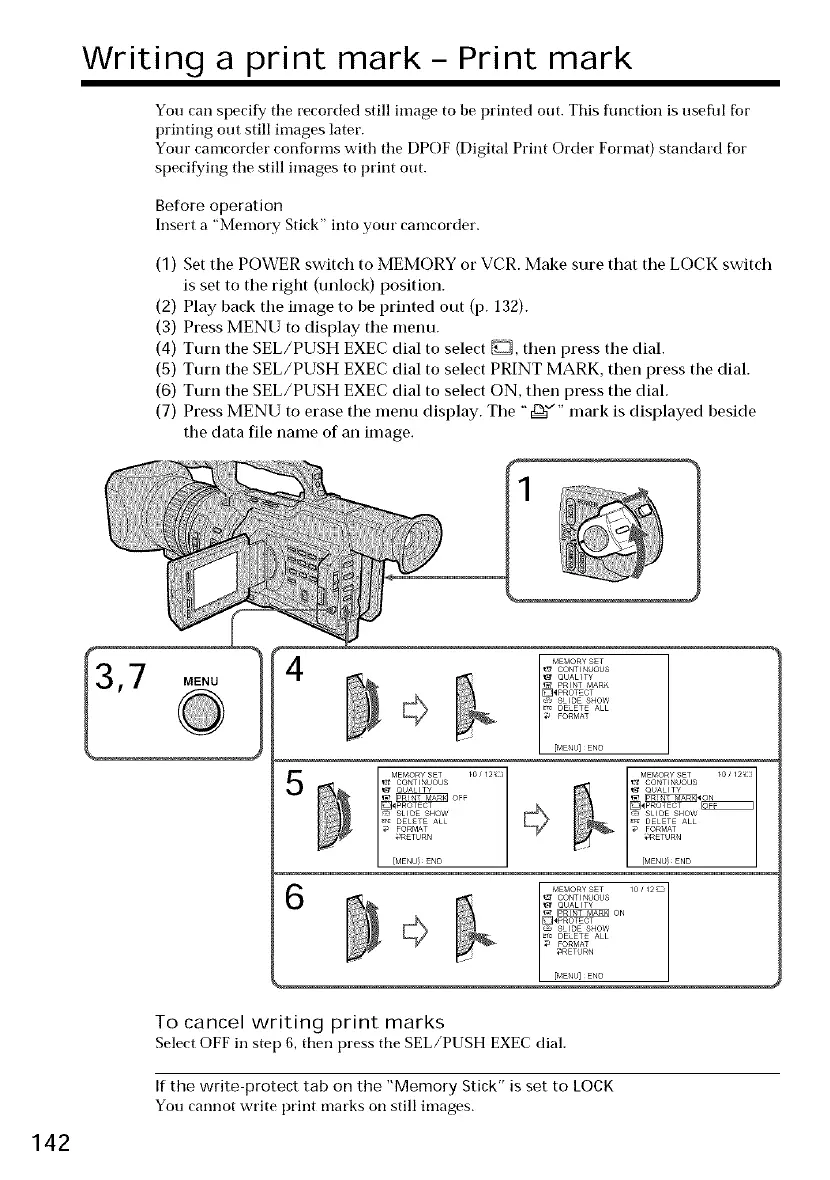
(1) Set the POWER switch to MEMORY or VCR. Make sure that the LOCK switch
is set to the right (unlock) position.
(2) Play back the image to be printed out (p. 132).
(3) Press MENU to display the menu.
(4) Turn the SEL/PUSH EXEC dial to select _, then press the dial.
(5) Turn the SEL/PUSH EXEC dial to select PRINT MARK, then press the dial.
(6) Turn the SEL/PUSH EXEC dial to select ON, then press the dial.
(7) Press MENU to erase the menu display. The ",[_"" mark is displayed beside
the data file name of an image.
5
MEf_ORYSET /0 / 12_::_
CO_TI_UOUS
_PROTECT
SLIDE SHOW
DELETE ALL
FORMAT
,aRETURN
142
To cancel writing print marks
Select OFF in step 6, then press the SEL/PUSH EXEC dial.
If the write-protect tab on the "Memory Stick" is set to LOCK
You cannot write print marks on still images.















 To Next Page